Skip to content

TechDirectArchive

Hands-on IT, Cloud, Security & DevOps Insights

  • Home
  • About
  • Advertise With US
  • Reviews
  • Contact
  • Toggle search form
Home » Windows Server » How to disable the Microsoft Deployment Toolkit Task Sequence property sheet

How to disable the Microsoft Deployment Toolkit Task Sequence property sheet

Posted on 06/12/202009/09/2023 Christian By Christian No Comments on How to disable the Microsoft Deployment Toolkit Task Sequence property sheet
disable Microsoft Deployment Toolkit

Microsoft Deployment Toolkit (MDT) provides a unified collection of tools, processes, and guidance for automating desktop and server deployments. Task sequences are basic XML files that call on a series of scripts to run parameters chosen by the user when the task was created. Here are a few different types of task sequence tasks, some for capturing images, deploying software, deploying an operating system image to computer hardware and building, installing Drivers, and many other applications. To install and configure MDT, see the following guide “ADK, MDT, and WDS: How to configure and deploy Windows using MDT, and WDS in Windows 10 and “what is ADK, MDT, Microsoft Endpoint Configuration Manager (SCCM), Intune, Autopilot, and WSUS“. For more articles relating to MDT, see the following link.

Disable Microsoft Deployment Toolkit Task Sequence

I would like to disable driver injection. To do this, please follow the steps described below. Disabling a driver task sequence property sheet (step) is easy, just right-click it in the MDT workbench and choose the appropriate option. Drivers must be disabled from their property sheet (step). Disabling a driver is a safe approach before it is determined that deletion is necessary.

Note: If you must delete a Driver, do it over MDT Workbench. Do not delete a driver from the driver store via the file system (Deployment Share). The scenario discussed here is different from deleting a driver on a Windows device as discussed in this guide “How to delete obsolete drivers from the Driver Store in Windows 10″.

To perform this operation, launch The Microsoft Deployment Toolkit (MDT)
– Navigate to your deployment share
– Expand and click on the Task sequence
– On the middle pane of the window, select your task sequence.

Task Sequence property sheet
Note: If you have multiple task sequences, be sure to select the right one.

Right-click on the task sequence and select properties. This will open up the Task Sequence properties window as shown below
– Select the task sequence menu, and navigate to the desired property sheet (step) and click on it.

On the right pane of the Window, click on Option, select Disable as shown below, and click on Apply
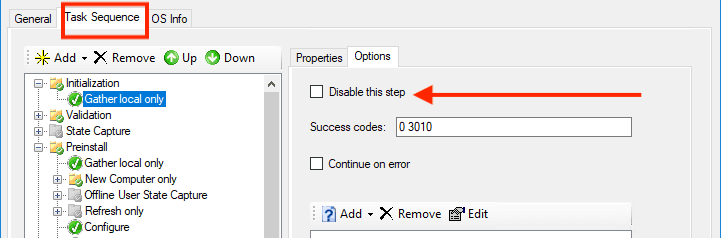
That is all that is needed to disable a task from MDT property sheet (step). I hope you found this blog post helpful. If you have any questions, please let me know in the comment session
Rate this post

Thank you for reading this post. Kindly share it with others.

  • Share on X (Opens in new window) X
  • Share on Reddit (Opens in new window) Reddit
  • Share on LinkedIn (Opens in new window) LinkedIn
  • Share on Facebook (Opens in new window) Facebook
  • Share on Pinterest (Opens in new window) Pinterest
  • Share on Tumblr (Opens in new window) Tumblr
  • Share on Telegram (Opens in new window) Telegram
  • Share on WhatsApp (Opens in new window) WhatsApp
  • Share on Mastodon (Opens in new window) Mastodon
  • Share on Bluesky (Opens in new window) Bluesky
  • Share on Threads (Opens in new window) Threads
  • Share on Nextdoor (Opens in new window) Nextdoor
Windows Server Tags:Microsoft Deployment Tool kit, Microsoft Deployment Toolkit (MDT), WDS, Windows 10, Windows Deployment Services

Post navigation

Previous Post: Windows cannot connect to the printer: Operation Failed with error 0x000004f8
Next Post: MDT Driver injection: How to import drivers in .exe format into Microsoft Deployment Toolkit

Related Posts

  • image 64
    How to install Fax Server on a Windows Server Windows
  • image 9
    Fix Error 853: The remote access connection completed, but authentication failed because the certificate that authenticates the client to the server is not valid Network | Monitoring
  • sdgfdhx
    MDT Warning: Unable to set working directory, the application returned an unexpected code 2 Windows Server
  • App Locker
    Harden your Veeam Backup Server with Microsoft AppLocker Windows
  • Fixed Sysprep Generalize 1
    How to Fix The Virtual Desktop is Not Sysprep Generalized Virtualization
  • WindowsServer2022
    Windows Server 2022 Capabilities: Register Windows Admin Center with Azure Windows Server

More Related Articles

image 64 How to install Fax Server on a Windows Server Windows
image 9 Fix Error 853: The remote access connection completed, but authentication failed because the certificate that authenticates the client to the server is not valid Network | Monitoring
sdgfdhx MDT Warning: Unable to set working directory, the application returned an unexpected code 2 Windows Server
App Locker Harden your Veeam Backup Server with Microsoft AppLocker Windows
Fixed Sysprep Generalize 1 How to Fix The Virtual Desktop is Not Sysprep Generalized Virtualization
WindowsServer2022 Windows Server 2022 Capabilities: Register Windows Admin Center with Azure Windows Server

Leave a Reply Cancel reply

You must be logged in to post a comment.

Microsoft MVP

VEEAMLEGEND

vexpert-badge-stars-5

Virtual Background

GoogleNews

Categories

veeaam100

sysadmin top30a

  • kubernetes
    Create and monitor Apps using the Azure Kubernetes Service manifest AWS/Azure/OpenShift
  • screenshot 2020 03 20 at 16.10.20
    How to install Ansible on Windows with Cygwin Windows Server
  • trrdf
    Remote Desktop cannot find the computer this in the specified network: Verify the computer name and domain that you are trying to connect Windows Server
  • Featured image IE mode.
    How to Enable Internet Explorer Mode in Edge in Windows 11 Windows
  • wine 2 1
    How to install and uninstall WineHQ on Linux Linux
  • runlevels
    How to check your current Runlevel in Linux Linux
  • ClamAV
    How to install and manage ClamAV and ClamTK on Ubuntu Linux Anti-Virus Solution
  • GitLabrunner 1 1
    There has been a runner system failure: failed to start the process exec “pwsh” Containers

Subscribe to Blog via Email

Enter your email address to subscribe to this blog and receive notifications of new posts by email.

Join 1,823 other subscribers
  • RSS - Posts
  • RSS - Comments
  • About
  • Authors
  • Write for us
  • Advertise with us
  • General Terms and Conditions
  • Privacy policy
  • Feedly
  • Telegram
  • Youtube
  • Facebook
  • Instagram
  • LinkedIn
  • Tumblr
  • Pinterest
  • Twitter
  • mastodon

Tags

Active Directory Azure Bitlocker Microsoft Windows PowerShell WDS Windows 10 Windows 11 Windows Deployment Services Windows Server 2016

Copyright © 2025 TechDirectArchive


Loading Comments...
 

You must be logged in to post a comment.