Skip to content

TechDirectArchive

Hands-on IT, Cloud, Security & DevOps Insights

  • Home
  • About
  • Advertise With US
  • Reviews
  • Contact
  • Toggle search form
Home » Linux » How to solve Errno 256
  • Trellix Invalid credential
    Fix unable to login to Trellix ePO with Windows authentication Windows Server
  • Capture 37
    How to Configure Network Load Balancing on Windows Server Backup
  • fxcgbnm
    How to export and import Windows Start layout Windows
  • image 64
    Windows Local Account Authorization and Access Control Windows
  • Screenshot 2020 05 14 at 18.00.59
    Linux Error 13: Permission denied, are you root Linux
  • How to Enable or Disable Inherited Permissions for Files and Folders in Windows
    How to Enable or Disable Inherited Permissions for Files and Folders in Windows Windows
  • ssl 600x315 1 1
    Components needed to create a certificate signing request Windows Server
  • coding
    Git GUI and Gitk won’t open “Missing Tcl / Tk Aqua libraries” Version Control System

How to solve Errno 256

Posted on 13/10/202122/02/2025 Raphael Gab-Momoh By Raphael Gab-Momoh No Comments on How to solve Errno 256
Errno-256-No-more-mirrors-to-try-1

Have you been trying to work with Apache and your computer won’t let you download anything related to Apache because there are no more mirrors to try? Then you are in the right place. This article explains how to solve Errno 256. Other guides can be found from these links: Setting-up-SElinux-on-a-Linux-server, Group Policy Settings for BitLocker: Resolving Startup Conflict, and Group Managed Service Accounts: How to create a KDS root key using PowerShell.

Steps to Solve Errno 256 Error Code

In this guide, I am going to be showing you the easiest way to solve Errno 256 with just one simple command, but you might have to write some other two from our previous guide before this will work.
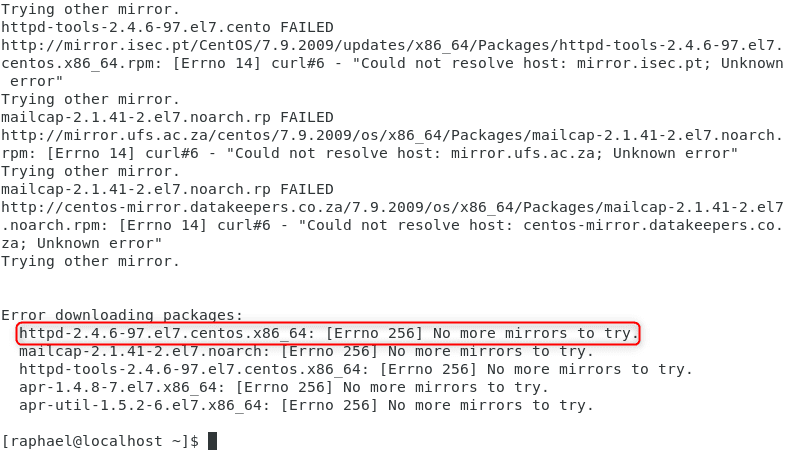
base-image

The above image simply implies that :

Errors were encountered while downloading packages.

Let’s run through two commands in the previous guide how-to-solve-cannot-find-a-valid-base-url-for-repo-base-7-x86_64/ before proceeding with this

Here are the two commands in the guide above.

#ONBOOT=no
#dhclient

To effectively solve Errno 256, ensure you are in the root shell when executing the commands mentioned above. Once in the root shell, proceed with the next step, which involves performing a “yum update.”

This update will help resolve any underlying issues causing the Errno 256 error, ensuring smooth system performance and uninterrupted operations.

#yum update

After the command above, the next and most important command for this step

#yum clean all
yum-clean-all

yum clean all command removes the cache of repositories which are enabled in /etc/yum.repos.d/*.repo. Read what the manpages have to say about it below

# man yum
....
clean
Clear out cached package data
yum clean packages
Delete packages saved in cache
yum clean all
Clean out all packages and meta data from cache

To successfully solve Errno 256, first, execute the “yum clean all” command to prepare the system. Once completed, proceed with the “yum install httpd” command again. This time, you’ll notice that the download process will be error-free, as evidenced by the screenshot below.
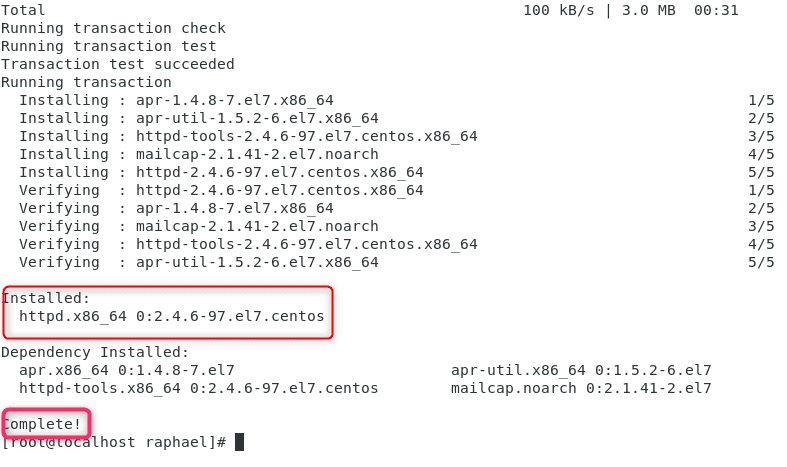
complete

Below are some FAQs on Errno 256 Error

What is YUM Error 256?

YUM Error 256 is an error message encountered when using the YUM package manager on Linux-based systems. This error shows that there was an issue during the installation or upgrade of a package using YUM.

What if I still can’t resolve YUM Error 256?

As there isn’t always a universal solution to solving IT problems, YUM 256 Error can be attributed to many different reasons. Let us know in the comment section or a reputable Linux support community to address the issue.

Summary

If you experience Errno 256 the one simple command that you can use to fix this on centos7 is #yum clean all but before that make sure you run #ONBOOT=no, #dhclient and #yum update.

After these, if you run #yum install httpd you will not experience or see Errno 256 anymore. By now, you should have clear knowledge of how to solve Errno 256. Below are some interesting articles that you may want to read.

  • Creating an offline local repository in Linux
  • What are the differences between dnf and apt package managers?
  • PrintNightmare security update for Windows Server and Windows 10

I hope you found this blog post helpful on how to solve Errno 256. If you have any questions, please let me know in the comment session.

5/5 - (1 vote)

Thank you for reading this post. Kindly share it with others.

  • Click to share on X (Opens in new window) X
  • Click to share on Reddit (Opens in new window) Reddit
  • Click to share on LinkedIn (Opens in new window) LinkedIn
  • Click to share on Facebook (Opens in new window) Facebook
  • Click to share on Pinterest (Opens in new window) Pinterest
  • Click to share on Tumblr (Opens in new window) Tumblr
  • Click to share on Telegram (Opens in new window) Telegram
  • Click to share on WhatsApp (Opens in new window) WhatsApp
  • Click to share on Pocket (Opens in new window) Pocket
  • Click to share on Mastodon (Opens in new window) Mastodon
  • Click to share on Bluesky (Opens in new window) Bluesky
  • Click to share on Threads (Opens in new window) Threads
  • Click to share on Nextdoor (Opens in new window) Nextdoor
Linux

Post navigation

Previous Post: How to solve cannot find a valid base URL for repo: base/7/x86_64
Next Post: How to fix the Security Database on the Server does not have a Computer Account for this Workstation Trust Relationship on Windows Server [Part 2]

Related Posts

  • Slide1 1
    Create Multiple Users with Passwords in Ubuntu Linux Linux
  • trip wire feature
    How to install and configure Tripwire on Ubuntu Linux
  • SSL on WAMPServer
    Setup VirtualHost with SSL on WAMP Server Linux
  • dns
    How to setup a cache-only DNS server Linux
  • TERRAFORM ON LINUX FEATURE IMAGE
    How to Install Terraform on Linux Linux
  • feature image sublime text 4
    How to install Sublime Text 4 on Ubuntu Linux

More Related Articles

Slide1 1 Create Multiple Users with Passwords in Ubuntu Linux Linux
trip wire feature How to install and configure Tripwire on Ubuntu Linux
SSL on WAMPServer Setup VirtualHost with SSL on WAMP Server Linux
dns How to setup a cache-only DNS server Linux
TERRAFORM ON LINUX FEATURE IMAGE How to Install Terraform on Linux Linux
feature image sublime text 4 How to install Sublime Text 4 on Ubuntu Linux

Leave a Reply Cancel reply

You must be logged in to post a comment.

Microsoft MVP

VEEAMLEGEND

vexpert-badge-stars-5

Virtual Background

GoogleNews

Categories

veeaam100

sysadmin top30a
 
  • Trellix Invalid credential
    Fix unable to login to Trellix ePO with Windows authentication Windows Server
  • Capture 37
    How to Configure Network Load Balancing on Windows Server Backup
  • fxcgbnm
    How to export and import Windows Start layout Windows
  • image 64
    Windows Local Account Authorization and Access Control Windows
  • Screenshot 2020 05 14 at 18.00.59
    Linux Error 13: Permission denied, are you root Linux
  • How to Enable or Disable Inherited Permissions for Files and Folders in Windows
    How to Enable or Disable Inherited Permissions for Files and Folders in Windows Windows
  • ssl 600x315 1 1
    Components needed to create a certificate signing request Windows Server
  • coding
    Git GUI and Gitk won’t open “Missing Tcl / Tk Aqua libraries” Version Control System

Subscribe to Blog via Email

Enter your email address to subscribe to this blog and receive notifications of new posts by email.

Join 1,841 other subscribers
  • RSS - Posts
  • RSS - Comments
  • About
  • Authors
  • Write for us
  • Advertise with us
  • General Terms and Conditions
  • Privacy policy
  • Feedly
  • Telegram
  • Youtube
  • Facebook
  • Instagram
  • LinkedIn
  • Tumblr
  • Pinterest
  • Twitter
  • mastodon

Tags

AWS Azure Bitlocker Microsoft Windows PowerShell WDS Windows 10 Windows 11 Windows Deployment Services Windows Server 2016

Copyright © 2025 TechDirectArchive


Loading Comments...
 

You must be logged in to post a comment.