Skip to content

TechDirectArchive

Hands-on IT, Cloud, Security & DevOps Insights

  • Home
  • About
  • Advertise With US
  • Reviews
  • Contact
  • Toggle search form
Home » Windows » The web application “Administration Portal” cannot be enabled because one or more software dependencies are not met
  • screenshot 2020 02 08 at 17.23.28
    How to disable Password Change for all Exchange Server Users Network | Monitoring
  • screenshot 2020 03 19 at 19.17.42
    SG300 Firmware Upgrade Copy: Illegal software format Network | Monitoring
  • regreg
    How to configure screen saver timeout in Windows Windows
  • savds
    VM is not accessible: Fix Taking ownership of a VM failed Virtualization
  • TLS1.2
    Unable to install Azure AD Connect, TLS 1.2 is required: How to enable or disable TLS 1.2 on a Windows Server via the Registry and PowerShell AWS/Azure/OpenShift
  • BitLocked suspended and resumed
    Query MBAM-protected Client for non-compliance [Part 2] Windows
  • Route53AWS
    Set up and configure Route 53 for your Domain in AWS AWS/Azure/OpenShift
  • MDT Workbench Crashes when opening WinPE tab Properties
    Fix MDT Workbench Crashes when opening WinPE tab Properties Windows

The web application “Administration Portal” cannot be enabled because one or more software dependencies are not met

Posted on 07/12/202121/12/2023 Christian By Christian No Comments on The web application “Administration Portal” cannot be enabled because one or more software dependencies are not met
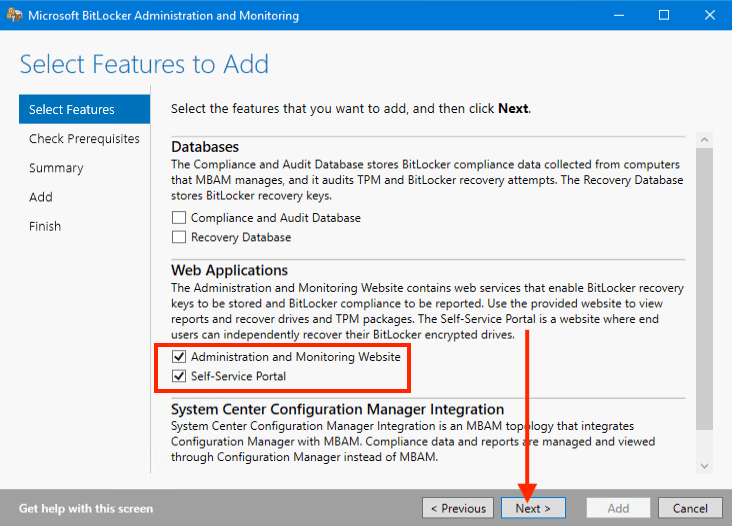
software dependencies

In this guide, we shall discuss “The web application “Administration Portal” cannot be enabled because one or more software dependencies are not met’. Microsoft Desktop Optimisation Pack (MDOP) is a suite (portfolio) of technologies available to Software Assurance customers through an additional subscription. Please see the following comprehensive guide on how to enable Bitlocker Pre-Boot Authentication via the Group Policy, and BitLocker PIN bypass: How to configure Network Unlock. 

The following components are included in the MDOP suite: Microsoft Application Virtualization (App-V), Microsoft User Experience Virtualization (UE-V), Microsoft Advanced Group Policy Management (AGPM), Microsoft Diagnostics & Recovery Toolset (DaRT), and Microsoft BitLocker Administration and Monitoring (MBAM).

MBAM is an administrator interface used to manage BitLocker drive encryption. It allows you to configure your enterprise with the correct BitLocker encryption policy options, as well as monitor compliance with these policies.

Kindly take a look at this guide on MBAM components: How to deploy Microsoft BitLocker Administration and Monitoring Tool. See how to enable or disable BitLocker Drive Encryption on Windows and Virtual Machines.

Reason for the error “The web application “Administration Portal” cannot be enabled”

While configuring MBAM, you might encounter the error: “Web application ‘Administration Portal’ can’t enable due to unmet software dependencies.” Incorrectly installing MBAM occurred due to not meeting the specified prerequisites accurately.
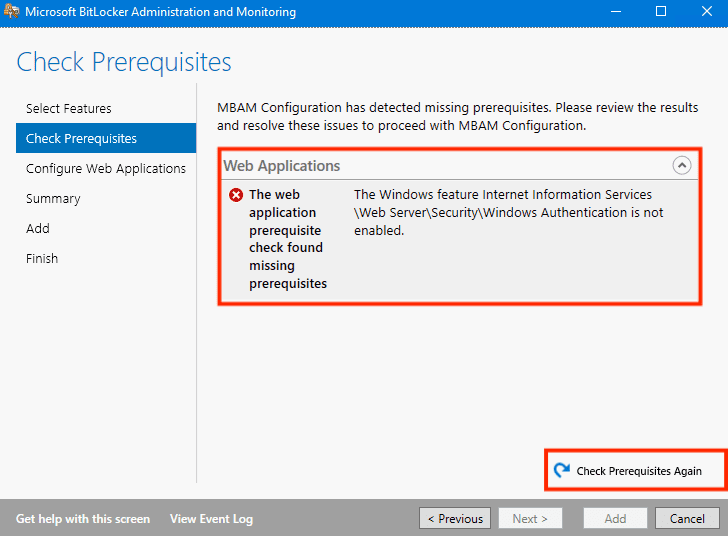
web application

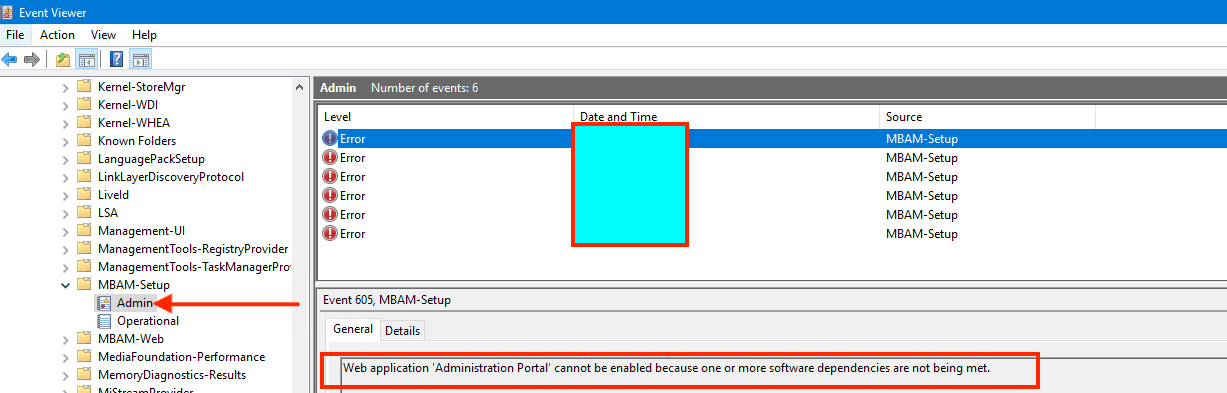
The Event Viewer below illustrates that the Web application “Administration Portal” can’t activate due to unmet software dependencies.

To resolve this issue, we need to install the prerequisites through the portal or PowerShell.  
Administration Portal

Kindly refer to the following similar guides on BitLocker. How to view BitLocker disk encryption status in Windows. You may want to see how to backup existing and new BitLocker recovery keys to Active Directory.

Solution – Install the Web Server, role services and features via PowerShell

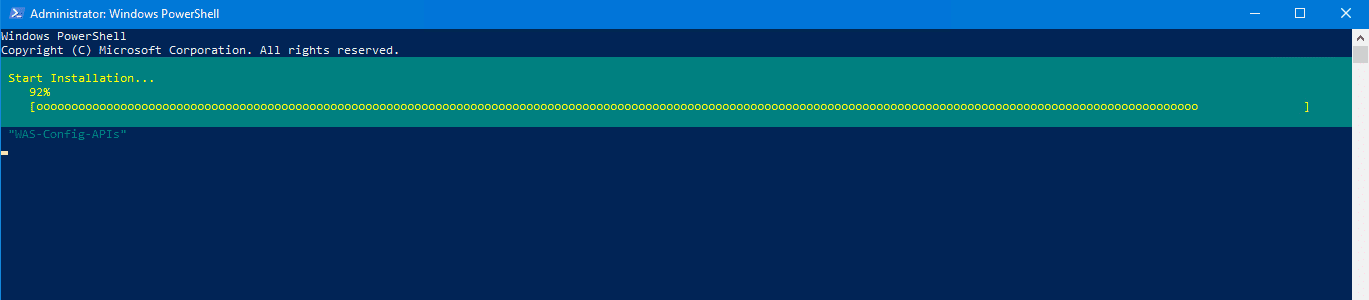
Run the following PowerShell Command to have all the Web Server, role services and features installed as shown below.

When you run this command, as evident in the image below, the server will receive the installation of the components. This command will ensure you aren’t missing any steps.

Add-WindowsFeature -Name "Web-Server", "Web-WebServer", "Web-Common-Http", "Web-Default-Doc", "Web-Dir-Browsing", "Web-Http-Errors", "Web-Static-Content", "Web-Health", "Web-Http-Logging", "Web-Performance", "Web-Stat-Compression", "Web-Security", "Web-Filtering", "Web-Windows-Auth", "Web-App-Dev", "Web-Net-Ext", "Web-Net-Ext45", "Web-Asp-Net", "Web-Asp-Net45", "Web-ISAPI-Ext", "Web-ISAPI-Filter", "Web-Mgmt-Tools", "Web-Mgmt-Console", "NET-Framework-Features", "NET-Framework-Core", "NET-Non-HTTP-Activ", "NET-Framework-45-Features", "NET-Framework-45-Core", "NET-Framework-45-ASPNET", "NET-WCF-Services45", "NET-WCF-HTTP-Activation45", "NET-WCF-TCP-Activation45", "NET-WCF-TCP-PortSharing45", "RDC", "WAS-Process-Model", "WAS-NET-Environment", "WAS-Config-APIs"
enablement

Examining the image below reveals the successful execution of the command, achieved by effectively utilizing the Microsoft Desktop Optimisation Pack.

software dependencies

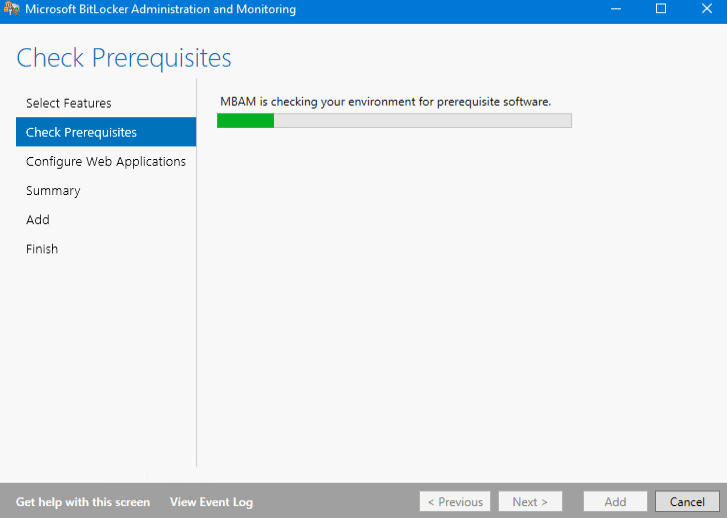
Activate the Microsoft BitLocker Administration and Monitoring tool, and the system will verify prerequisites, confirming essential feature installation. You may also want to see this guide: MBAM reports automatic E-mail notification: How to create MBAM Enterprise and Compliance, and Recovery Audit reports.
web application

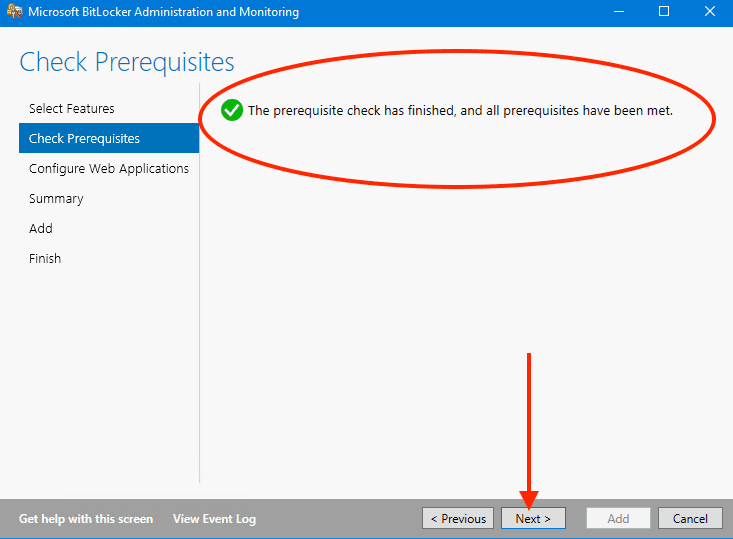
After reviewing the presented information, it’s clear that the successful execution of the prerequisite check has occurred. A reassuring green checkmark validates the fulfillment of all necessary requirements.

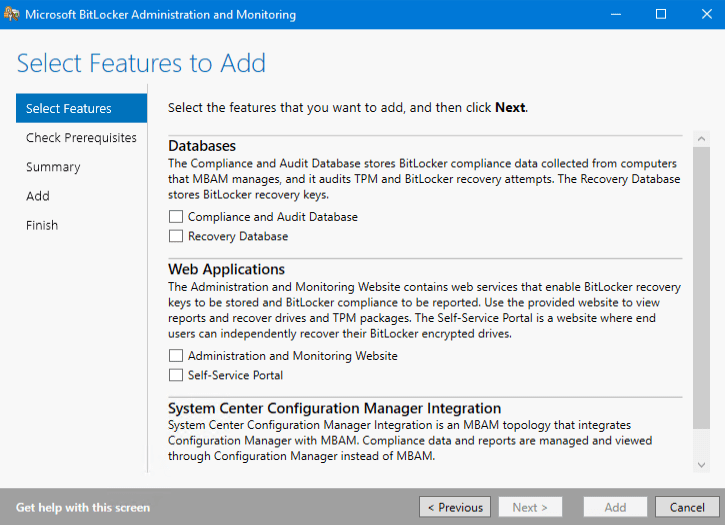
With this confirmation, you are now ready to initiate the configuration process for the components of the Microsoft Desktop Optimisation Pack.
Error4
Error4
We
we2

Also, see  BitLocker Drive Encryption architecture and implementation types on Windows, how to fix missing BitLocker Recovery Tab in Active Directory Users and Computers.

Also, considering your interest in optimizing software experiences. The Microsoft Desktop Optimisation Pack could be a valuable asset to explore further. Your feedback is greatly appreciated.

I trust you’ve discovered value in this blog post on how to fix ‘The web application “Administration Portal” cannot be enabled because one or more software dependencies are not met”. Should any inquiries arise, feel free to raise them in the comments section.

Rate this post

Thank you for reading this post. Kindly share it with others.

  • Click to share on X (Opens in new window) X
  • Click to share on Reddit (Opens in new window) Reddit
  • Click to share on LinkedIn (Opens in new window) LinkedIn
  • Click to share on Facebook (Opens in new window) Facebook
  • Click to share on Pinterest (Opens in new window) Pinterest
  • Click to share on Tumblr (Opens in new window) Tumblr
  • Click to share on Telegram (Opens in new window) Telegram
  • Click to share on WhatsApp (Opens in new window) WhatsApp
  • Click to share on Pocket (Opens in new window) Pocket
  • Click to share on Mastodon (Opens in new window) Mastodon
  • Click to share on Bluesky (Opens in new window) Bluesky
  • Click to share on Threads (Opens in new window) Threads
  • Click to share on Nextdoor (Opens in new window) Nextdoor
Windows Tags:Bitlocker, Enable BitLocker, MBAM, Microsoft BitLocker Administration and Monitoring, Windows 10, Windows Server 2016

Post navigation

Previous Post: Email notifications for MBAM Enterprise and Compliance and Recovery Audit reports
Next Post: How to Clear Cache on Windows 10

Related Posts

  • Clear Saved Email Address in Microsoft Edge
    Clear Saved Email Address: Stop Microsoft Edge from remembering your email ID Windows
  • How to Fix Scanning and Repairing Drive on Every Boot
    How to Fix Scanning and Repairing Drive on Every Boot Windows
  • Update Wampserver
    How to update WampServer to Latest Version Web Server
  • Prevent OS Reinstallation When Switching from Legacy BIOS to UEFI
    Prevent OS Reinstallation: Change from legacy BIOS to UEFI Windows
  • ETWindows
    An Overview of Event Tracing for Windows Windows
  • View installed Updates on Windows
    Get lists of installed Microsoft Windows Updates Windows

More Related Articles

Clear Saved Email Address in Microsoft Edge Clear Saved Email Address: Stop Microsoft Edge from remembering your email ID Windows
How to Fix Scanning and Repairing Drive on Every Boot How to Fix Scanning and Repairing Drive on Every Boot Windows
Update Wampserver How to update WampServer to Latest Version Web Server
Prevent OS Reinstallation When Switching from Legacy BIOS to UEFI Prevent OS Reinstallation: Change from legacy BIOS to UEFI Windows
ETWindows An Overview of Event Tracing for Windows Windows
View installed Updates on Windows Get lists of installed Microsoft Windows Updates Windows

Leave a Reply Cancel reply

You must be logged in to post a comment.

Microsoft MVP

VEEAMLEGEND

vexpert-badge-stars-5

Virtual Background

GoogleNews

Categories

veeaam100

sysadmin top30a

  • screenshot 2020 02 08 at 17.23.28
    How to disable Password Change for all Exchange Server Users Network | Monitoring
  • screenshot 2020 03 19 at 19.17.42
    SG300 Firmware Upgrade Copy: Illegal software format Network | Monitoring
  • regreg
    How to configure screen saver timeout in Windows Windows
  • savds
    VM is not accessible: Fix Taking ownership of a VM failed Virtualization
  • TLS1.2
    Unable to install Azure AD Connect, TLS 1.2 is required: How to enable or disable TLS 1.2 on a Windows Server via the Registry and PowerShell AWS/Azure/OpenShift
  • BitLocked suspended and resumed
    Query MBAM-protected Client for non-compliance [Part 2] Windows
  • Route53AWS
    Set up and configure Route 53 for your Domain in AWS AWS/Azure/OpenShift
  • MDT Workbench Crashes when opening WinPE tab Properties
    Fix MDT Workbench Crashes when opening WinPE tab Properties Windows

Subscribe to Blog via Email

Enter your email address to subscribe to this blog and receive notifications of new posts by email.

Join 1,841 other subscribers
  • RSS - Posts
  • RSS - Comments
  • About
  • Authors
  • Write for us
  • Advertise with us
  • General Terms and Conditions
  • Privacy policy
  • Feedly
  • Telegram
  • Youtube
  • Facebook
  • Instagram
  • LinkedIn
  • Tumblr
  • Pinterest
  • Twitter
  • mastodon

Tags

AWS Azure Bitlocker Microsoft Windows PowerShell WDS Windows 10 Windows 11 Windows Deployment Services Windows Server 2016

Copyright © 2025 TechDirectArchive


Loading Comments...
 

You must be logged in to post a comment.