Error 0x8007232B: Can’t activate Windows on this device as we can’t connect to your organization’s activation server


Microsoft includes product activation technology in some products sold through the Volume Licensing channel. A product key is required to activate these products. Activation is the process by which your Windows device is licensed and considered genuine. In this article, we will learn how to fix “Error 0x8007232B: Error 0x8007232B: Can’t activate Windows on this device as we can’t connect to your organization’s activation server”. Please see how to Deploy a Static Website to Azure Storage from VSCode.
Activation helps verify that your copy of Windows is genuine and hasn’t been used on more devices than the Microsoft Software License Terms permit.
See the following guide on how to find your Windows 10 Product key and how to replace your Windows license via the Graphical User Interface (GUI), “check Windows 10 activation status and change your product key“.
Software Licensing Management Tool
The Software Licensing Management Tool (slmgr) commands are used to enable advanced Windows activation tasks (change, uninstall, or install) your product key. See this guide on other methods to find your Windows product key, how to activate DriveLock License on Windows Server, and how to find your Windows 10 Product key.
In this guide, you will learn the differences between KMS and Multiple Activation Keys, and the various error code associated with them before showing you the steps I followed in resolve this issue.
Key Management Service (KMS)
It is an activation method for Microsoft products, including Windows and Office. The KMS server, called ‘KMS host’, is installed on a server in your local network. The client connects to the KMS host for activation of both Windows and Office. To activate clients, the KMS uses a KMS host key.
Multiple Activation Key
It is another activation method for Microsoft products, including Windows and Office. Unlike KMS, Multiple Activation key activation is used for a one-time activation against Microsoft’s hosted activation services. This means that Multiple Activation Key does not require any server or services within your network.
Summary of Windows Activation Error Codes
The table below provides troubleshooting information to help you respond to error messages that you may receive when you try to use a Multiple Activation Key or the Key Management Service (KMS) to perform Volume Activation on one or more Windows-based computers.
| Error code | Error message | Activation type |
|---|---|---|
| 0x8004FE21 | This computer is not running genuine Windows. | MAK KMS client |
| 0x80070005 | Access denied. The requested action requires elevated privileges. | MAK KMS client KMS host |
| 0x8007007b | 0x8007007b DNS name does not exist. | KMS client |
| 0x80070490 | The product key you entered didn’t work. Check the product key and try again, or enter a different one. | MAK |
| 0x800706BA | The RPC server is unavailable. | KMS client |
| 0x8007232A | DNS server failure. | KMS host |
| 0x8007232B | DNS name does not exist. | KMS client |
| 0x8007251D | No records found for DNS query. | KMS client |
| 0x80092328 | DNS name does not exist. | KMS client |
| 0xC004B100 | The activation server determined that the computer could not be activated. | MAK |
| 0xC004C001 | The activation server determined the specified product key is invalid | MAK |
| 0xC004C003 | The activation server determined the specified product key is blocked | MAK |
| 0xC004C008 | The activation server determined that the specified product key could not be used. | KMS |
| 0xC004C020 | The activation server reported that the Multiple Activation Key has exceeded its limit. | MAK |
| 0xC004C021 | The activation server reported that the Multiple Activation Key extension limit has been exceeded. | MAK |
| 0xC004F009 | The Software Protection Service reported that the grace period expired. | MAK |
| 0xC004F00F | The Software Licensing Server reported that the hardware ID binding is beyond level of tolerance. | MAK KMS client KMS host |
| 0xC004F014 | The Software Protection Service reported that the product key is not available | MAK KMS client |
| 0xC004F02C | The Software Protection Service reported that the format for the offline activation data is incorrect. | MAK KMS client |
| 0xC004F035 | The Software Protection Service reported that the computer could not be activated with a Volume license product key. | KMS client KMS host |
| 0xC004F038 | The Software Protection Service reported that the computer could not be activated. The count reported by your Key Management Service (KMS) is insufficient. Please contact your system administrator. | KMS client |
| 0xC004F039 | The Software Protection Service reported that the computer could not be activated. The Key Management Service (KMS) is not enabled. | KMS client |
| 0xC004F041 | The Software Protection Service determined that the Key Management Server (KMS) is not activated. KMS needs to be activated. | KMS client |
| 0xC004F042 | The Software Protection Service determined that the specified Key Management Service (KMS) cannot be used. | KMS client |
| 0xC004F050 | The Software Protection Service reported that the product key is invalid. | MAK KMS KMS client |
| 0xC004F051 | The Software Protection Service reported that the product key is blocked. | MAK KMS |
| 0xC004F064 | The Software Protection Service reported that the non-genuine grace period expired. | MAK |
| 0xC004F065 | The Software Protection Service reported that the application is running within the valid non-genuine period. | MAK KMS client |
| 0xC004F06C | The Software Protection Service reported that the computer could not be activated. The Key Management Service (KMS) determined that the request timestamp is invalid. | KMS client |
| 0xC004F074 | The Software Protection Service reported that the computer could not be activated. No Key Management Service (KMS) could be contacted. Please see the Application Event Log for additional information. | KMS client |
Here is an updated guide on this issue: How to activate, check activation status and troubleshoot Windows common activation errors [Part 1].
Issue (reason for this error “Error code 0x8007232B”)
As you can see from the table, the error “0x8007232B” is a DNS-related error that shows that the name does not exist. This means the DNS client cannot find the KMS Server resource records (SRV RRs) in DNS.

As discussed, due to the DNS issues, even when you click on the Troubleshoot button in the image above, Windows will still not be activated and the following window below will be displayed. Even when you click on troubleshoot

Before proceeding to show you the steps I followed to resolve this issue, there are other ways to activate your license key such as using a Multiple Activation Key instead of KMS. All you need to do is click on the Change product key.
Select Start > Settings > System > Activation . Select Change product key, and then type your 25-character product key. You might be asked for an admin password or to confirm your choice.
The following guide will show you how “how to find your Windows 10 Product key“.
Fix – Error code 0x8007232B: Can’t activate Windows on this device as we can’t connect to your organization’s activation server
To test for connectivity, you will have to launch the Windows command prompt as shown below. Here is a guide on how to use Software Licensing Management Tool (slmgr) to install and uninstall the Windows product key. By default, the KMS host is listening on port 1688 (TCP). You can change the port if needed using this setting.
Kindly verify that the Client is pointing to the KMS host by using slmgr.vbs /skms <kms_host_name>. Below is a command that can be used. As you can see, we have set the Volume Licensing KMS server and the port used for KMS activation in the image below.
cscript.exe %windir%\system32\slmgr.vbs -skms techdakms.local:1688
Next, run the following command to activate the Windows License only if you wish to manually resolve the issue. Note: Even when you do not run the command below, upon restart the Windows will be activated. If these commands resolve the problem, this is most likely a name resolution issue as it is in my case.
cscript \windows\system32\slmgr.vbs -atoStep 2: Fix Error 0x8007232B: Can’t activate Windows on this device as we can’t connect to your organization’s activation server
If none of these commands resolves the problem, check the computer’s firewall configuration. Any activation communications that occur between Key Management Service clients and the KMS host use the 1688 TCP port.
The firewalls on both the Key Management Service client and the KMS host must allow communication over port 1688.
In order to automate Windows Deployment, right-click on the Task Sequence and select Properties. Under the OS Info, click on Edit the Unattended.xml file as shown below.
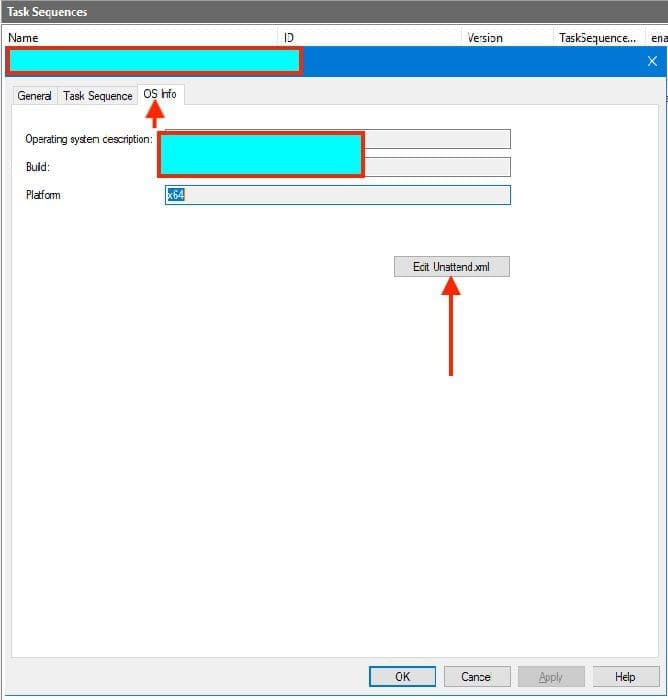
kindly take a look at these steps: Install ADK, MDT, and WDS: How to deploy Windows images via Microsoft Deployment Toolkit and Windows Deployment Services.
Modify the Answer File
This will open the Answer File. Under the OOBE System, expand the FirstlogonCommands and add the command in the following order. When you are done, check for errors and save the unattended.xml file.
Ensure you update the deployment share again. For comprehensive steps of how this is done,
cscript.exe %windir%\system32\slmgr.vbs -skms techdakms.local:1688
cscript.exe %windir%\system32\slmgr.vbs -ato
As you can see below. A new deployment of Windows 11 is run. The deployment is still running and Windows have been activated already.

Here is the workaround guide I have written to help fix the following issue “Failed to run the action install Operating System: Lifetouch deployment failed, Return Code = -2147467259 0x80004005 when installing Windows image via MDT“.
Diagnostic tool
It is worth mentioning that the Microsoft Support and Recovery Assistant (SaRA) simplifies Windows KMS Activation troubleshooting. Download the diagnostic tool.
This tool will try to activate Windows. If it returns an activation error code, the tool will display targeted solutions for known error codes.
I hope you found this blog post helpful on how to fix error 0x8007232B: Can’t activate Windows on this device as we can’t connect to your organization’s activation server. If you have any questions, please let me know in the comment session.


Even in a crisis, if there is one person who would manage to deliver impeccable results each and every time, it would have to be you. Thanks for your hard work and dedication while being someone that everyone in the office can depend on.
Thank you very much for your feedback. This is very much appreciated!