Skip to content

TechDirectArchive

Hands-on IT, Cloud, Security & DevOps Insights

  • Home
  • About
  • Advertise With US
  • Reviews
  • Contact
  • Toggle search form
Home » Windows » Install and License Devolutions Remote Desktop Manager
  • Feature Image
    How to Enable and Disable WMI Traffic through Windows CMD Windows
  • how to install software packages from source files
    How to install a software package from source file in Linux Linux
  • speedtest
    How to set up a self-hosted speed test server on Ubuntu Linux Linux
  • proxmox
    Clone a Proxmox Container: CT Restoration Guide Virtualization
  • How to create blue screen using the Not my Fault tool from Sysinternals
    How to create blue screen using the Not my Fault tool from Sysinternals Windows
  • Featured image 8
    How to restore quarantined files in Microsoft Defender Antivirus Security | Vulnerability Scans and Assessment
  • hh
    Graphical Network Simulator: How to install GNS3 on a Windows device Windows
  • microsoft ntlm2
    NT LAN Manager: How to prevent NTLM credentials from being sent to remote servers Security | Vulnerability Scans and Assessment

Install and License Devolutions Remote Desktop Manager

Posted on 08/03/202322/07/2025 Christian By Christian No Comments on Install and License Devolutions Remote Desktop Manager
devolution Remote Desktop Manager

In this guide, you will learn how to Install and license Devolutions Remote Desktop Manager on Mac. Devolutions Remote Desktop Manager is an application that integrates a comprehensive set of tools to meet the needs of any IT team. It is designed to centralize remote connection technologies, credentials, and secure access to these resources. Most connections are established using either an external library or third-party software. Please, see how to protect Remote Desktop credentials with Windows Defender Remote Credential Guard or Restricted Admin Mode, and how to connect to the Remote Desktop console session from the command line,

Devolutions Remote Desktop Manager is compatible with a wide range of tools and technologies, including Apple Remote Desktop, Citrix, Dameware, FTP, Hyper-V, LogMeIn, Radmin, RDP (Microsoft Remote Desktop), SSH (Shell and Port Forwarding), TeamViewer, Telnet, Remote Desktop Services, VMware, VNC, SCP, X Windows, and more.

Connecting to remote computers, devices, and servers is at the heart of every IT, and System Admins. Remote access to a host of systems s possible using a variety of software, services, and applications.

These tools are an essential part of their IT toolbox, as they allow for the management of multiple systems, while also providing end users with the support they need. This is why I use Devolutions Remote Desktop Manager and Microsoft Remote Desktop for my Lab and work!

Also, see how to remove a Remote Desktop Service collection on Windows Server, and how to install a new Per User Remote Desktop Services license.

Install the Remote Desktop Manager

Remote Desktop Manager for Mac can be downloaded as a .dmg file via our Devolutions website. When on the webpage, ensure the right OS platform is selected. In my case, Mac! For Windows users.

Devolutions Remote Desktop Manager can be downloaded as setup files or as a binary compressed file (.zip) via our Devolutions website. It can also be downloaded from the Microsoft Store.

In order to proceed with the installation of this tool, click on download under the Free Edition.

Download-Devolution-Remote-Manager

As you can see above, the Remote Desktop Manager is available in two editions:

FreeUsed by teams, this edition offers user permissions, user groups, advanced logging, etc. RDM uses a Database Management System (DBMS) for storing the information and sharing it according to your security requirements. Devolutions also offer two specialized services for Cloud-Based storage or to get full Active Directory Integration. It is mainly used by individual users who do not need to share remote connections and privileged passwords with other IT professionals.
TeamUsed by teams, this edition offers user permissions, user groups, advanced logging, etc. RDM uses a Database Management System (DBMS) for storing the information and sharing it according to your security requirements. Devolutions also offer two specialized services for Cloud-Based storage or to get full Active Directory Integration.

Please, see how to install Microsoft Teams on a macOS, and how to fix Remote Desktop cannot find the computer this in the specified network: Verify the computer name and domain that you are trying to connect.

Download Devolutions Remote Manager

As you can see below, the Devolutions Remote Manager is being downloaded.

Remote-Manager-Downloaded

Upon download, double-click on the downloaded .dmg file open it, and mount it to your Mac device. next, place the Remote Desktop Manager App Installer in the application folder as shown below.

Move-Rmote-Manager-to-Applications-folder

Now, you can search for the Remote Desktop Manager via LaunchPad, etc in order to launch the application.

launch-devolution-remote-manager

As you can see from the Devolution Remote Desktop Manager dashboard as shown below.

You can do a whole lot such as adding new Remote Desktop Connections, credential entry, etc. We will come back to this topic later as this is not the focus at the moment.

Devolution-Remote-MAnager-Dashboard

Please see Determine the Remote Desktop Client Version, How to delete AWS S3 Bucket and Objects via  AWS CLI from Linux, and how to install and configure Microsoft Teams on Ubuntu

Step 2: Licensing the Remote Desktop Manager

Remote Desktop Manager for Mac Team Edition comes with a 30-day trial. If you possess a purchased license of the Team Edition, kindly follow the steps below to have your license registered. You can also purchase your subscription via the following link.

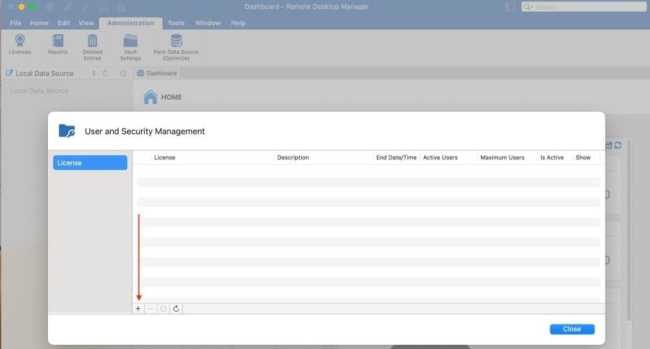
To add a license serial to the data source, navigate to Administration and then Licenses as shown below. Next, click on Add Licenses.
AddLicense-Devolution-RDM

Enter the license serial in the License field.

Luckily, I got a free license as a VeeamLegend and at the same time a VMware vExpert!
enter-license

As you can see, my license has been correctly applied, and its validity is displayed. When you are done, click on OK.

Optional: Check the Auto-assign box to automatically provide the Remote Desktop Manager for Mac serial to all newly created users.
devolutions-licensed

In the User and Security Management, you can perform other options such as editing and removing licenses, etc.

license-devolution-rdm

Managing a wide range of remote connections and tools from a centralized platform can boost productivity, decrease costs, and increase security.

You may also want to learn about a free solution from Microsoft called Remote Desktop Connection Manager (RDCMan).

I hope you found this blog post helpful. Now you have learned how to install and license Devolutions Remote Desktop Manager on Mac. If you have any questions, please let me know in the comment session.

Rate this post

Thank you for reading this post. Kindly share it with others.

  • Click to share on X (Opens in new window) X
  • Click to share on Reddit (Opens in new window) Reddit
  • Click to share on LinkedIn (Opens in new window) LinkedIn
  • Click to share on Facebook (Opens in new window) Facebook
  • Click to share on Pinterest (Opens in new window) Pinterest
  • Click to share on Tumblr (Opens in new window) Tumblr
  • Click to share on Telegram (Opens in new window) Telegram
  • Click to share on WhatsApp (Opens in new window) WhatsApp
  • Click to share on Pocket (Opens in new window) Pocket
  • Click to share on Mastodon (Opens in new window) Mastodon
  • Click to share on Bluesky (Opens in new window) Bluesky
  • Click to share on Threads (Opens in new window) Threads
  • Click to share on Nextdoor (Opens in new window) Nextdoor
Mac, Windows, Windows Server Tags:Microsoft Windows, RDP, Remote Desktop, remote desktop app, Remote Desktop Connection, Remote Desktop Protocol, Windows 10, Windows 11, Windows Server 2016

Post navigation

Previous Post: Check the Size of Video Random Access Memory (VRAM) in Windows
Next Post: Set Browers and Windows to reopen Apps on Startup

Related Posts

  • Featured image 3
    How to fix White Screen in Microsoft Teams Windows
  • shut down 650x300 1
    How to prevent users from shutting down in a Virtual Machine Windows
  • sdf
    What is GPO and how can it be launched in Windows Windows Server
  • image 43
    Configure GPS location “Google Map” on your Android Studio Emulator Windows
  • Windows 10 Upgrade 1 1
    Perform an in-place upgrade from Windows Server 2016 to Windows Server 2019 Windows Server
  • How to Lock the Find My Device Option in Windows 11
    How to Lock the Find My Device Option in Windows 11 Windows

More Related Articles

Featured image 3 How to fix White Screen in Microsoft Teams Windows
shut down 650x300 1 How to prevent users from shutting down in a Virtual Machine Windows
sdf What is GPO and how can it be launched in Windows Windows Server
image 43 Configure GPS location “Google Map” on your Android Studio Emulator Windows
Windows 10 Upgrade 1 1 Perform an in-place upgrade from Windows Server 2016 to Windows Server 2019 Windows Server
How to Lock the Find My Device Option in Windows 11 How to Lock the Find My Device Option in Windows 11 Windows

Leave a Reply Cancel reply

You must be logged in to post a comment.

Microsoft MVP

VEEAMLEGEND

vexpert-badge-stars-5

Virtual Background

GoogleNews

Categories

veeaam100

sysadmin top30a

  • Feature Image
    How to Enable and Disable WMI Traffic through Windows CMD Windows
  • how to install software packages from source files
    How to install a software package from source file in Linux Linux
  • speedtest
    How to set up a self-hosted speed test server on Ubuntu Linux Linux
  • proxmox
    Clone a Proxmox Container: CT Restoration Guide Virtualization
  • How to create blue screen using the Not my Fault tool from Sysinternals
    How to create blue screen using the Not my Fault tool from Sysinternals Windows
  • Featured image 8
    How to restore quarantined files in Microsoft Defender Antivirus Security | Vulnerability Scans and Assessment
  • hh
    Graphical Network Simulator: How to install GNS3 on a Windows device Windows
  • microsoft ntlm2
    NT LAN Manager: How to prevent NTLM credentials from being sent to remote servers Security | Vulnerability Scans and Assessment

Subscribe to Blog via Email

Enter your email address to subscribe to this blog and receive notifications of new posts by email.

Join 1,841 other subscribers
  • RSS - Posts
  • RSS - Comments
  • About
  • Authors
  • Write for us
  • Advertise with us
  • General Terms and Conditions
  • Privacy policy
  • Feedly
  • Telegram
  • Youtube
  • Facebook
  • Instagram
  • LinkedIn
  • Tumblr
  • Pinterest
  • Twitter
  • mastodon

Tags

AWS Azure Bitlocker Microsoft Windows PowerShell WDS Windows 10 Windows 11 Windows Deployment Services Windows Server 2016

Copyright © 2025 TechDirectArchive


Loading Comments...
 

You must be logged in to post a comment.