Fix An error has occurred during report processing (rsProcessingAborted)


MBAM Report Users can access the Compliance and Audit reports in the MBAM administration website. The local group for this role is installed on the Administration and Monitoring Server, Compliance and Audit Reports Server, and Compliance Status Database Server. In this article, we shall discuss how to resolve the “Fix An error has occurred during report processing (rsProcessingAborted)”. See how to Install SonarQube on Ubuntu 20.04 LTS.
Reporting Services uses role-based security to grant user access to a report server. On a new report server installation, only users who are members of the local Administrators group have permissions to report server content and operations.
To make the report server available to other users, you must create role assignments that map user or group accounts to a predefined role that specifies a collection of tasks.
Please see How to determine why an MBAM-protected device is non-compliant, and Email notifications for MBAM Enterprise and Compliance and Recovery Audit reports.
Why was the error “Fix An error has occurred during report processing (rsProcessingAborted)” Prompted?
The below error was prompted when you wish to Query MBAM to display the BitLocker Recovery report. The reason for this error is because you do not have specific rights for the local group role installed on the Administration and Monitoring Server.
Note: To run the reports, you must be a member of the Report Users Role on the servers where the “Administration and Monitoring Server,” “Compliance and Audit Reports,” and “Compliance Status Database” features are installed.
Reproduce Error
The user without membership to the Report Users Role launches a web browser. Navigate to the MBAM administration website.

Selects the MBAM folder, select desired language and then he or she is unable to view the report.

In this case, the Recovery Audit Report. Then the Below error will be prompted.
An error has occurred during report processing (rsProcessingAborted): Queryexecution failed for dataset 'Recovery AuditReportDataSet', the Execute permission was denied on the object 'GetAuditInformation'Solution to fixing the the Execute permission was denied on the object ‘GetAuditInformation’
To fix this, launch the MBAM administration website as a SQL Administrator. Select the Gear icon in the upper right and then select Site Settings from the dropdown menu.
In this section, you have two options which are as follow below
- Add a user or group to a system role
- Add a user or group to an item role
I will be using the the ‘Add a user or group to an item role”. Select Manage Folder.

Or Select the … (ellipse) on an MBAM Website. In the menu, select Manage.

As you can see, the Administrator has access by default to this website. Select Security, and Select Add group or user.
Note: You must be a member of the local Administrators group on the report server computer to perform the tasks below. To delegate this task to other users, create role assignments that map user accounts to Content Manager and System Administrator roles. Users who have Content Manager and System Administrator permissions can add users to a report server
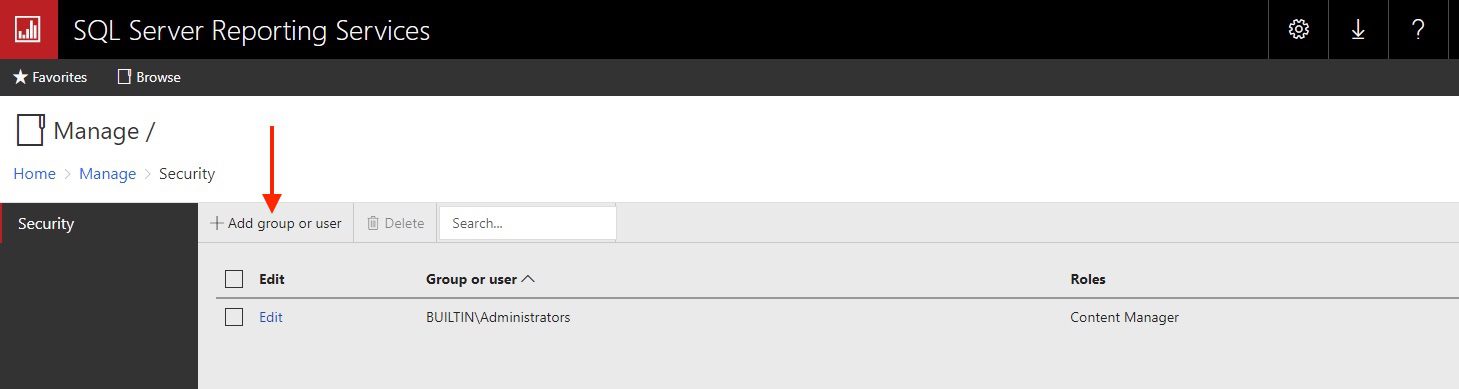
Add the User group or User. In my case a group as it is easier to manage user rights.
In Group or user, enter a Windows domain user or group account in this format: <domain>\<account>. If you’re using forms authentication or custom security, specify the user or group account in the format that is correct for your deployment.

Select one or more role definitions that describe how the user or group should access the MBAM website, and then select OK.

Check on the SQL database if the User Group has the right database permission assigned. I have decided to assign the following rights to this MBAM Report User Group. Please see this guide from Microsoft to learn more on managing MBAM Administrator Roles

View and Generate MBAM Reports
Now that you have the right permissions in place, navigate again and launch the MBAM website. Select your desired language.
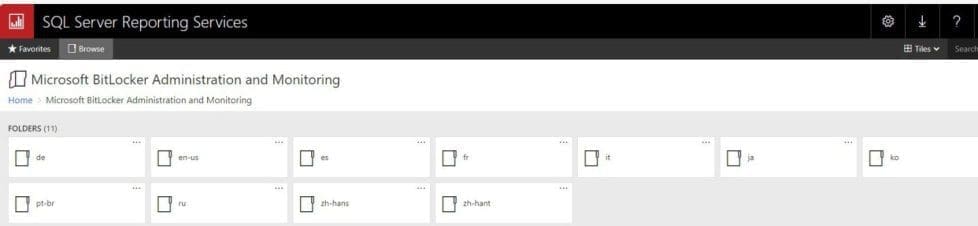
Now select any report you would like to view. Because we have dealt with articles descripting how to view reports etc. We will not be discussing these extensively.
Now you can start generating reports and view the Recovery Audit Report as well.
Enterprise Compliance Report
The Enterprise Compliance Report provides information on overall BitLocker compliance in your organization. The available filters for this report allow you to narrow your search results according to the Compliance state and Error status.
Here are some related guides: Enterprise Compliance, Computer Compliance, and Recovery Audit Report: Understanding the Microsoft BitLocker Administration and Monitoring (MBAM) reports fields. And MBAM Frequent Report Errors: Understanding Microsoft BitLocker Administration and Monitoring compliance state and error status.
Computer Compliance Report
The Computer Compliance Report displays information that is specific to a computer or user. To generate the Computer Compliance Report, access the Administration and Monitoring website and select the Microsoft BitLocker Administration and Monitoring node, select your desired language format (en-us) and select the Computer Compliance Report and use the Computer Compliance report to search for a user name or computer name.
Here is how to fix you are not allowed to view this folder on SSRS: MBAM reports cannot be accessed because it could not load folder contents, and how to change the Windows Pagefile Size.
FAQs
Are TPM cleared during a system reset or reinstall?
There isn’t a yes or no answer to this. It depends on how the WDS environment is set up. But for other Windows installation types, the answer is no. You will have to manually reset the TPM.
I can view MBAM administration website as discussed above. But why do I get the error “Could not load folder contents” when navigating through SQL Server Reporting services?
Due to various permission configured on the reporting server. The following error message may be prompted when accessing the Compliance/Recovery Report.
This error simply means you do not have permission to list this specific folder but access to the MBAM report website only is possible. Please see “How to fix you are not allowed to view this folder on SSRS: MBAM reports cannot be accessed because it could not load folder contents“.
How does TPM and BitLocker work together?
TPM protects and detect change to the pre-boot environment which consist of the computer hardware, firmware (including BIOS) and operating system boot loader. The boot loader protects the essential operating system files and the system partition if BitLocker is enabled.
How does BitLocker Protect other volumes?
The system partition protects any other volumes. The key for the secondary partition is not stored in the TPM chip itself but somewhere on the system partition. So for the secondary volume to be decrypted automatically, the system volume must be encrypted as well.
I hope you found this article useful on “Fix An error has occurred during report processing (rsProcessingAborted)”. Please feel free to leave a comment below.


