Skip to content

TechDirectArchive

Hands-on IT, Cloud, Security & DevOps Insights

  • Home
  • About
  • Advertise With US
  • Reviews
  • Contact
  • Toggle search form
Home » Version Control System » Install Git on Windows: Practical Git use with markdown
  • ddf 2
    Add boot and install images to WDS and configure Multicast transmission via the GUI and WDSUTIL Windows Server
  • azure 1
    Fix SSO sign-in and non-routable domain issues AWS/Azure/OpenShift
  • 1 WeXxkEX0JG3oB781HD8Hrg 1
    Command Prompt in Windows: Creating Volumes Guide Windows
  • Telegram Bot for wordpress
    Configure Telegram to receive Blog Notifications JIRA|Confluence|Apps
  • screenshot 2020 04 04 at 01.38.38
    Fix Failed to create scheduled task due to Windows Server Management service issue Windows Server
  • removeguesttrello
    Remove a member from Trello Workspace: How to add or remove a Board Guest to a Trello Board JIRA|Confluence|Apps
  • linux w640 h400
    How to install and configure Ubuntu Linux on VirtualBox Linux
  • screenshot 2020 04 17 at 17.09.01
    How to configure a remote Windows Server to Support Ansible Windows Server

Install Git on Windows: Practical Git use with markdown


Posted on 16/07/201829/09/2023 Christian By Christian No Comments on Install Git on Windows: Practical Git use with markdown
Install Git on Windows (GitMarkDown)

Git is a free and open-source distributed version control system designed to handle everything from small to very large projects with speed and efficiency. Git is easy to learn and has a tiny footprint with lightning-fast performance. It outclasses SCM tools like Subversion, CVS, Perforce, and ClearCase with features like cheap local branching, convenient staging areas, and multiple workflows. Kindly refer to these related guides: How to create and deploy a local Registry Server with Docker Image, how to Pull your first Nginx Container Image from Docker Hub and deploy it to your local machine, Azure DevOps and GitHub integration for Docker and Kubernetes deployment, how to create a static pod in Kubernetes, and how to install, register and start GitLab Runner on Windows.

The most widely used version control system are as follow;
- GitHub is the most used version control system in the world. This project was developed by Linus Torvalds, the creator of the Linux operating system, and it is used by an enormous collection of software projects both commercial and open-source that depend on Git for version control.
- GitLab is an open source end-to-end software development platform with built-in version control, issue tracking, code review, CI/CD, and more. Self-host GitLab on your own servers, in a container, or on a cloud provider. It offers free unlimited (private) repositories and unlimited collaborators.

Note: First install Git on windows and wish to use Tortoisegit for windows, you will need the GitHub executable path entered into ToitoiseGit. You can download Git from the following link: https://git-scm.com/downloads

  • To download ToitoiseGit, click on this link.

Note: After installing git, you will need to set it up as below. For the complete installation steps, please visit this link.

setup and configure git

Now you can change into any directory on your PC and clone your repository (project)

clone yor repository

Practical Git use with Markdown

Note: When you are using markdown and you encounter errors.

markdown error

Technical Issues

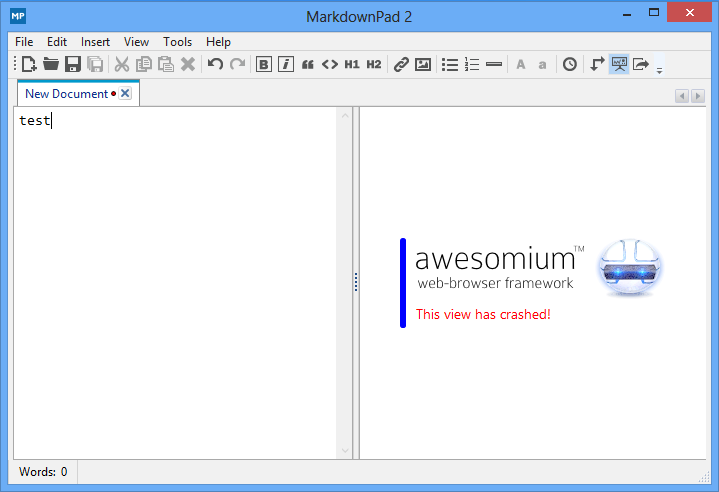
LivePreview is not working – it displays an error message stating This view has crashed!

This issue has been specifically observed in Windows 8, 10 etc. You may see an error message as shown here, and no HTML will be rendered when you type in the Markdown Editor pane.

Solution

To fix this issue, please try installing the Awesomium 1.6.6 SDK. If you continue to experience issues, please install Microsoft’s DirectX End-User Runtimes (June 2010).

Note: I did not install Microsoft’s DirectX End-User Runtimes (June 2010)  and it worked. Please take a look at this link.

I hope you found this blog post on practical git use with Markdown helpful. If you have any questions, please let me know in the comment session.

Rate this post

Thank you for reading this post. Kindly share it with others.

  • Click to share on X (Opens in new window) X
  • Click to share on Reddit (Opens in new window) Reddit
  • Click to share on LinkedIn (Opens in new window) LinkedIn
  • Click to share on Facebook (Opens in new window) Facebook
  • Click to share on Pinterest (Opens in new window) Pinterest
  • Click to share on Tumblr (Opens in new window) Tumblr
  • Click to share on Telegram (Opens in new window) Telegram
  • Click to share on WhatsApp (Opens in new window) WhatsApp
  • Click to share on Pocket (Opens in new window) Pocket
  • Click to share on Mastodon (Opens in new window) Mastodon
  • Click to share on Bluesky (Opens in new window) Bluesky
  • Click to share on Threads (Opens in new window) Threads
  • Click to share on Nextdoor (Opens in new window) Nextdoor
Version Control System Tags:Git, Github, GitLab, Version Control

Post navigation

Previous Post: How to find Computer Model and Serial Number
Next Post: Office Configuration Analyser Tool (OFFCAT): Now Microsoft Support and Recovery Wizard

Related Posts

  • uninstall gtla runner
    How to uninstall GitLab Runner from your Windows device Version Control System
  • banner2
    How to Integrate Postman With GitHub Automation
  • Error during connect in the default daemon configuration on Windows
    Preparation failed: The docker client must be run with elevated privileges Version Control System
  • Upstream branch in Git 1
    Set up and use an upstream branch in Git Version Control System
  • term “git” was not used as the name of a cmdlet, function, script file, or executable Program recognised
    The term “git” was not used as the name of a cmdlet, function, script file, or executable Program recognized Version Control System
  • automatepythonsinwindows
    Python Automation in Windows with Visual Studio Code Version Control System

More Related Articles

uninstall gtla runner How to uninstall GitLab Runner from your Windows device Version Control System
banner2 How to Integrate Postman With GitHub Automation
Error during connect in the default daemon configuration on Windows Preparation failed: The docker client must be run with elevated privileges Version Control System
Upstream branch in Git 1 Set up and use an upstream branch in Git Version Control System
term “git” was not used as the name of a cmdlet, function, script file, or executable Program recognised The term “git” was not used as the name of a cmdlet, function, script file, or executable Program recognized Version Control System
automatepythonsinwindows Python Automation in Windows with Visual Studio Code Version Control System

Leave a Reply Cancel reply

You must be logged in to post a comment.

Microsoft MVP

VEEAMLEGEND

vexpert-badge-stars-5

Virtual Background

GoogleNews

Categories

veeaam100

sysadmin top30a

  • ddf 2
    Add boot and install images to WDS and configure Multicast transmission via the GUI and WDSUTIL Windows Server
  • azure 1
    Fix SSO sign-in and non-routable domain issues AWS/Azure/OpenShift
  • 1 WeXxkEX0JG3oB781HD8Hrg 1
    Command Prompt in Windows: Creating Volumes Guide Windows
  • Telegram Bot for wordpress
    Configure Telegram to receive Blog Notifications JIRA|Confluence|Apps
  • screenshot 2020 04 04 at 01.38.38
    Fix Failed to create scheduled task due to Windows Server Management service issue Windows Server
  • removeguesttrello
    Remove a member from Trello Workspace: How to add or remove a Board Guest to a Trello Board JIRA|Confluence|Apps
  • linux w640 h400
    How to install and configure Ubuntu Linux on VirtualBox Linux
  • screenshot 2020 04 17 at 17.09.01
    How to configure a remote Windows Server to Support Ansible Windows Server

Subscribe to Blog via Email

Enter your email address to subscribe to this blog and receive notifications of new posts by email.

Join 1,839 other subscribers
  • RSS - Posts
  • RSS - Comments
  • About
  • Authors
  • Write for us
  • Advertise with us
  • General Terms and Conditions
  • Privacy policy
  • Feedly
  • Telegram
  • Youtube
  • Facebook
  • Instagram
  • LinkedIn
  • Tumblr
  • Pinterest
  • Twitter
  • mastodon

Tags

AWS Azure Bitlocker Microsoft Windows PowerShell WDS Windows 10 Windows 11 Windows Deployment Services Windows Server 2016

Copyright © 2025 TechDirectArchive


Loading Comments...
 

You must be logged in to post a comment.