Skip to content

TechDirectArchive

Hands-on IT, Cloud, Security & DevOps Insights

  • Home
  • About
  • Advertise With US
  • Reviews
  • Contact
  • Toggle search form
Home » Windows Server » Fix Active Directory Domain Controller (AD DS) for this domain could not be contacted
  • Block ZIPRAR Attachments in Outlook 2016 – 2007
    How to Block ZIP/RAR Attachments in Outlook Windows
  • Angular Azure
    How to deploy your Angular App to Azure from Visual Studio Code AWS/Azure/OpenShift
  • Test your webcam and microphone before meeting
    How to Test Your Webcam And Microphone Before Meeting Windows
  • image 41
    How to Quickly Fix Windows Search Bar Not Working Windows
  • Check Hard Drive Health (SMART) in Windows
    How to check Hard Drive Health (SMART) in Windows Windows
  • Jenkins
    How to Install Jenkins Automation Server on Ubuntu 20.04 LTS Linux
  • Windows Defender exclusion
    Mitigate Veeam Threat Hunter Service Scanning Interference Windows Server
  • veeaamAgent1
    Veeam Agent Vulnerability: Fix Veeam Agent vulnerability for Microsoft Windows  Backup

Fix Active Directory Domain Controller (AD DS) for this domain could not be contacted

Posted on 21/03/202008/04/2024 Christian By Christian No Comments on Fix Active Directory Domain Controller (AD DS) for this domain could not be contacted
nonexistent AD

The Active Directory is a centralized directory service used in Windows environments for user authentication and authorization. In this article, we shall discuss the steps to fix “An Active Directory Domain Controller (AD DS) for this domain could not be contacted”. Please see How to create a contact in Active Directory, Learn Active Directory Contact and a User Account Object Differences, What happens when WDS and DNS are installed on the same Windows Server? DNS issues with WDS, and Create and Delete AD DS Partition with NTDSUTIL.EXE.

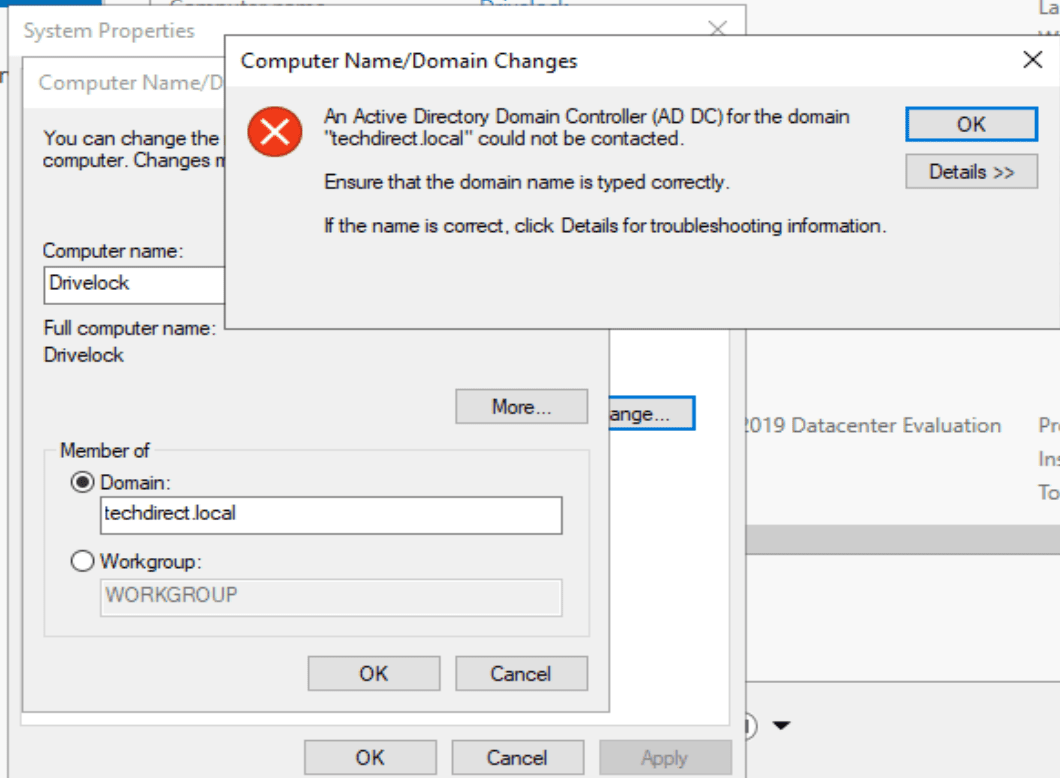
Generically, the above error message “Active Directory Domain Controller (AD DS) for this domain could not be contacted” means that an issue with your PC’s inability to contact the Active Directory Domain Controller (DC). Below is the error message that was prompted

Active Diectory for this domain could not be contacted

Reason for the Error “AD DS could not be contacted”

This error below will prevent you from being able to join the device to the domain. Like I always say, the solution I employed to solve this problem can be different from yours. The error message can be the same. However, the solution can be different as there could be many underlying reasons for this error.

Also, see how to install and configure Active Directory Domain Services on Windows Server 2022 and how to Pause Windows Update. See Bidding Farewell to NTLM in favour of Kerberos.

For me, the reason for this error was an incorrect DNS IP entered on the client.

Active Directory relies heavily on DNS (Domain Name System). Ensure that your PC is using the correct DNS server(s). In an Active Directory environment, your DNS settings should point to the DNS server running on your domain.
cannot find domain

Note: This could also mean that the IP addresses on the DC are wrong. Double check on the DC by performing nslookup

nonexistent domain

Resolve Active Directory Domain Controller (AD DS) for this domain could not be contacted

Ensure your server is pointing to the DNS server Address or else this will not work correctly as shown below

Active Directory contact error

When the TCP/IP properties field are filled correctly as shown above. Since Active Directory relies on DNS (Domain Naming Service). This error will be eradicated.

Active Directory error

Now you can have your device joined to your domain correctly.

cannot find domain

Here you will be prompted with a welcome message that the device has been successfully joined to the domain.

Ensure the IP parameters are entered correctly and the Preferred DNS server is pointing to the DNS server IP Address itself.

When joining the domain, you can use the NetBIOS name of the domain or the DNS name of the domain.

Furthermore, I hope you found this blog post on how to Fix “An Active Directory Domain Controller (AD DS) for this domain could not be contacted” helpful. Please let me know in the comment session if you have any questions.

Rate this post

Thank you for reading this post. Kindly share it with others.

  • Click to share on X (Opens in new window) X
  • Click to share on Reddit (Opens in new window) Reddit
  • Click to share on LinkedIn (Opens in new window) LinkedIn
  • Click to share on Facebook (Opens in new window) Facebook
  • Click to share on Pinterest (Opens in new window) Pinterest
  • Click to share on Tumblr (Opens in new window) Tumblr
  • Click to share on Telegram (Opens in new window) Telegram
  • Click to share on WhatsApp (Opens in new window) WhatsApp
  • Click to share on Pocket (Opens in new window) Pocket
  • Click to share on Mastodon (Opens in new window) Mastodon
  • Click to share on Bluesky (Opens in new window) Bluesky
  • Click to share on Threads (Opens in new window) Threads
  • Click to share on Nextdoor (Opens in new window) Nextdoor
Windows Server Tags:Active Directory, Domain, Windows Server 2016

Post navigation

Previous Post: Fix cannot find KDC for realm while getting initial credentials and kinit configuration file does not specify default realm
Next Post: Kerberos error: Clock skew too great while getting initial credentials

Related Posts

  • ansible business cards 1600x0 c default
    Kerberos error: Clock skew too great while getting initial credentials Windows Server
  • screenshot 2020 02 07 at 20.59.01
    How to use the PsInfo utility from SysInternals Windows Server
  • dgfhjm
    How to fix DISM Error 87: The package is unknown Windows Server
  • Screenshot 2020 10 31 at 10.35.37
    How to set the PowerShell Execution Policy via Windows Registry Windows Server
  • schedulepythontasksinWindows
    Run Python Script via Windows Task Scheduler Windows
  • Remove Desktop Desktop services
    How to Remove Remote Desktop Services Role on Windows Server Windows Server

More Related Articles

ansible business cards 1600x0 c default Kerberos error: Clock skew too great while getting initial credentials Windows Server
screenshot 2020 02 07 at 20.59.01 How to use the PsInfo utility from SysInternals Windows Server
dgfhjm How to fix DISM Error 87: The package is unknown Windows Server
Screenshot 2020 10 31 at 10.35.37 How to set the PowerShell Execution Policy via Windows Registry Windows Server
schedulepythontasksinWindows Run Python Script via Windows Task Scheduler Windows
Remove Desktop Desktop services How to Remove Remote Desktop Services Role on Windows Server Windows Server

Leave a Reply Cancel reply

You must be logged in to post a comment.

Microsoft MVP

VEEAMLEGEND

vexpert-badge-stars-5

Virtual Background

GoogleNews

Categories

veeaam100

sysadmin top30a
 
  • Block ZIPRAR Attachments in Outlook 2016 – 2007
    How to Block ZIP/RAR Attachments in Outlook Windows
  • Angular Azure
    How to deploy your Angular App to Azure from Visual Studio Code AWS/Azure/OpenShift
  • Test your webcam and microphone before meeting
    How to Test Your Webcam And Microphone Before Meeting Windows
  • image 41
    How to Quickly Fix Windows Search Bar Not Working Windows
  • Check Hard Drive Health (SMART) in Windows
    How to check Hard Drive Health (SMART) in Windows Windows
  • Jenkins
    How to Install Jenkins Automation Server on Ubuntu 20.04 LTS Linux
  • Windows Defender exclusion
    Mitigate Veeam Threat Hunter Service Scanning Interference Windows Server
  • veeaamAgent1
    Veeam Agent Vulnerability: Fix Veeam Agent vulnerability for Microsoft Windows  Backup

Subscribe to Blog via Email

Enter your email address to subscribe to this blog and receive notifications of new posts by email.

Join 1,841 other subscribers
  • RSS - Posts
  • RSS - Comments
  • About
  • Authors
  • Write for us
  • Advertise with us
  • General Terms and Conditions
  • Privacy policy
  • Feedly
  • Telegram
  • Youtube
  • Facebook
  • Instagram
  • LinkedIn
  • Tumblr
  • Pinterest
  • Twitter
  • mastodon

Tags

AWS Azure Bitlocker Microsoft Windows PowerShell WDS Windows 10 Windows 11 Windows Deployment Services Windows Server 2016

Copyright © 2025 TechDirectArchive


Loading Comments...
 

You must be logged in to post a comment.