Skip to content

TechDirectArchive

Hands-on IT, Cloud, Security & DevOps Insights

  • Home
  • About
  • Advertise With US
  • Contact
  • Reviews
  • Toggle search form
Home » Windows Server » Fix the following error occurred when DNS was queried for the service location
  • Screenshot 2022 03 15 at 10.05.53
    VMware Workstation states: What are the differences between Suspend, Power Off, and Run in Background Linux
  • User profile in Windows
    How to delete User Profile in Windows Windows
  • AzureMonitor
    Configure Azure Monitor for VMs on Azure Stack Hub AWS/Azure/OpenShift
  • Delete VM and Storage in Proxmox
    How to delete a VM and Storage in Proxmox Virtualization
  • AzureCloudShell
    Provisioning Azure Resources using Azure Az PowerShell Cmdlet from Cloud Shell AWS/Azure/OpenShift
  • Screenshot 2020 05 19 at 18.54.21
    Unable to find File Explorer in the Group Policy Editor when resolving the security tab missing under properties Windows Server
  • VMware vCenter Standalone
    Fix VMware vCenter converter standalone started but not running Virtualization
  • sql
    How to alter a DATABASE compatibility level Oracle/MSSQL/MySQL

Fix the following error occurred when DNS was queried for the service location

Posted on 28/07/202024/04/2023 Christian By Christian No Comments on Fix the following error occurred when DNS was queried for the service location

A DNS query (also known as a DNS request) is a demand for information sent from a user’s computer (DNS client) to a DNS server. When prompted with the following error as shown below. In this guide, I will show you how to fix “the following error occurred when DNS was queried for the service location (SRV) resource record used to locate an Active Directory Domain Controller (AD DS) for domain: Error code 0x0000232B RCODE_NAME_ERROR”. Please see the following guides: DNS: Unable to register a client to Domain, How to find disabled Active Directory User accounts, how to fix WinRM cannot process the request: The following error occurred while using Kerberos authentication, cannot find the computer.
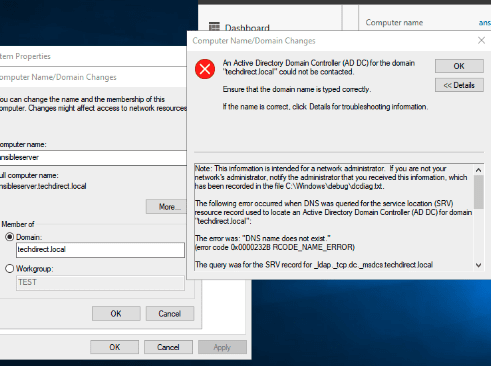
This is a DNS issue, no doubt! Use this guide for the different types of DNS records. When you search on the internet, you may find conflicting tips. In my environment, here are some tips I followed to resolve this issue.

Please see these exciting articles: Domain Name System: How to create a DNS record. How to fix DNS Bad key 9017: The Cluster Name registration failed of one or more associated DNS names. And how to enable God Mode via PowerShell, CLI and GUI.

Resolve Error for “DNS was queried for the service location (SRV)”

Here are  my recommendations below

1: Ensure the client(s) IP parameters (preferred DNS Server) set on the client machine points to the DNS points to internal DNS servers as DNS servers. See a similar error “The following errors occurred attempting to join the domain: The specified domain either does not exist or could not be contacted“.

As you can see, it was pointing to a wrong IP Address (gateway).
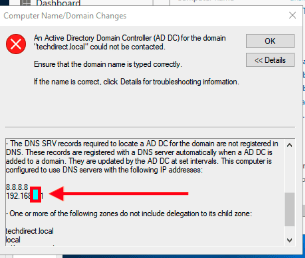
Therefore, I will have to corrected the information.


2: Ensure the DNS server has the right IP address of itself populated for all zones and records. A similar idea was used in resolving this issue “How to fix nslookup unknown: cannot find non-existent domain“.

After ensuring the above two recommendations are met, flush the DNS cache and registered the DNS again using the command below on the DNS server and restart the DNS and netlogon service. You can optionally restart your DNS server. for other DNS troubleshooting parameters, see this link.

ipconfig /registerdns
net stop netlogon
net start netlogon

Now, you should e able to join your device to the domain as shown below. For how to set up a domain, see the following link. Also for how to add a second DC, see the following link. For how to join a PC to a Domain, see the following link.

Note: You will be prompted to restart your device as shown below. Proceed and have it restarted.

I hope you found this blog post helpful on how to fix the following error occurred when DNS was queried for the service location”. If you have any questions, please let me know in the comment session.

Rate this post

Thank you for reading this post. Kindly share it with others.

  • Click to share on X (Opens in new window) X
  • Click to share on Reddit (Opens in new window) Reddit
  • Click to share on LinkedIn (Opens in new window) LinkedIn
  • Click to share on Facebook (Opens in new window) Facebook
  • Click to share on Pinterest (Opens in new window) Pinterest
  • Click to share on Tumblr (Opens in new window) Tumblr
  • Click to share on Telegram (Opens in new window) Telegram
  • Click to share on WhatsApp (Opens in new window) WhatsApp
  • Click to share on Pocket (Opens in new window) Pocket
  • Click to share on Mastodon (Opens in new window) Mastodon
  • Click to share on Bluesky (Opens in new window) Bluesky
  • Click to share on Threads (Opens in new window) Threads
  • Click to share on Nextdoor (Opens in new window) Nextdoor
Windows Server Tags:DNS, DNSRecord, Domain, Domain Controller, FQDN, Windows Server 2016

Post navigation

Previous Post: The following errors occurred attempting to join the domain: The specified domain either does not exist or could not be contacted
Next Post: How to fix “Unable to Sign In: Domain Not Available”

Related Posts

  • Actualidad 211741393 129861581 1050x760
    Edge GPO settings: All Group Policies available to configure Microsoft Edge Settings Windows Server
  • adac
    Enable Active Directory Recycle Bin: How to delete and restore objects using Active Directory Administrative Center Windows Server
  • windows workstations inactivity
    Configure Windows Device Inactivity Limit Locally and Domain Wide Windows
  • original 1
    DISM “Failed to open image” CWimImageInfo Mount(hr:0x8007000d): Fix Error DISM WIM Provider Windows
  • Uninstall SQL Server 2025
    Uninstall Microsoft SQL Server 2025 from Windows Oracle/MSSQL/MySQL
  • Windows server 2025 set up
    Install Windows Server 2025 via iDRAC Virtual Media or PXE Windows Server

More Related Articles

Actualidad 211741393 129861581 1050x760 Edge GPO settings: All Group Policies available to configure Microsoft Edge Settings Windows Server
adac Enable Active Directory Recycle Bin: How to delete and restore objects using Active Directory Administrative Center Windows Server
windows workstations inactivity Configure Windows Device Inactivity Limit Locally and Domain Wide Windows
original 1 DISM “Failed to open image” CWimImageInfo Mount(hr:0x8007000d): Fix Error DISM WIM Provider Windows
Uninstall SQL Server 2025 Uninstall Microsoft SQL Server 2025 from Windows Oracle/MSSQL/MySQL
Windows server 2025 set up Install Windows Server 2025 via iDRAC Virtual Media or PXE Windows Server

Leave a Reply Cancel reply

You must be logged in to post a comment.

Microsoft MVP

VEEAMLEGEND

vexpert-badge-stars-5

Virtual Background

GoogleNews

Categories

veeaam100

sysadmin top30a

  • Screenshot 2022 03 15 at 10.05.53
    VMware Workstation states: What are the differences between Suspend, Power Off, and Run in Background Linux
  • User profile in Windows
    How to delete User Profile in Windows Windows
  • AzureMonitor
    Configure Azure Monitor for VMs on Azure Stack Hub AWS/Azure/OpenShift
  • Delete VM and Storage in Proxmox
    How to delete a VM and Storage in Proxmox Virtualization
  • AzureCloudShell
    Provisioning Azure Resources using Azure Az PowerShell Cmdlet from Cloud Shell AWS/Azure/OpenShift
  • Screenshot 2020 05 19 at 18.54.21
    Unable to find File Explorer in the Group Policy Editor when resolving the security tab missing under properties Windows Server
  • VMware vCenter Standalone
    Fix VMware vCenter converter standalone started but not running Virtualization
  • sql
    How to alter a DATABASE compatibility level Oracle/MSSQL/MySQL

Subscribe to Blog via Email

Enter your email address to subscribe to this blog and receive notifications of new posts by email.

Join 1,839 other subscribers
  • RSS - Posts
  • RSS - Comments
  • About
  • Authors
  • Write for us
  • Advertise with us
  • General Terms and Conditions
  • Privacy policy
  • Feedly
  • Telegram
  • Youtube
  • Facebook
  • Instagram
  • LinkedIn
  • Tumblr
  • Pinterest
  • Twitter
  • mastodon

Tags

AWS Azure Bitlocker Microsoft Windows PowerShell WDS Windows 10 Windows 11 Windows Deployment Services Windows Server 2016

Copyright © 2025 TechDirectArchive


Loading Comments...
 

You must be logged in to post a comment.