Skip to content

TechDirectArchive

Hands-on IT, Cloud, Security & DevOps Insights

  • Home
  • About
  • Advertise With US
  • Reviews
  • Contact
  • Toggle search form
Home » Linux » [MAILX ERROR: STATUS=BOUNCED] Fixing Mailx error when sending emails from Command line

[MAILX ERROR: STATUS=BOUNCED] Fixing Mailx error when sending emails from Command line

Posted on 06/09/202024/09/2024 Christian By Christian No Comments on [MAILX ERROR: STATUS=BOUNCED] Fixing Mailx error when sending emails from Command line
Mailx troubleshooting

Mailx is an intelligent mail processing system, which has a command syntax reminiscent of ed(1) with lines replaced by messages. It is based on Berkeley Mail 8.1, is intended to provide the functionality of the POSIX mailx command, and offers extensions for MIME, IMAP, POP3, SMTP, and S/MIME. In this article, we will learn how to fix “[MAILX ERROR: STATUS=BOUNCED] Fixing Mailx error when sending emails from Command line”. Please see How to uninstall AWS CLI in Windows, and Hhow to install WSUS on Windows Server 2022.

Mailx provides enhanced features for interactive use, such as caching and disconnected operation for IMAP, message threading, scoring, and filtering. It is also usable as a mail batch language, both for sending and receiving mail.

While trying to send an email from CLI on a local server to an external email address, you can come across the error log below.

echo -e "testing email via yourisp.com from command line\n\nsent on: $(date)" | mailx -r "Test-Email <ola@testlab.com>" -s "test cli email $(date)" -- meettoy2004@gmail.com
Email sending issues

Also, see How to change Windows 11 and 10 default mail app to Outlook, how to “Prevent Microsoft Edge from sending your Search data to Microsoft“, and “How to fix error “Microsoft Outlook cannot sign or encrypt this message” when sending email?“.

Fixing Mailx error when sending emails

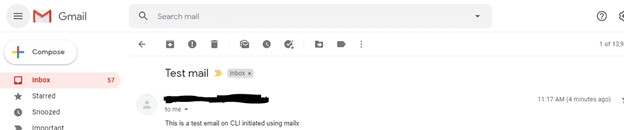
To fix this, make sure you have the SMTP server address (either Gmail or your ISP) and also authentication to log in (Some ISP’s allow anonymous) then use the command below

echo "This is a test email on CLI initiated using mailx" | mailx -vvv -s "Test mail" -r "ola@testlab.com" -S smtp="your smtp server address" meettoy2004@gmail.com
Command line email errors

USING GMAIL AS THE EMAIL SERVER

Establish a certificate directory for secure storage. Include new certificates and keys – a step toward fixing Mailx error when sending emails.

mkdir ~/.certs
certutil -N -d ~/.certs

Download the certificate from Gmail and import the cert file into the new database.

echo -n | openssl s_client -connect smtp.gmail.com:465 | sed -ne '/-BEGIN CERTIFICATE-/,/-END CERTIFICATE-/p' > ~/.certs/gmail.crt
certutil -A -n "Google Internet Authority" -t "C,," -d ~/.certs -i ~/.certs/gmail.crt

Add configurations into the mailx config file (/etc/mail.rc)

 
account gmail {
set smtp-use-starttls
set ssl-verify=ignore
set smtp-auth=login
set smtp=smtp://smtp.gmail.com:587
set from="username@gmail.com"
set smtp-auth-user=username@gmail.com
set smtp-auth-password=jjdeuen@SGY^
set ssl-verify=ignore
set nss-config-dir=/home/path/to/.certs
}

Test Email.

echo -e " body " | mailx -A gmail -s "Subject" recipient@anywhere.com

I hope you found this blog post on “[MAILX ERROR: STATUS=BOUNCED] Fixing Mailx error when sending emails from Command line” helpful. If you have any questions, please let me know in the comment session.

5/5 - (1 vote)

Thank you for reading this post. Kindly share it with others.

  • Share on X (Opens in new window) X
  • Share on Reddit (Opens in new window) Reddit
  • Share on LinkedIn (Opens in new window) LinkedIn
  • Share on Facebook (Opens in new window) Facebook
  • Share on Pinterest (Opens in new window) Pinterest
  • Share on Tumblr (Opens in new window) Tumblr
  • Share on Telegram (Opens in new window) Telegram
  • Share on WhatsApp (Opens in new window) WhatsApp
  • Share on Mastodon (Opens in new window) Mastodon
  • Share on Bluesky (Opens in new window) Bluesky
  • Share on Threads (Opens in new window) Threads
  • Share on Nextdoor (Opens in new window) Nextdoor
Linux Tags:email

Post navigation

Previous Post: Replicating MDT Deployment Share: How to Create a Selection Profile and Link MDT Deployment Shares
Next Post: How to link a removable media to a Deployment Share: Replicate Deployment share to a removable device

Related Posts

  • Security enhanced linux
    How to setup SELinux on a Linux server Linux
  • Manage Log Files via Logrotate
    How To Use Logrotate For Managing Log Files In Ubuntu Linux Linux
  • Screenshot 2024 02 28 at 11.17.41 PM
    GitHub Pages Deployment Guide Linux
  • discorddd
    Discord Installation Guide for Linux System Linux
  • yarnfinalfeature
    How to Install and Uninstall Yarn on Ubuntu Linux Linux
  • feature image
    How to install PostgreSQL on Ubuntu Linux

More Related Articles

Security enhanced linux How to setup SELinux on a Linux server Linux
Manage Log Files via Logrotate How To Use Logrotate For Managing Log Files In Ubuntu Linux Linux
Screenshot 2024 02 28 at 11.17.41 PM GitHub Pages Deployment Guide Linux
discorddd Discord Installation Guide for Linux System Linux
yarnfinalfeature How to Install and Uninstall Yarn on Ubuntu Linux Linux
feature image How to install PostgreSQL on Ubuntu Linux

Leave a Reply Cancel reply

You must be logged in to post a comment.

Microsoft MVP

VEEAMLEGEND

vexpert-badge-stars-5

Virtual Background

GoogleNews

Categories

veeaam100

Veeam Vanguard

  • Watchguard Firewall 180504 100511 1
    WatchGuard Firebox XTM Device Image Backup Network | Monitoring
  • Drop or delete a MySQL user from phpmyAdmin
    How to delete a MySQL User Account Oracle/MSSQL/MySQL
  • qAS
    How to disable the Microsoft Deployment Toolkit Task Sequence property sheet Windows Server
  • Featured Image 3
    How to enable Secure Boot on PC to install Windows 11 Windows
  • Object First OOTBI   Best Storage Repo for Veeam
    Understanding User Roles & Access Control in Object First OOTBI Backup
  • lang2
    How to add languages to your Windows PC Windows
  • erroradkupdate
    An error has occurred in the script on this page: HTA applications report a Script error after upgrading to ADK for Windows 11, version 22H2 Windows Server
  • Root
    Change your root password: Manage the root user on your macOS Mac

Subscribe to Blog via Email

Enter your email address to subscribe to this blog and receive notifications of new posts by email.

Join 1,814 other subscribers
  • RSS - Posts
  • RSS - Comments
  • About
  • Authors
  • Write for us
  • Advertise with us
  • General Terms and Conditions
  • Privacy policy
  • Feedly
  • Telegram
  • Youtube
  • Facebook
  • Instagram
  • LinkedIn
  • Tumblr
  • Pinterest
  • Twitter
  • mastodon

Tags

Active Directory Azure Bitlocker Microsoft Windows PowerShell WDS Windows 10 Windows 11 Windows Deployment Services Windows Server 2016

Copyright © 2025 TechDirectArchive


Loading Comments...
 

You must be logged in to post a comment.