Skip to content

TechDirectArchive

Hands-on IT, Cloud, Security & DevOps Insights

  • Home
  • About
  • Advertise With US
  • Contact
  • Reviews
  • Toggle search form
Home » AWS/Azure/OpenShift » How to deploy your Angular App to Azure from Visual Studio Code
  • Windows Logo
    Restrict IP Address Range on Windows PC Windows
  • Delete VM and Storage in Proxmox
    How to delete a VM and Storage in Proxmox Virtualization
  • images 1
    How to Monitor Windows Hosts via Nagios Network | Monitoring
  • vSwitches
    vSwitches: How to delete Virtual Switches from Hyper-V Virtualization
  • how to bypass windows admin log in password 2
    How to disable Lock Screen on Windows 10 via Registry Editor Windows
  • ansiblebanner
    Install and configure Ansible on Azure Virtual Machine Configuration Management Tool
  • Fix Windows Security Blank Screen Issue
    How to Fix Windows Security Blank Screen Issue Network | Monitoring
  • f97cd picture1 128
    How to disable Windows Hardware Power Button Windows

How to deploy your Angular App to Azure from Visual Studio Code

Posted on 29/08/202120/12/2023 Temitope Odemo By Temitope Odemo 3 Comments on How to deploy your Angular App to Azure from Visual Studio Code
Deploying Angular App

This guide will show you how easy it is in deploying your angular app to Azure right from your IDE-like visual studio code. The integration of Azure with VS Code is very seamless when you put the right things in place and you do the right thing. Azure is a public cloud computing platform from Microsoft. Please see how to build your first CI/CD Pipeline in Azure DevOps using ASP.Net Core Application, and GitLab-runner is not recognized as an internal or external command, operable program, or batch file.

Some of the solutions it offers are infrastructure as a service (IaaS), Platform as a Service (PaaS), and Software as a Service (SaaS). This cloud solution provides you with computing, storage, networking capacity, and many more. Visual Studio Code is an integrated development environment software with a graphical user interface with different development tools that delight any developer.

Create an Azure Web Service in Azure Portal – Login to your Azure portal and click the “Create a resource” button and choose the Web App template.

Azure deployment
Azure Portal

Select Web App as shown below

Visual Studio Code
Creating your Azure resources

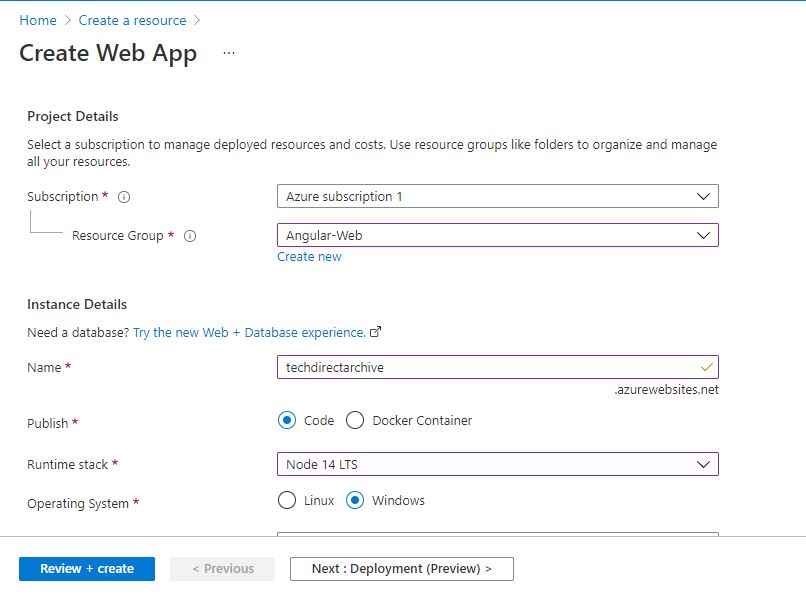
On the next page under your Azure subscription create a Resource Group. Configure your instance details:

  • Give it a URL name
  • Select Code as the Publish
  • Select either Node 14 LTS or Node 12 LTS as the Runtime stack
  • Depending on your operating system select either Linus or Windows
  • Select Region

Here are some guides: How to create Windows 11 Bootable USB drive, How to fix Windows Task Scheduler Service Greyed Out in Services MMC, The term “git” was not used as the name of a cmdlet, function, script file, or executable Program recognized, and Azure DevOps and GitHub integration for Docker and Kubernetes deployment.

Configure your App Service Plan

Note: App Service plan pricing tier determines the location, features, cost, and compute resources associated with your app.

  • Create your windows Plan

Then Click Review + Create and wait for the review page to open,, then click on Create and wait for the Web App to be created for some seconds.
Angular application deployment
Creating your Web App on Azure

Consequently, Click on Create as shown below

Deploying Angular App
Creating your Web App on Azure

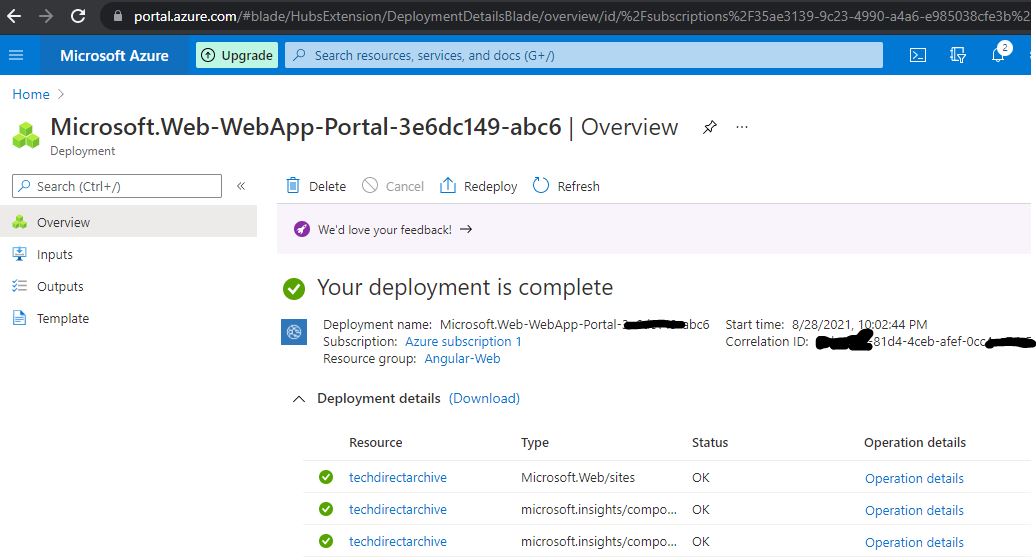
Nonetheless, the deployment, the Web App will be ready for use
Azure deployment
Web App Deployment

It’s now time to create an Angular application using Angular CLI. In addition, Install Angular CLI by opening a terminal window and running the following command:

npm install –g @angular/cli
Angular application deployment
NPM installation via PowerShell

Then run the CLI command ng new and supply the name you want to use for the app.

ng new techdirectarchive

In addition, the App is created change the directory to the app folder and run the server in the app directory.

cd techdirectarchive
Visual Studio Code
Angular App installation via PowerShell

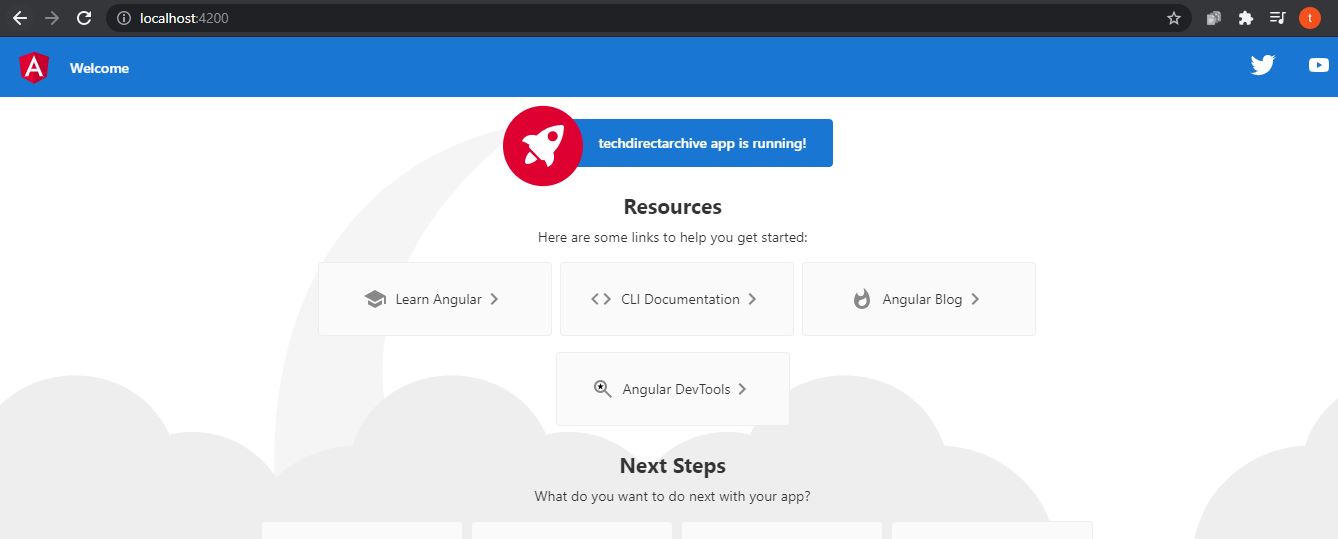
Run the command “ng serve” as shown below.

ng serve
Azure deployment
Angular App installation via PowerShell

Moreover, creating the Angular application, open it with Visual Studio Code.
angular-App
Deploying Angular App

However, You must also install the Azure App Service extension in VS Code.

extension
Installation of Azure App Service Extension on VS Code

Additionally, Sign in to Azure and see a new Azure workloads button at the bottom. Furthermore, When the button is clicked, you will see all the Azure workloads.

After signing in to the Azure portal from Visual Studio Code, you can see the list of available subscriptions and web apps for that user.

ide
Azure with VS Code

Initially, we created a Web App, “techdirectarchive,” using a node runtime stack. Therefore, It is effortless to deploy our Angular application to this Web App on Azure.

Nevertheless, deploying to Azure, we must build our Angular app using the below command, which will build the Angular project and create all necessary files to a dist folder.

ng build --prod

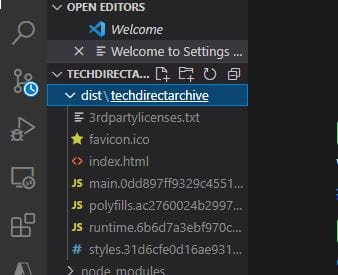
Similarly, note that sometimes another subfolder may be created in the name of your project.

prod
The Build Command

Consequently, We must deploy this “dist\techdirectarchive” folder to Azure by right-clicking it and choosing the  Deploy to Web App option.
ide2
Deployment from VS Code to Azure


Nonetheless, it will display the default Angular project folder, and make sure you select the correct folder.

ide3
Deployment from VS Code to Azure

Go ahead and open the application on the Azure web service

azurewebsite2
azureweb
Angular App Deployed to Azure

However, Your Angular App is live on Azure. When you make any adjustment in the code you need to deploy again. Moreover, After every adjustment you must build the application again with the same command:

ng build –prod

Furthermore, select our Web App and choose the Deploy to Web App option in the visual studio code. In addition, You can reconfirm the Angular App again via Azure to see the changes.

5/5 - (1 vote)

Thank you for reading this post. Kindly share it with others.

  • Click to share on X (Opens in new window) X
  • Click to share on Reddit (Opens in new window) Reddit
  • Click to share on LinkedIn (Opens in new window) LinkedIn
  • Click to share on Facebook (Opens in new window) Facebook
  • Click to share on Pinterest (Opens in new window) Pinterest
  • Click to share on Tumblr (Opens in new window) Tumblr
  • Click to share on Telegram (Opens in new window) Telegram
  • Click to share on WhatsApp (Opens in new window) WhatsApp
  • Click to share on Pocket (Opens in new window) Pocket
  • Click to share on Mastodon (Opens in new window) Mastodon
  • Click to share on Bluesky (Opens in new window) Bluesky
  • Click to share on Threads (Opens in new window) Threads
  • Click to share on Nextdoor (Opens in new window) Nextdoor
AWS/Azure/OpenShift, Version Control System Tags:Azure, Microsoft Azure

Post navigation

Previous Post: CI/CD Pipeline: Your First in Azure DevOps with ASP.Net Core
Next Post: How to deploy an Angular App to AWS S3

Related Posts

  • CloudFrontAWS
    Serve Private S3 Bucket Contents Via CloudFront AWS/Azure/OpenShift
  • unnamed
    Add or delete users and set permissions in Azure AD AWS/Azure/OpenShift
  • Amazon
    Import Virtual Machines to AWS as AMI AWS/Azure/OpenShift
  • Create AWS RDS instance
    How to create an Amazon Relational Database Service Instance AWS/Azure/OpenShift
  • Screenshot 2022 03 20 at 20.37.16
    Setup HTTPS users using Git credentials and Pushing Code to AWS CodeCommit AWS/Azure/OpenShift
  • New OpenShift Featured Image
    OpenShift common Commands AWS/Azure/OpenShift

More Related Articles

CloudFrontAWS Serve Private S3 Bucket Contents Via CloudFront AWS/Azure/OpenShift
unnamed Add or delete users and set permissions in Azure AD AWS/Azure/OpenShift
Amazon Import Virtual Machines to AWS as AMI AWS/Azure/OpenShift
Create AWS RDS instance How to create an Amazon Relational Database Service Instance AWS/Azure/OpenShift
Screenshot 2022 03 20 at 20.37.16 Setup HTTPS users using Git credentials and Pushing Code to AWS CodeCommit AWS/Azure/OpenShift
New OpenShift Featured Image OpenShift common Commands AWS/Azure/OpenShift

Comments (3) on “How to deploy your Angular App to Azure from Visual Studio Code”

  1. Avatar photo unimpressed says:
    06/01/2022 at 1:50 PM

    An Angular app that does nothing!, how bout with a .net core api behind it

    Log in to Reply
  2. Avatar photo Juan says:
    18/07/2022 at 12:40 PM

    Many thanks for the article, it helped me a lot!

    Log in to Reply
    1. chris Christian says:
      22/07/2022 at 10:02 AM

      You are welcome!

      Log in to Reply

Leave a Reply Cancel reply

You must be logged in to post a comment.

Microsoft MVP

VEEAMLEGEND

vexpert-badge-stars-5

Virtual Background

GoogleNews

Categories

veeaam100

sysadmin top30a

  • Windows Logo
    Restrict IP Address Range on Windows PC Windows
  • Delete VM and Storage in Proxmox
    How to delete a VM and Storage in Proxmox Virtualization
  • images 1
    How to Monitor Windows Hosts via Nagios Network | Monitoring
  • vSwitches
    vSwitches: How to delete Virtual Switches from Hyper-V Virtualization
  • how to bypass windows admin log in password 2
    How to disable Lock Screen on Windows 10 via Registry Editor Windows
  • ansiblebanner
    Install and configure Ansible on Azure Virtual Machine Configuration Management Tool
  • Fix Windows Security Blank Screen Issue
    How to Fix Windows Security Blank Screen Issue Network | Monitoring
  • f97cd picture1 128
    How to disable Windows Hardware Power Button Windows

Subscribe to Blog via Email

Enter your email address to subscribe to this blog and receive notifications of new posts by email.

Join 1,839 other subscribers
  • RSS - Posts
  • RSS - Comments
  • About
  • Authors
  • Write for us
  • Advertise with us
  • General Terms and Conditions
  • Privacy policy
  • Feedly
  • Telegram
  • Youtube
  • Facebook
  • Instagram
  • LinkedIn
  • Tumblr
  • Pinterest
  • Twitter
  • mastodon

Tags

AWS Azure Bitlocker Microsoft Windows PowerShell WDS Windows 10 Windows 11 Windows Deployment Services Windows Server 2016

Copyright © 2025 TechDirectArchive


Loading Comments...
 

You must be logged in to post a comment.