Differences between vSphere and ESXi and vCenter

VMware Inc. is a software company that develops many suites of software products, especially for providing various virtualization solutions. There are many cloud products, datacenter products, desktop products, and so on. People who are new to VMware’s virtualization platform often get confused learning about VMware vSphere and its components. So today I will be explaining all about vSphere and its components. There are many components of the VMware vSphere solution. In this article, you will learn the Differences between vSphere and ESXi and vCenter. Please see the following related articles: How to remove recent connections from the vSphere Client. And 3 Ways to Convert VMware VMs to Hyper-V.
It’s important to know the difference between vSphere, ESXi, and vCenter. To get in-depth knowledge and experience in vSphere you can install vSphere and use it. This can also be installed on a VMware Workstation. Kindly refer to some of these guides on VMware: How to create and delete a snapshot on VMware Workstation. How to install Windows Server 2022 on VMware Workstation, how To Deploy Azure VMware Solution Private Cloud,
What are the differences between vSphere and ESXi and vCenter
vSphere is a software suite that comes under the data centre product. vSphere is like Microsoft Office suite which has a lot of software like MS Office, MS Excel, MS Access, and the likes.
Like Microsoft Office, vSphere is also a software suite that has many software components like vCenter, ESXi, vSphere client, and so on. So, the combination of all these software components is vSphere. vSphere is not a particular software that you can install and use, “it is just a package name which has other sub-components”.
ESXi, vSphere Client, and vCenter are components of VMware vSphere. ESXi Server
This is the most important part of vSphere. ESXi is the virtualization server. and a type 1 hypervisor. All the virtual machines or Guest OS are installed on an ESXi server.
Please see these exciting articles: vCenter Converter removed from available downloads on VMware – Use Veeam instead. How to install and configure Veeam Backup and Replication 11 Community Edition with its default SQL Server Express Edition. And CVE-2022-22948. Patch available to address vCenter Server information disclosure vulnerability.
vSphere client
To install, manage and access those virtual servers that reside on an ESXi server, you will need another part of the vSphere suite called vSphere client. Now, the vSphere client allows administrators to connect to ESXi servers and access or manage virtual machines. vSphere client is HTML5/web-based management portal. The Administrator logs into Web Browser to access the vSphere Client in order to manage ESXi servers.
vSphere Client for Windows or C# vSphere client is no longer available and is replaced by HTML5-based. vSphere client in vSphere 6.7 eliminates the need for installing vSphere Client software to access the ESXi host.
Therefore, what is a vCenter? Why do we need it? Here are some more guides: How to extend a VM’s Hard Disk on VMware Workstation, Boot failure: How to fix EFI network timeout on VMware Workstation, and how to initialize and format a virtual disk: How to add and remove a new virtual disk from a VM on VMware Workstation.
The vCenter server
This is another piece of the vSphere suite. There are two flavours of vCenter servers. vCenter Server can be installed on Windows Server or can be a Linux-based virtual appliance.
Previously, VMware supported a Windows-based vCenter server and release only a Linux-based vCenter appliance, but has deprecated the vCenter Server for Windows with the release of vSphere 6.7.
Centralized management
VMware vCenter Server is a centralized management application that lets you manage virtual machines and ESXi hosts centrally. vSphere client again is used to accessing vCenter Server and eventually managing the ESXi servers. vCenter server is compulsory for enterprises that need enterprise features like vMotion, VMware High Availability, VMware Update Manager, VMware Distributed Resource Scheduler (DRS) etc. For example, you can easily clone existing virtual machines in the vCenter Server. So vCenter is another important part of the vSphere suite. You have to purchase a vCenter server license separately.
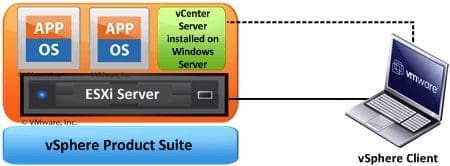
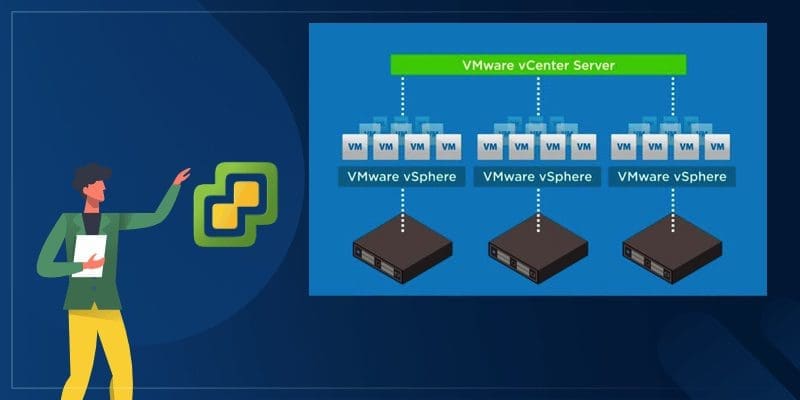
The diagram above shows the vSphere suite in a more descriptive way. vSphere is a product suite, ESXi is a hypervisor installed on a physical machine. vSphere Client HTML5 is used to access ESXi Server to create and manage virtual machines on the ESXi server. vCenter Server is installed as a virtual machine on top of the ESXi server, it can also be Linux based virtual machine (or virtual appliance). vCenter server can also be installed on different standalone physical servers, but why not virtualize it too right?
vCenter server is a vSphere component that is mostly used in large environments where there are many ESXi hosts and virtual machines and require advanced enterprise features of vSphere. The vCenter server is also accessed by the vSphere client for management purposes. So, the vSphere client is used to access the ESXi server directly in a small environment. In a larger environment, the vSphere client is used again to access the vCenter server to manage the ESXi server.
I hope you found this blog post on the differences between vSphere and ESXi and Center helpful. If you have any questions, please let me know in the comment session.