Domain Name System: All you need to know about DNS


What would a world without Domain Name System be like? Just imagine you want to order your favorite McDonald’s cheese or chicken burger online and you must type some numbers in the browser before doing so, and it even gets worse if you don’t remember the number you need to type in order to complete your transaction. How many of such numbers would you have to store in your head to continue your daily activities, especially in the face of a global pandemic, where the only way to shop is online. Life would have been different, or humans would have evolved into something different with special abilities in mathematics and numbers. Nonetheless, you already figured out that DNS helps translate IP addresses into words that humans can easily understand.
Want to know more about Domain Name System? Read on. This article will equip you with all the information you need, including the A-Z of Domain Name System and how to start configuring a DNS server. Find previous guides here: How to Configure Advanced PAM in Linux/ , and How to locate directory file context and restore it with SELinux/, also How to Install Terraform on Linux/, How to install Apache Tomcat on Ubuntu/, and How to Install LAMP Stack on Ubuntu 18.04/ , and How to install MariaDB on Ubuntu. For a similar guide, check here: what-are-the-different-types-of-dns-records/
Prior to DNS, ARPANET existed before DNS. A flat text file called "HOSTS". TXT was the original solution to a name service. This file was hosted on a single machine, and when you needed a copy, you used File Transfer Protocol (FTP) or a similar protocol to retrieve it from this central server. Kindly refer to these related guides: Domain Name System: How to create a DNS record, How to setup SPF and TXT Records in AWS, and How to add and verify a custom domain name to Azure Active Directory.
/etc/hosts
The host file is a descendent of the HOSTS.TXT file. Thus, you can find the file in /etc/hosts on Linux. Hence, It has a straightforward syntax: HOSTNAME> [HOSTNAME or alias] … IP ADDRESS The following is an example of a /etc/hosts file: localhost 127.0.0.1 localhost.localdomain localhost4 is a subdomain of localhost.localdomain. localhost localhost.localdomain localhost6 localhost4.localdomain4::1 localhost6.localdomain6 laser4 10.100.42.4 laser4.example.com mail.example.com 10.100.42.1 mail.example.com, This hosts file frequently overrides other resolution methods:
Domain Name System (DNS) Definition
The Domain Name System (DNS) is a hierarchical, distributed database that converts DNS names to IP addresses. The key-value store saves more than simply IP addresses. So, there are two modes of operation for the DNS protocol:
With caching mode, it’s recursive.
Authoritative mood.
When a network node performs a DNS query, it almost always uses a recursive, caching server. After that, the recursive, caching server will execute a recursive query via the DNS database until it finds an authoritative server. After that, the authoritative server will send the query’s response.
The DNS database is a key-value store that resembles a tree. In addition, domains are tree nodes that make up the database. Furthermore, a zone is manages these domains. Meanwhile, zones are the parts of the namespace that the authoritative server oversees (s). DNS delegation occurs at the zone level.
What Are The Domain Name System?
Recursive DNS Query
The following steps take in a hypothetical recursive DNS query for host1.foo.example.com:
- The client sends a recursive request to the nameserver cache it has set up.
- The caching nameserver sends a query to the root (“.”) zone nameserver for host1.foo.example.com.
- The nameserver for the root (“.”) zone is the same as the nameserver for the com. zone.
- The caching nameserver sends a query to the com. zone’s nameserver for host1.foo.example.com.
- The nameserver for the com. zone responds with a response pointing to the nameserver for example.com. zone.
- The caching nameserver sends a query to the nameserver for the example.com. zone for host1.foo.example.com.
- The nameserver for the foo.example.com. zone sends a response that links to the nameserver for the example.com. zone.
- The caching nameserver sends a query to host1.foo.example.com. to the food.example.com. zone’s nameserver.
- The foo.example.com nameserver answers authoritatively to the caching nameserver for the IP host1.foo.example.com.
- The caching nameserver caches all of these inquiries and responses, which then responds to the client with the answer to the original question.
Query/Record Types
Different types of database records store different types of data. Therefore, using the ALL query type will return all record types. Moreover, many Internet protocols rely on correctly configured record types.So, for more information, kindly take a look at this guide: A, CNAME, and ALIAS: What are the different types of DNS records.
| A (Address Mapping Records) Return an IPv4 address in 32 bits. | |
| AAAA (IP Version 6 Address Records) Return an IPv6 address with a 128-bit length | |
| CNAME (Canonical Name Records) Return the alias to its original name. | |
| MX (Mail Exchanger Records) Return the message transfer agents (mail servers) for a domain. | |
| NS (Nameserver Records) Delegate a nameserver for the authoritative DNS zone. | |
| PTR (Reverse-Lookup Pointer Records) A canonical name is indicated by a pointer (IP address to name). | |
| SOA (Start of Authority Records) | |
Forward and Reverse DNS Queries
Forward DNS Queries :
Usually, these queries converts a DNS name to an IP address and employ the A or AAAA record types. The most important aspect of a Fully Qualified Domain Name (FQDN) is the entire DNS address in the DNS database. The hostname – foo:
foo.example.com
Reverse DNS Queries:
A reverse DNS query works to turn an IP address into a DNS name. In addition, it uses a PTR record type and an arpa. domain in a DNS database:
- in-addr.arpa. domain for IPv4
- ip6.arpa. domain for IPv6.
In an IP address, the most significant part is on the right. Because an FQDN is left-to-right most significant, and an IP address is right-to-left, we have to translate an IP address to put it into the DNS database. For example:
192.168.13.32 becomes 32.13.168.192.in-addr.arpa

And

2001:500:88:200::10 becomes 0.1.0.0.0.0.0.0.0.0.0.0.0.0.0.0.0.0.2.0.8.8.0.0.0.0.5.0.1.0.0.2.ip6.arpa.
DNS Server Daemons
DNS server daemons respond to information requests from clients. Thus, these server daemons include:
- djbdns -D.J. Berstein designed it. It also sells as a highly secure DNS replacement for BIND. Besides, the inventor of djbdns has offered a reward to the first person to discover a DNS security flaw. .
- Dnsmasq
- Microsoft DNS server
- BIND (Berkeley Internet Name Domain)
– Since BIND9 is the de-facto standard for the Internet,
Domain Name System (DNS) Client (The ”Resolver”)
Nameserver entries in the DNS client or the /etc/resolv.conf file were traditionally created at configuration time and never modified. Nonetheless, for servers that never moved locations or IP addresses, this static configuration worked effectively. You should modify the nameserver entries because the network setup is more dynamic. So, some of the utilities that can and will change the behavior of /etc/resolv.conf are as follows:
/etc/resolv.conf
Therefore, using the standard static file helps to set up the resolver.
Furthermore, files for configuring network interfaces. When you start the interface, most distros add the nameserver information to the interface configuration file, overwriting or changing /etc/resolv.conf.
Client for DHCP
Nameserver information is frequently given to the DHCP client as part of the information sent to the DHCP client, replacing the current nameserver records.
dnsmasq
Sets up a “mini” DNS cache server and may change the resolver’s configuration to look for dnsmasq instead of the items provided in /etc/resolv.conf.
systemd.resolved
The systemd-resolved command is available as of systemd version 233. Furthermore, it runs a DNS stub listener on the loopback adapter with the IP address 127.0.0.53 and takes input from various files, including /etc/systemd/resolved.conf, /etc/systemd/network/*.network, and any DNS information provided by other services like “dnsmasq.”
BIND (named) Server
BIND is an ISC-standard DNS Internet software that is extensively used. In addition, it is compatible with the majority of UNIX-based platforms.
Note: BIND4 and BIND8 have been deprecated for a long time:Consequently, both have experienced numerous security issues. Hence, it is strongly advised that you do not use them. BIND9 was rewritten from the ground up: Issues with security have been resolved. The following new functionalities have been enabled:
- DNSSEC (Domain Name System Security Extensions) – security extensions – It can be run inside a chroot
- It provides for a variety of perspectives and contains IPv6 functionality
BIND Configuration File
On CentOS and OpenSUSE, the BIND configuration file settings are saved in the /etc/named.conf file, while on Ubuntu, they are stored in the /etc/bind/named.conf file. Therefore, the syntax may be found in the man page for named.conf(5).
BIND makes use of three different types of comments:
/* add a comment here */ in C style.
/ C++ style to the end of the line UNIX style # to the end of the line
BIND Configuration Options
You can use the named-checkconf command to check the configuration file for appropriate syntax. Therefore, use the syntax named-checkconf -t CHROOTDIR> when named is running in a chroot. Using the -z switch, the named-checkconf program can additionally test load any defined primary zone files.
| listen-on Port and IP address to listen for connections. | |
| listen-on-v6 IPv6 port and IP address to listen for connections. | |
| allow-query Controls hosts which can make queries of the server. | |
| recursion Controls the server acting as a recursive resolver. | |
| forwarders When acting as a recursive resolver, controls which nameservers we should query first. | |
| forward-first Controls where the first recursive query happens (forwarders or ‘root’ domain). |
BIND Zone Configuration
Each authoritative zone requires a definition in named.conf when it comes to BIND zone configuration. In named.conf, secondary zones are also defined. However, in named.conf, a zone definition for a primary zone looks like this:
zone "example.com." IN {
   type primary;
   file "example.com.zone";
};
A zone definition for a secondary zone in named.conf looks like this:
zone "foo.example." IN {
   type secondary;
   primary { 192.168.122.11; 192.168.131.45; };
};
Other Domain Name System
Zone Files
Authoritative zones are defined and must contain an SOA (Start of Authority) record. Zone files should contain an NS (nameserver) record. Some of the syntax considerations include:
- The record format is: “{name} {ttl} {class} {type} {data}”
- Always use trailing “.” on all fully-qualified domain names
- @ special character
- GENERATE syntax
- Comment marker – ; to end of line.
Below you can see an example of a zone file:
$TTL 60
@ IN SOA  ns1.example.com. admin.example.com. (
  2012012301 ; serial
  3H         ; refresh
  1H         ; retry
  2H         ; expire
  1M)        ; neg ttl
  IN NS ns1.example.com.;
  IN A 192.168.23.43
  IN AAAA 2001:500:88:200::10
;generate host1 thru host10
$GENERATE 1-10 host$  IN  A 127.0.0.$
We would verify the above zone file by using the following command:
# named-checkzone example.com. /var/named/chroot/var/named/example.com.zone
The @ character expands to whatever the zone name is. This example is using the CentOS default-named chroot option for the file location.
SOA Record
The SOA (Start of Authority) is required for every zone. Special control fields include:
- Admin email
- Primary name server
- Serial number
- Timers (secondary server refresh settings)
– Refresh: How often to check for new serial from primary.
– Retry: How often to retry if no response from primary.
– Expire: How long to keep returning authoritative answers when we cannot reach the primary server.
– Negative TTL: How long to cache an NX domain answer.
The serial number is one of the more important things in the SOA record. Thus, it should increment every time you make a change to your zone file. One of the ways to ensure your serial number is updated properly is to use the following format, YYYYMMDDXX where XX is a two-digit revision number.
The negative TTL (part of the SOA record) is the amount of time your caching nameserver will keep a “this record does not exist” response in its cache. Therefore, use the $TTL line at the start of the line to establish the default TTL.
Split Horizon or DNS View
Sometimes referred to as split-horizon or DNS view: Depending on the selected criteria, this can offer multiple DNS responses to requests.
Furthermore, Domain name system services inside a firm utilizing private or non-routable addresses are frequently provided using multiple zone files with different data for the same zone.
DNS view can assist in solving challenges with multiple domains on a single DNS server, one example is: A DHCP server manages a private network.
To notify the DNS server that an address has been allocated on the private network, use the DHCP server's DDNS/RNDC options.
The system's hostname is updated in the DNS via RNDC.
A router/firewall is allocated the default route, with Network Address Translation set to the firewall's external address.
Outsiders should never be able to see the private network addresses.
DNS names are used to communicate between systems on a private network.
Only public addresses and names are visible to systems outside the private network.
Domain Name System (DNS) Views
DNS view is an option in current versions of a bind. A DNS view will cause the DNS server to respond to requests for different data depending on the match criteria, such as source IP address. Meanwhile, there are a couple of rules:
- If the view directive is used, ALL zones must be in a view.
- Usually restrictions are added to the view, but are not mandatory. Yes, you can declare a view that no effect, it is just a label.
- The named.conf file is processed sequentially. In addition, the file should be ordered most restrictive to least restrictive.
- Each zone in a view will have a separate zone file.
View Configuration Considerations
When deploying a view there are some considerations for success.
- Wrap the zone stanza with a view command.
- Add to the view a name.
- Add to the view conditional tests as required:
– match-clients
– match-destinations
– match-recursive-only
Syntax of the view clause:
view "view_name" [class]
  [ match-clients address_match_list ; ]
  [ match-destinations address_match_list ; ]
  [ match-recursive-only yes | no ; ]
  // view statements
  // zone clauses
;
Sample configuration snippet from a running server:
// views in the named.conf file
view "internal" {
      match-clients {127.0.0.0/8; 172.16.42.0/16; };
    zone "example.com" {
        type primary;
        file "/etc/bind/internals/example.com.zone";
    };
};
view "external" {
    match-clients { any; };
    zone "example.com" {
        type primary;
        file "/etc/bind/externals/example.com.zone";
    };
};
Domain Name System (DNS) Tools
There are three types of DNS testing tools: server configuration testing, server information testing, and server update testing. In any case, DNS testing client tools require an active DNS server to transmit the questions to. Afterward, the default or named DNS server receives a standard DNS request from DNS client tools. Meanwhile, Bind is the most widely used server on the Internet.
Domain Name System (DNS) Servers
- bind (Berkeley Internet Name Domain)
– May be called bind9 depending on the distribution.
Clients
- dig: domain information groper
– Queries DNS for for domain name or ip address mapping.
– Output format resembles the records used by the DNS server and is excellent for debugging DNS queries. - host
– Simple interface for DNS queries.
– Excellent for use in scripts. - nslookup: name server lookup,
– Rescued from deprecation.
– Queries DNS for domain name or IP address mapping.
– Less verbose than dig.
– Available on many operating systems. - nsupdate: name server update
– Send updates to a name server.
– Requires authentication and permission.
– Uses DNSSEC.
DEMO – Configure Caching DNS STEPS
1. Install the Domain Name Server
2. Configure the Domain Name server for local caching
3. Start the Domain Name Server
4. Test
install the named server:
#apt install bind9
configure the Domain Name server for local caching
#vim /etc/bind/named.conf
start the Domain Name Server
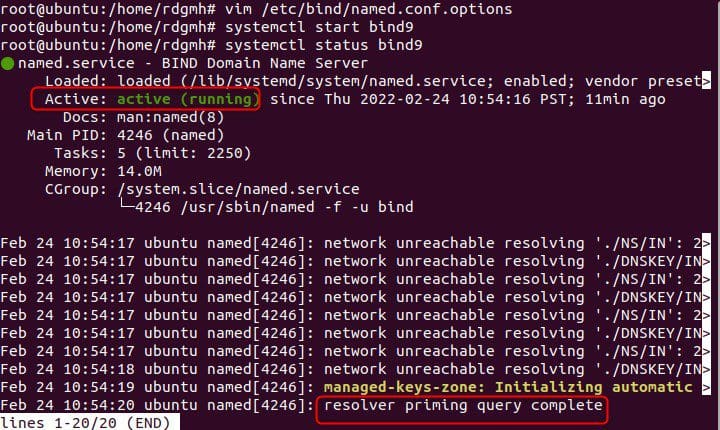
#systemctl start bind9
Test
#systemctl status bind9

Summary
DNS helps us translate IP addresses into a format that is readable and friendly to the human eyes, In this article, we have talked about everything you need to start configuring a DNS server.