Let us imagine a scenario where you host lots of applications, especially third-party applications, and multiple people access your system, and not just that you run hundreds of servers. Here’s a guide on how to locate directory file context. Please see how to install Git on macOS, how to clone a repository and install software from GitHub on Windows, Panic: Failed to register the GitLab-runner, you may be having network issues,
You are most likely to face some peculiar challenges and would need protection from the following types of issues
- Misconfiguration
- Weak programming
- Privillege escallation
Even with all the necessary firewalls and security architecture in place, an attacker can use the possibility of a bug in our software to inject a code. For example, PHP code that can start a remote shell and even without privilege escalation find a way to do what they ought not to do.
Since we are talking about having hosting applications in outside-facing servers we should realize that we are going to be dealing with the security of the operating system. Thus, SELinux has to be in the picture. What we would need to be able to take the scenario given above is
- setenforce 1
- Good use of SElinux boolean
- Writing modules as neccesary
Objective
Our Objective in this guide is to:
- Make you have an appreciation of SElinux
- Show you how check and locate directory and Index File Security Context
- Restore the appropriate Security Context to the API Directory
SELinux is Security-Enhanced Linux. Furthermore, SELinux is the way to go about security when it comes to Linux operating systems. SELinux grants or denies a user access to a file or process. Ports, files, and processes are labeled with an SELinux context.
The thing that should come to your mind when you think of denial and you have SELinux in place
1. You have a labelling problem
2. Something has been configured in a way that is not the default and SElinux is not
    aware of it
3. Application or SElinux has bugs that have not been taken care of
4. You have been compromised
SELinux is a labeling system
Every process in Linux has a label not just that, every file, directory, system object has a label, and lastly, policy rules control access between labeled processes and labeled objects. Another labeling system in Linux is discretionary access control -owner of a file, group of a file, and permission flags.
SELinux Label -Type field
There are two types of enforcement, Multi-Category Security (MCS) enforcement, and type enforcement, type enforcement protects the host from the processes while MCS protects one process from another.
user:role:type:level
System_u:system_r:httpd_t:s0
system_u:object_r:httpd_sys_rw_content_t:s0user:role:type:level
System_u:system_r:httpd_t:s0
system_u:object_r:httpd_sys_rw_content_t:s0
In SELinux, a context is considered as the additional insight about a process or file that the security mechanism can use to make access control choices.
the addition insight include:
- SELinux User: In Linux-based operating systems, SELinux User defines the identity of the user that accesses, owns, modifies, or deletes a process or file
- Role: In SELinux, a user is granted or refused access to a certain object based on this entity. The term “role” comes from well-known access control methodology, Role-Based Access Control (RBAC)
- Type:In SELinux, this component is used to define file types and process domains.
- Level: This component or entity of the security context is represented by Multi-Level Security (MLS) and Multi-Category Security (MCS).
MCS enforcement
MCS enforcement protects like processes from each other. Examples include multiple virtual machines, container environments, docker, open shift. We can use tooling to pick out random MCS labels s0:c1,c2. It assigns MCS to all content and launches processes with the same label
Every process and object in the machine has a label: If you don’t label your files correctly, you won’t have access to them. We can’t keep objects in random directories without pointing them to SElinux, if we do we will have issues because everything is denied by default for example
If we have HTTP files in /srv/myweb instead of the default /var/www/http we need to let SElinux know. We can fix this with a tool called semanage as semanage can help set labels correct
#semanage fcontent -a -t httpd_sys_content '/srv/myweb/(/.*)'
After we have set the labels correctly, we need to apply them to the inodes by using the command below
#restorecon -R /srv/myweb
So in practice, if we get an SElinux error on our object that is tested or even in production, just run restorecon on it.
File labeling
SElinux files label definition are stored in /etc/selinux/targeted /file_content*
– files are stored in inode Xattrs
– matchpatcon/path shows what the labels should be.
Check the Directory and Index file Security context
The command below shows us what the label should be
sudo ls -lZ
The image above is showing context labels are in the etc config file with u for the user, r for the role, and t for type. The most important for SELinux is the context type because it helps SELinux to identify what type of item it is dealing with. Even after exiting the config file, we can still see that the files have the admin_home_t label.


If we go into the default document directory, files in there are following the same pattern. We see cgi-bin route that apache can use to store script and the file context for HTML in the screenshot below

The cgi-bin and the HTML context are different, if you mistakenly mismatch them it will never work, because what SELinux does is to check if a source context has the required permission to the target context of the particular route, if it does not, then it is automatically denied. In summary, rules aid matching source context types with target context types in SELinux.
Demo
We changed the default document directory from /var/www in apache to /web and created a document in the index.html with the word “hello from techdirectarchive this is being served from /web”. In addition, we tested the process of changing the default HTML directory to /web and checked the added document with index.html using elinks.
#elinks http://www.localhost

Selinux detected the change and served it accordingly
Common Problems
SElinux=0 destroys your labelingSElinux=MV keeps the original permissions and ownership of the files
BOOLEANS
These are If then else rules written in SElinux. for example, if you want to use apache to send an email then you have to turn boolean on
#setsebool- P httpd_can_send_email 1
or if you want the user directory (homedir) to be accessible by FTP
#setsebool -P FTP_home_dir 1
which booleans are available
semanage boolean --list
How to enable and disable SELinux
To switch between disabled and enable mode, we need to do a reboot
$ /usr/sbin/getenforce
permissive
A permissive mood is the easiest mode to do troubleshooting. If it is enabled and we use setenforce to switch from permissive to enforcing. Enforcing mood means that SElinux is fully operational.
$ /usr/sbin/setenforce 1
Enforcing
enforcing mode means that it is fully operational. To set the disabled mood we need to go through the configuration file
cd /etc/sysconfig

To be able to config we need to further edit using vim from the sysconfig file as shown below
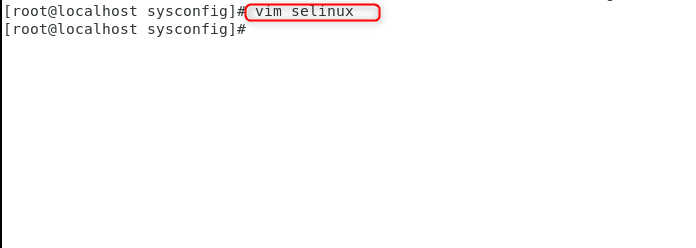

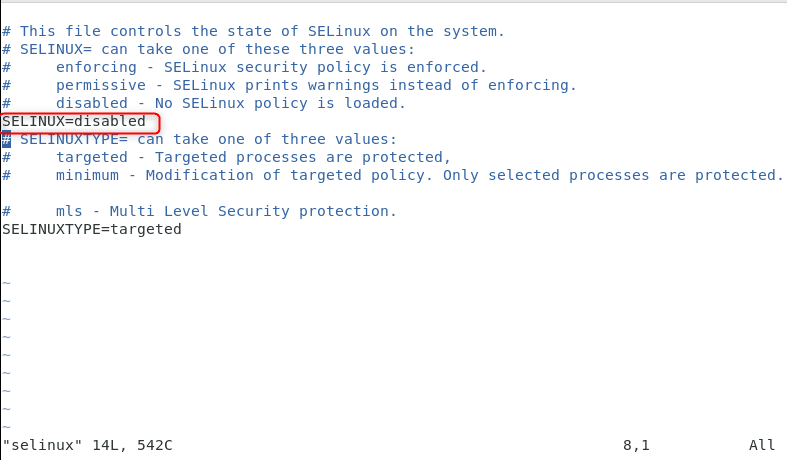
When we originally open this it shows enforcing, we needed to change it to disabled manually and reboot. In practice, it’s wiser to always leave our servers protected so it’s better for it not to be disabled.
Sealerts
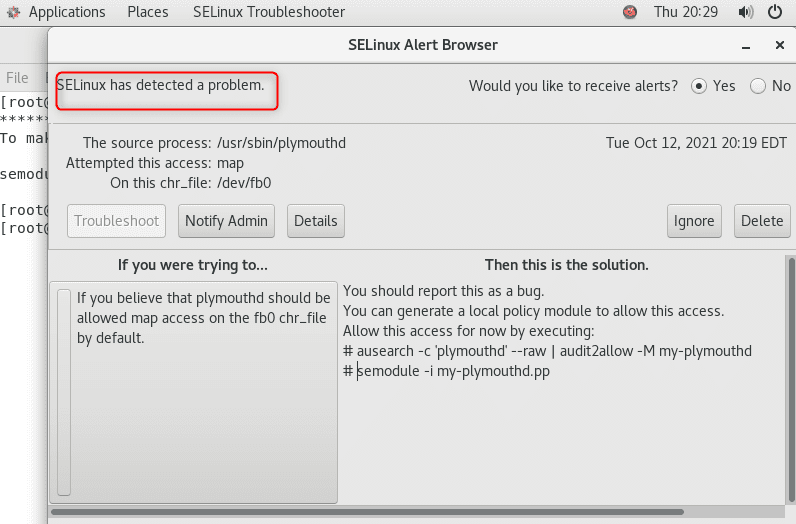
Sealert is the user interface component (either GUI or command line) to the setroubleshoot system. In addition, setroubleshoot is used to diagnose SELinux denials and attempts to provide user-friendly explanations for an SELinux denial
Summary
96.63% of the world’s servers run on Linux and from reports around the world about customer use cases, no matter how we harden our security architecture. So, if we do not make provision for implementing SElinux, a bad actor might do a workaround and inject unwanted scripts into our system.
Thus, all issues that we will have with regards to SElinux are always related to labeling. We can use semanage command to fix our labels and use restorecon to set our fix to their desired state. We can also set rules and possibilities within our system using booleans. By now, you should have a clear understanding of how to enable SELinux, disable SELinux, locate directory file context and restore it with SELinux.