Skip to content

TechDirectArchive

Hands-on IT, Cloud, Security & DevOps Insights

  • Home
  • About
  • Advertise With US
  • Reviews
  • Contact
  • Toggle search form
Home » JIRA|Confluence|Apps » Workaround for there were no pages selected to print or the documents could not be printed from Adobe Acrobat Reader
  • PXE E18 Server response timeout
    Stuck at Start PXE over IPv4: PXE-E18 Server response timeout Windows
  • Fix this PC cannot run Windows 11
    Bypass unsupported CPU and Processor by upgrading to Windows 11 via Windows Update Virtualization
  • drivelock 1280x720 1
    Concept of DriveLock with a focus on Encryption Security | Vulnerability Scans and Assessment
  • Distributed File System DFS
    All About Distributed File System Windows
  • zoom
    How to update Zoom Desktop Client on macOS Mac
  • images 5
    IP Address UNREACHABLE: HTTP connection pool Max exceeded Configuration Management Tool
  • images 5 1
    How to access MySQL Server from command Prompt Oracle/MSSQL/MySQL
  • WinRM and Kerberos Delegation troubleshooting
    Troubleshooting WinRM and Kerberos Delegation for WAC Network | Monitoring

Workaround for there were no pages selected to print or the documents could not be printed from Adobe Acrobat Reader

Posted on 23/08/202228/08/2023 Christian By Christian No Comments on Workaround for there were no pages selected to print or the documents could not be printed from Adobe Acrobat Reader
Adobe Acrobat Reader printing issues

Adobe Acrobat is a free PDF reader app that lets you view, comment, fill out, and sign PDF forms to help you move through your workflow quickly and efficiently. There is a paid plan which is referred to as Adobe Acrobat Pro which provides a complete PDF solution for desktop, smartphone, tablet, and web. Adobe Acrobat Reader DC software can be downloaded from the following link for your Windows, Mac OS, and Android devices. Here are some other interesting guides: How to enable Exploit Protection on Windows using Windows Security App, Microsoft Endpoint Configuration Manager, and Group Policy Editor, How to set up Trend Micro WorryFree Business Security Server, and How to fix unable to access the microphone on Zoom.

On a Mac device, Adobe Acrobat Reader might show the error when printing a restricted file. Solutions vary; check your print settings.

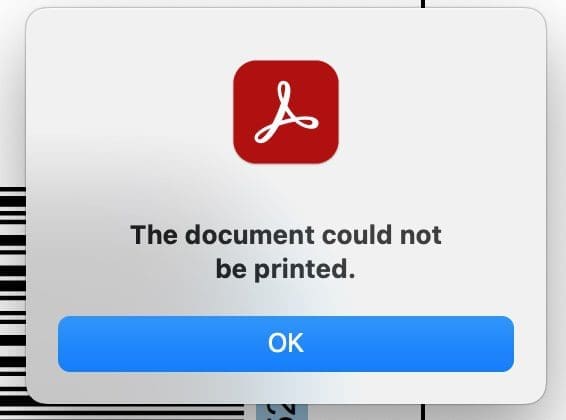
Printing problems in Acrobat Reader
Unable to print from PDF documents

I observed that the file’s permission settings, as shown in the image, might be causing this. It could be that printing isn’t allowed in your case as well. To view this, please follow the steps below. From the menubar, under under Edit > Protection > Security.

No pages selected to print error

Other troubleshooting steps to fix there were no pages selected to print or the documents could not be printed

So, if the above issues don’t apply to you. Furthermore, I suggest ensuring your application is up to date.

Adobe Acrobat Reader printing issues

Nonetheless, As you can see below, Adobe Reader is up to date; therefore, this does not work either.

Unable to print from PDF documents

Workaround for there were no pages selected to print or the documents could not be printed

I took a different PDF and I initiated a printout, and it was successfully printed. Note: This document didn’t have the permission issue as shown below.

Screenshot-2022-08-23-at-15.24.21

Additionally, I opened the PDF using Safari and encountered the Adobe Acrobat Reader Printing Issue Fix.

Openpdfinabrowser

Moreover, As you can see below, I initiated a printout using the Adobe Acrobat Reader Printing Issue Fix, and it was successful.

printPDFfromsafari-1

Furthermore, I hope you found this blog post on the Adobe Acrobat Reader Printing Issue Fix helpful. However, Please let me know in the comment section if you have any questions.

Rate this post

Thank you for reading this post. Kindly share it with others.

  • Click to share on X (Opens in new window) X
  • Click to share on Reddit (Opens in new window) Reddit
  • Click to share on LinkedIn (Opens in new window) LinkedIn
  • Click to share on Facebook (Opens in new window) Facebook
  • Click to share on Pinterest (Opens in new window) Pinterest
  • Click to share on Tumblr (Opens in new window) Tumblr
  • Click to share on Telegram (Opens in new window) Telegram
  • Click to share on WhatsApp (Opens in new window) WhatsApp
  • Click to share on Pocket (Opens in new window) Pocket
  • Click to share on Mastodon (Opens in new window) Mastodon
  • Click to share on Bluesky (Opens in new window) Bluesky
  • Click to share on Threads (Opens in new window) Threads
  • Click to share on Nextdoor (Opens in new window) Nextdoor
JIRA|Confluence|Apps Tags:Printing

Post navigation

Previous Post: How to fix unable to access microphone on Zoom
Next Post: Deploy a Linux virtual machine (VM) on Azure using the Azure CLI

Related Posts

  • Mendeley Error Code ACLx80sr
    Fix Mendeley Cite Error has occurred: ECITE40001 (ac1x80sr) JIRA|Confluence|Apps
  • Screenshot 2022 04 25 at 16.46.34
    Hide YouTube Subscriber Count: Privacy for Channel Subscriptions JIRA|Confluence|Apps
  • Confluence setup
    How to set up Confluence Site and Spaces in Confluence Cloud JIRA|Confluence|Apps
  • YouTubeComment456789
    How to hold comments for review on YouTube JIRA|Confluence|Apps
  • Telegram Bot for wordpress
    Configure Telegram to receive Blog Notifications JIRA|Confluence|Apps
  • TasteWP Homepage
    Launch a free WordPress test site with TasteWP JIRA|Confluence|Apps

More Related Articles

Mendeley Error Code ACLx80sr Fix Mendeley Cite Error has occurred: ECITE40001 (ac1x80sr) JIRA|Confluence|Apps
Screenshot 2022 04 25 at 16.46.34 Hide YouTube Subscriber Count: Privacy for Channel Subscriptions JIRA|Confluence|Apps
Confluence setup How to set up Confluence Site and Spaces in Confluence Cloud JIRA|Confluence|Apps
YouTubeComment456789 How to hold comments for review on YouTube JIRA|Confluence|Apps
Telegram Bot for wordpress Configure Telegram to receive Blog Notifications JIRA|Confluence|Apps
TasteWP Homepage Launch a free WordPress test site with TasteWP JIRA|Confluence|Apps

Leave a Reply Cancel reply

You must be logged in to post a comment.

Microsoft MVP

VEEAMLEGEND

vexpert-badge-stars-5

Virtual Background

GoogleNews

Categories

veeaam100

sysadmin top30a
 
  • PXE E18 Server response timeout
    Stuck at Start PXE over IPv4: PXE-E18 Server response timeout Windows
  • Fix this PC cannot run Windows 11
    Bypass unsupported CPU and Processor by upgrading to Windows 11 via Windows Update Virtualization
  • drivelock 1280x720 1
    Concept of DriveLock with a focus on Encryption Security | Vulnerability Scans and Assessment
  • Distributed File System DFS
    All About Distributed File System Windows
  • zoom
    How to update Zoom Desktop Client on macOS Mac
  • images 5
    IP Address UNREACHABLE: HTTP connection pool Max exceeded Configuration Management Tool
  • images 5 1
    How to access MySQL Server from command Prompt Oracle/MSSQL/MySQL
  • WinRM and Kerberos Delegation troubleshooting
    Troubleshooting WinRM and Kerberos Delegation for WAC Network | Monitoring

Subscribe to Blog via Email

Enter your email address to subscribe to this blog and receive notifications of new posts by email.

Join 1,841 other subscribers
  • RSS - Posts
  • RSS - Comments
  • About
  • Authors
  • Write for us
  • Advertise with us
  • General Terms and Conditions
  • Privacy policy
  • Feedly
  • Telegram
  • Youtube
  • Facebook
  • Instagram
  • LinkedIn
  • Tumblr
  • Pinterest
  • Twitter
  • mastodon

Tags

AWS Azure Bitlocker Microsoft Windows PowerShell WDS Windows 10 Windows 11 Windows Deployment Services Windows Server 2016

Copyright © 2025 TechDirectArchive


Loading Comments...
 

You must be logged in to post a comment.