Skip to content

TechDirectArchive

Hands-on IT, Cloud, Security & DevOps Insights

  • Home
  • About
  • Advertise With US
  • Reviews
  • Contact
  • Toggle search form
Home » Linux » Discord Installation Guide for Linux System
  • Remove Custom Domain from Entra ID and Azure tenant
    Delete Azure Tenant: Remove Custom Domain from Entra ID AWS/Azure/OpenShift
  • Encryption
    How to encrypt Microsoft SQL Server Traffic Oracle/MSSQL/MySQL
  • zoom 2
    How to stop Zoom App from launching automatically at startup on Mac Mac
  • screenshot 2020 04 27 at 17.34.38
    Remote Server Administration Tools: Install RSAT on Windows Windows Server
  • fba7f screenshot 2019 04 15 at 18.33.30
    File System Overview: How to decide on the right File System to use for your USB Linux
  • original
    Windows Deployment Services: WDSUTIL CommandLine Options on Windows Server 2019 Windows Server
  • Webp.net resizeimage 5
    How to create a Traffic Manager Profile in Azure AWS/Azure/OpenShift
  • Microsoft 365 Developer Program instant
    Get your free Microsoft 365 E5 Sandbox today AWS/Azure/OpenShift

Discord Installation Guide for Linux System

Posted on 28/09/202218/04/2024 Raphael Gab-Momoh By Raphael Gab-Momoh No Comments on Discord Installation Guide for Linux System
discorddd

Discord is a social platform for VoIP and instant messaging. Users can communicate via voice calls, video calls, text messages, media files, and private chats as well as through online groups known as “servers.” This article will give you an overview of how to install Discord on Linux and Ubuntu 22.04. Please see How To Install Nextcloud on a Linux system also How to install Redis on a Linux System and How to Install Apache Subversion on a Linux System and How to install Rust in a Linux System.

Readers will be capable of installing Discord on Ubuntu 22.04 LTS and the commands will work for ubuntu 14.04, ubuntu 16.04, ubuntu 18.4, ubuntu 20.04, ubuntu 21 and ubuntu 22.04 versions as well. Explore this guide on Discord installation for Linux system.

Other useful articles are here: How to install Windows Server 2022 on VirtualBox and How to install Unison on a Linux System.

Steps to Installing Discord on Linux System

To set up Discord, follow the steps listed below.

Step1: Update Package Index & System

It’s essential you update software packages before proceeding with Discord installation on Linux. This step makes sure that the system and the existing packages are up to date and current . Open your terminal and run the following command:

sudo apt update && sudo apt upgrade
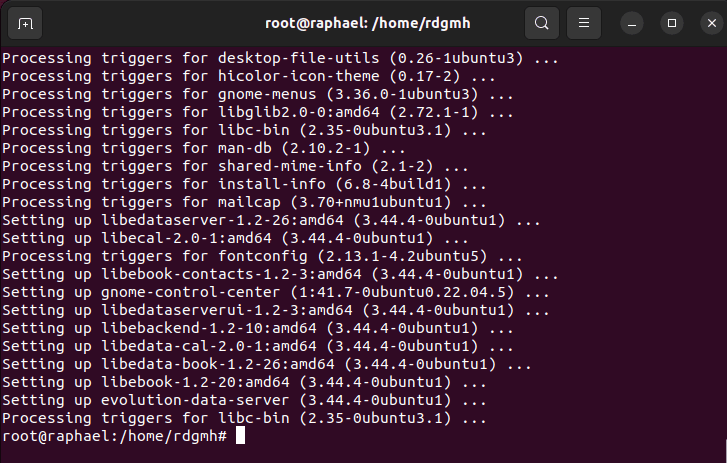
Install and uninstall Discord-vid
update & upgrade complete

Step2: Download and Install Discord

Use the following command to set up Discord on your system from the snap store as the package manager for Ubuntu apt won’t be able to do it

sudo snap  install discord
Install and uninstall Discord-discord
installed

This will not work unless snapd is installed. You can install snapd with the command:

sudo apt install snapd
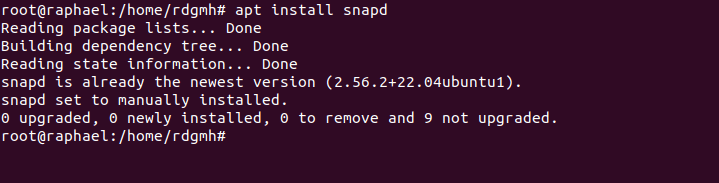
Install and uninstall Discord-ins
snapd installation

Step 3: Uninstall Discord on Linux

Here’s how to uninstall Discord using the following command

sudo snap remove discord

dr
Discord removed

To effectively uninstall Discord on our Linux machine, we can employ the following command. So, by executing the command, we can effortlessly manage the installation and uninstallation, ensuring a seamless process.

Summary

Discord installation for Linux systems is not hard. We successfully installed and also removed using the steps outlined above.

I hope you found this guide useful on Discord Installation Guide for Linux System. Please feel free to leave a comment below.

Rate this post

Thank you for reading this post. Kindly share it with others.

  • Click to share on X (Opens in new window) X
  • Click to share on Reddit (Opens in new window) Reddit
  • Click to share on LinkedIn (Opens in new window) LinkedIn
  • Click to share on Facebook (Opens in new window) Facebook
  • Click to share on Pinterest (Opens in new window) Pinterest
  • Click to share on Tumblr (Opens in new window) Tumblr
  • Click to share on Telegram (Opens in new window) Telegram
  • Click to share on WhatsApp (Opens in new window) WhatsApp
  • Click to share on Pocket (Opens in new window) Pocket
  • Click to share on Mastodon (Opens in new window) Mastodon
  • Click to share on Bluesky (Opens in new window) Bluesky
  • Click to share on Threads (Opens in new window) Threads
  • Click to share on Nextdoor (Opens in new window) Nextdoor
Linux

Post navigation

Previous Post: Install Windows Server 2022 on VirtualBox
Next Post: How to Install PlayonLinux on a Linux System

Related Posts

  • portainer feature
    How to Install Docker Portainer on Linux Containers
  • Edge
    Install Microsoft Edge Browser on Ubuntu Linux Linux
  • On ubuntu mariadb
    How to install MariaDB on Ubuntu Linux
  • FLUTTER Feature
    How to Set Up Flutter with Android Studio on Linux Linux
  • apache ubuntu 20 04
    How to Install Apache HTTP Server on Ubuntu 20.04 LTS Linux
  • images copy
    How to disable automatic screen lock in Ubuntu Linux Linux

More Related Articles

portainer feature How to Install Docker Portainer on Linux Containers
Edge Install Microsoft Edge Browser on Ubuntu Linux Linux
On ubuntu mariadb How to install MariaDB on Ubuntu Linux
FLUTTER Feature How to Set Up Flutter with Android Studio on Linux Linux
apache ubuntu 20 04 How to Install Apache HTTP Server on Ubuntu 20.04 LTS Linux
images copy How to disable automatic screen lock in Ubuntu Linux Linux

Leave a Reply Cancel reply

You must be logged in to post a comment.

Microsoft MVP

VEEAMLEGEND

vexpert-badge-stars-5

Virtual Background

GoogleNews

Categories

veeaam100

sysadmin top30a

  • Remove Custom Domain from Entra ID and Azure tenant
    Delete Azure Tenant: Remove Custom Domain from Entra ID AWS/Azure/OpenShift
  • Encryption
    How to encrypt Microsoft SQL Server Traffic Oracle/MSSQL/MySQL
  • zoom 2
    How to stop Zoom App from launching automatically at startup on Mac Mac
  • screenshot 2020 04 27 at 17.34.38
    Remote Server Administration Tools: Install RSAT on Windows Windows Server
  • fba7f screenshot 2019 04 15 at 18.33.30
    File System Overview: How to decide on the right File System to use for your USB Linux
  • original
    Windows Deployment Services: WDSUTIL CommandLine Options on Windows Server 2019 Windows Server
  • Webp.net resizeimage 5
    How to create a Traffic Manager Profile in Azure AWS/Azure/OpenShift
  • Microsoft 365 Developer Program instant
    Get your free Microsoft 365 E5 Sandbox today AWS/Azure/OpenShift

Subscribe to Blog via Email

Enter your email address to subscribe to this blog and receive notifications of new posts by email.

Join 1,841 other subscribers
  • RSS - Posts
  • RSS - Comments
  • About
  • Authors
  • Write for us
  • Advertise with us
  • General Terms and Conditions
  • Privacy policy
  • Feedly
  • Telegram
  • Youtube
  • Facebook
  • Instagram
  • LinkedIn
  • Tumblr
  • Pinterest
  • Twitter
  • mastodon

Tags

AWS Azure Bitlocker Microsoft Windows PowerShell WDS Windows 10 Windows 11 Windows Deployment Services Windows Server 2016

Copyright © 2025 TechDirectArchive


Loading Comments...
 

You must be logged in to post a comment.