Skip to content

TechDirectArchive

Hands-on IT, Cloud, Security & DevOps Insights

  • Home
  • About
  • Advertise With US
  • Contact
  • Reviews
  • Toggle search form
Home » Security | Vulnerability Scans and Assessment » How to Scan Your Code by Integrating SonarCloud into Your GitHub Repository
  • Disable Hardware Acceleration in Browsers and Windows
    How to Disable Hardware Acceleration in Browsers and Windows Windows
  • Manually resize your partition
    KB5034439 Windows Update Error: Resize WinRE Partition Windows Server
  • Create AWS RDS instance
    How to create an Amazon Relational Database Service Instance AWS/Azure/OpenShift
  • Azure Backup Copy 1
    How to Delete Backup Job in Recovery Services Vault AWS/Azure/OpenShift
  • 7164 1024x575 1
    How to install MDT PowerShell module on Windows Scripts
  • Fix Failed to Connect a Hyper V Standalone to Veeam Backup
    Invalid Credentials “Fix Failed to Connect a Hyper-V Standalone to Veeam Backup” Backup
  • IIS Installed
    Add and remove IIS Web Server on Windows Server 2019 via the Server Manager and PowerShell Web Server
  • Hyper V Virtual Switch
    How to Create Hyper-V Virtual Switch Network | Monitoring

How to Scan Your Code by Integrating SonarCloud into Your GitHub Repository

Posted on 23/05/202318/04/2024 Temitope Odemo By Temitope Odemo No Comments on How to Scan Your Code by Integrating SonarCloud into Your GitHub Repository
Banner

SonarCloud is a static code analysis tool you can use to discover code smells, bugs and security vulnerabilities within your code. GitHub can be used as your code repository and where you can commit new code changes. Please see How to Deploy Code from GitHub to Azure App Service from the Command-line, and How to integrate AWS CodeBuild and AWS CodeCommit to SonarCloud. In this guide, I will be showing you how to Scan your Code by Integrating SonarCloud into Your GitHub Repository.

Here you will be able to Push your code to GitHub using GitHub Desktop and using SonarCloud to scan the code for code smell, bugs or vulnerabilities.

You may further read about How to use GitHub as Source Provider for AWS CodePipeline, How to use Command-Line on Git Bash and GitHub Desktop to PUSH local code to GitHub, and

Follow these steps to integrate SonarCloud into Github Repository

1: Download GitHub Desktop from here.

GitHub-Desktop-

2. After installing GitHub Desktop login and launch the app.
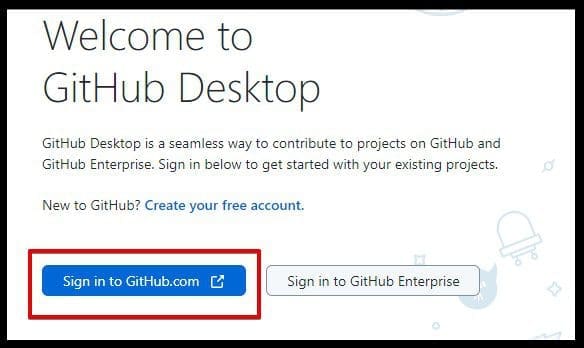
Login-GitHub

3. Add your GitHub Repository to the GitHub Desktop. Select repository and Clone.

Select-Repository

Clone the Repository

4. You can click either GitHub.com, GitHub Enterprise or URL, But in this guide, I will be selecting the URL and click on Clone.

Clone-a-Repository

The image below shows the GitHub Repo Cloning.

Cloning-Repo
5. After the Cloning is completed, you will see the below page where you carry out your request to a remote or local environment. 

This is where you handle your Pull Request and Push Request.

Repository-Location

Please see how to Integrate Pleasant Password Server with Active Directory, how to clone a repository and install software from GitHub on Windows, and How to Integrate SonarCloud with Azure DevOps Pipeline.

Access GitHub from SonarCloud

6. After your code is pushed to GitHub then browse the SonarCloud Website and select GitHub from the list.

SonarCloud-Linked-GitHub

7. Login and Authorize SonarCloud.

Sonar-Permission

8. Immediately after you logged in successfully, you will see the SonarCloud welcome screen.

Click on the + icon and select Analyze your first projects > Import an organization from GitHub. But if you already created an organization then you will only need to Analyze new project just like the image below.

Analyze-new-project

9. Select the Organization and the repository you want to analyze and click the Set Up button.

Analyze-Project

10. The selected projects will be imported and analyzed. There are two analysis methods available: Automatic analysis and CI-based analysis. SonarCloud will automatically analyze your code by reading it from the GitHub repository you have stated without the need for you to configure a CI-based analysis.

Analyzing-your-Project

11. Once the analysis is done, you will see the page refreshed with all the analysis results displayed for your review.

Scan-Result

I hope you found this blog post on how to Scan your Code by Integrating SonarCloud into Your GitHub Repository Interesting and helpful. In case you have any questions do not hesitate to ask in the comment section

Rate this post

Thank you for reading this post. Kindly share it with others.

  • Click to share on X (Opens in new window) X
  • Click to share on Reddit (Opens in new window) Reddit
  • Click to share on LinkedIn (Opens in new window) LinkedIn
  • Click to share on Facebook (Opens in new window) Facebook
  • Click to share on Pinterest (Opens in new window) Pinterest
  • Click to share on Tumblr (Opens in new window) Tumblr
  • Click to share on Telegram (Opens in new window) Telegram
  • Click to share on WhatsApp (Opens in new window) WhatsApp
  • Click to share on Pocket (Opens in new window) Pocket
  • Click to share on Mastodon (Opens in new window) Mastodon
  • Click to share on Bluesky (Opens in new window) Bluesky
  • Click to share on Threads (Opens in new window) Threads
  • Click to share on Nextdoor (Opens in new window) Nextdoor
Security | Vulnerability Scans and Assessment Tags:Git Bash, Git Clone, Github, Repository, scan

Post navigation

Previous Post: Move Azure Resources between Subscriptions
Next Post: How to Increase Disk Size in Hyper-V

Related Posts

  • Change BitLocker Password in Windows
    How to Change BitLocker Password in Windows Security | Vulnerability Scans and Assessment
  • 1 8y62mmvjlr 5uovgoq6zmq
    How to download and install DriveLock on Windows Security | Vulnerability Scans and Assessment
  • Featured image BitLocker AES XTX 256
    Enable BitLocker AES-XTX 256 Encryption Security | Vulnerability Scans and Assessment
  • Defender Antivirus
    Windows Defender Antivirus Management with Intune Anti-Virus Solution
  • 5rgh65436
    New Windows 11 encryption features and security enhancements for Hybrid Work Security | Vulnerability Scans and Assessment
  • Enable a Pre Boot BitLocker PIN on Windows
    How to Enable a Pre-Boot BitLocker PIN on Windows Security | Vulnerability Scans and Assessment

More Related Articles

Change BitLocker Password in Windows How to Change BitLocker Password in Windows Security | Vulnerability Scans and Assessment
1 8y62mmvjlr 5uovgoq6zmq How to download and install DriveLock on Windows Security | Vulnerability Scans and Assessment
Featured image BitLocker AES XTX 256 Enable BitLocker AES-XTX 256 Encryption Security | Vulnerability Scans and Assessment
Defender Antivirus Windows Defender Antivirus Management with Intune Anti-Virus Solution
5rgh65436 New Windows 11 encryption features and security enhancements for Hybrid Work Security | Vulnerability Scans and Assessment
Enable a Pre Boot BitLocker PIN on Windows How to Enable a Pre-Boot BitLocker PIN on Windows Security | Vulnerability Scans and Assessment

Leave a Reply Cancel reply

You must be logged in to post a comment.

Microsoft MVP

VEEAMLEGEND

vexpert-badge-stars-5

Virtual Background

GoogleNews

Categories

veeaam100

sysadmin top30a

  • Disable Hardware Acceleration in Browsers and Windows
    How to Disable Hardware Acceleration in Browsers and Windows Windows
  • Manually resize your partition
    KB5034439 Windows Update Error: Resize WinRE Partition Windows Server
  • Create AWS RDS instance
    How to create an Amazon Relational Database Service Instance AWS/Azure/OpenShift
  • Azure Backup Copy 1
    How to Delete Backup Job in Recovery Services Vault AWS/Azure/OpenShift
  • 7164 1024x575 1
    How to install MDT PowerShell module on Windows Scripts
  • Fix Failed to Connect a Hyper V Standalone to Veeam Backup
    Invalid Credentials “Fix Failed to Connect a Hyper-V Standalone to Veeam Backup” Backup
  • IIS Installed
    Add and remove IIS Web Server on Windows Server 2019 via the Server Manager and PowerShell Web Server
  • Hyper V Virtual Switch
    How to Create Hyper-V Virtual Switch Network | Monitoring

Subscribe to Blog via Email

Enter your email address to subscribe to this blog and receive notifications of new posts by email.

Join 1,839 other subscribers
  • RSS - Posts
  • RSS - Comments
  • About
  • Authors
  • Write for us
  • Advertise with us
  • General Terms and Conditions
  • Privacy policy
  • Feedly
  • Telegram
  • Youtube
  • Facebook
  • Instagram
  • LinkedIn
  • Tumblr
  • Pinterest
  • Twitter
  • mastodon

Tags

AWS Azure Bitlocker Microsoft Windows PowerShell WDS Windows 10 Windows 11 Windows Deployment Services Windows Server 2016

Copyright © 2025 TechDirectArchive


Loading Comments...
 

You must be logged in to post a comment.