Skip to content

TechDirectArchive

Hands-on IT, Cloud, Security, Veeam & DevOps

  • Home
  • About
  • Advertise With US
  • Reviews
  • Contact
  • Toggle search form

Author: Christian

Christian, Microsoft MVP, Veeam Vanguard & Legend (2021–2026), VMware vExpert, and Cisco Champion, shares expert guides, how-to tutorials, troubleshooting insights, and technical tips across Windows, Linux, Mac, databases, cloud, networking, hardware, and information security.

How to shrink and create new partition on Windows Server

Posted on 20/06/202524/06/2026 Christian By Christian No Comments on How to shrink and create new partition on Windows Server
How to shrink and create new partition on Windows Server

In this guide, you will learn how to shrink and create new partition on Windows Server. On Windows, you can decrease the space used by primary partitions and logical drives by shrinking them into adjacent, contiguous space on the same disk. Please, see how to Enable and use Sudo in Windows 11, how to Add…

Read More “How to shrink and create new partition on Windows Server” »

Windows Server

Fix long path names to files on SQL Server installation media error

Posted on 19/06/202524/06/2026 Christian By Christian No Comments on Fix long path names to files on SQL Server installation media error
Fix long path names to files on SQL Server installation media error

In this article, we will discuss how to fix long path names to files on SQL Server installation media error. This happens when installing Microsoft SQL Server on Windows Server. Despite installing SQL Server numerous times with the same installation media. I was prompted with the error that the installation media on a network share….

Read More “Fix long path names to files on SQL Server installation media error” »

Oracle/MSSQL/MySQL

Install SQL Server Management Studio 21 on Windows Server

Posted on 19/06/202524/06/2026 Christian By Christian No Comments on Install SQL Server Management Studio 21 on Windows Server
Install SQL Server Management Studio 21 on Windows Server

In this article, we shall discuss how to Install SQL Server Management Studio 21 on Windows Server. SSMS 21 can be installed via the “Visual Studio Installer.” Microsoft’s shift to using the Visual Studio-style installer for tools like SSMS 21 as highlighted during Microsoft Build. This reflects a broader strategy on unified experience, and also…

Read More “Install SQL Server Management Studio 21 on Windows Server” »

Oracle/MSSQL/MySQL

Install Windows Server 2025 via iDRAC Virtual Media or PXE

Posted on 18/06/202524/06/2026 Christian By Christian No Comments on Install Windows Server 2025 via iDRAC Virtual Media or PXE
Install Windows Server 2025 via iDRAC Virtual Media or PXE

In this article, we shall discuss the steps to install Windows Server 2025 via iDRAC Virtual Media or PXE. Windows Server 2025 delivers advanced security, enhanced performance, and greater cloud agility. Designed to meet diverse customer needs, it provides a secure, high-performance platform for deploying applications across on-premises, hybrid, and cloud environments. Wish to learn…

Read More “Install Windows Server 2025 via iDRAC Virtual Media or PXE” »

Windows Server

What you need to know about Microsoft Defender Antivirus

Posted on 16/06/202524/06/2026 Christian By Christian No Comments on What you need to know about Microsoft Defender Antivirus
What you need to know about Microsoft Defender Antivirus

In this article, the emphasis on “What you need to know about Microsoft Defender Antivirus”. Microsoft Defender Antivirus is a next-generation protection component of Microsoft Defender for Endpoint. It combines machine learning, big data analysis, in-depth threat research, and the Microsoft cloud infrastructure to protect endpoints across your organization. Please, see how to Set Microsoft…

Read More “What you need to know about Microsoft Defender Antivirus” »

Security | Vulnerability Scans and Assessment, Windows, Windows Server

How to set up the OOTBI Virtual Appliance on Proxmox VE

Posted on 04/06/202524/06/2026 Christian By Christian No Comments on How to set up the OOTBI Virtual Appliance on Proxmox VE
How to set up the OOTBI Virtual Appliance on Proxmox VE

Out-of-the-Box Immutability (Ootbi) is a purpose-built backup storage appliance developed by the founders of Veeam, specifically for Veeam customers (users). OOTBI delivers secure, simple, and powerful on-premises backup storage without requiring any security expertise. In this article, we shall discuss the steps on how to set up the OOTBI virtual appliance on Proxmox VE. Please,…

Read More “How to set up the OOTBI Virtual Appliance on Proxmox VE” »

Backup

Resolve the Update Package Database failure on Proxmox VE

Posted on 02/06/202524/06/2026 Christian By Christian No Comments on Resolve the Update Package Database failure on Proxmox VE
Resolve the Update Package Database failure on Proxmox VE

Proxmox Virtual Environment provides a complete open-source platform for enterprise virtualization. Its built-in web interface enables you to manage VMs and containers, configure software-defined storage and networking, set up high-availability clustering, and use multiple out-of-the-box tools all in a single solution. In this guide, we shall discuss the steps to resolve the Update Package Database…

Read More “Resolve the Update Package Database failure on Proxmox VE” »

Virtualization

Remote Desktop Connection behavior over UDP and TCP

Posted on 02/06/202524/06/2026 Christian By Christian No Comments on Remote Desktop Connection behavior over UDP and TCP
Remote Desktop Connection behavior over UDP and TCP

Microsoft’s Remote Desktop Protocol (RDP) enables users to establish remote connections to other computers over TCP AND UDP port 3389. RDP supports UDP for improved performance. Microsoft favours using UDP alongside TCP to enhance responsiveness and reduce latency during remote sessions. In this article, we shall discuss “Remote Desktop Connection behavior over UDP and TCP”….

Read More “Remote Desktop Connection behavior over UDP and TCP” »

Windows Server

Guide to Remote Desktop Connection Properties for Secure Access

Posted on 28/05/202524/06/2026 Christian By Christian No Comments on Guide to Remote Desktop Connection Properties for Secure Access
Guide to Remote Desktop Connection Properties for Secure Access

Since the COVID-19 pandemic, remote work has become the new norm. One of the key technologies enabling people to work effectively from home is Microsoft’s Remote Desktop Protocol (RDP). Here is a guide Guide to Remote Desktop Connection Properties for Secure Access. Please see how to determine why an MBAM-protected device is non-compliant, and an…

Read More “Guide to Remote Desktop Connection Properties for Secure Access” »

Windows, Windows Server

How to change the default user password in PostgreSQL

Posted on 26/05/202524/06/2026 Christian By Christian No Comments on How to change the default user password in PostgreSQL
How to change the default user password in PostgreSQL

In this guide, we shall discuss how to change the default user password in PostgreSQL. PostgreSQL is a relational database management system (RDBMS) that provides an open-source solution for storing and managing data. It offers a variety of features for database administration, queries, and security. This blog post was birthed by the following question: “Resetting…

Read More “How to change the default user password in PostgreSQL” »

Oracle/MSSQL/MySQL

How to upgrade PostgreSQL Engine used by VBR

Posted on 26/05/202524/06/2026 Christian By Christian No Comments on How to upgrade PostgreSQL Engine used by VBR
How to upgrade PostgreSQL Engine used by VBR

PostgreSQL is a relational database management system (RDBMS) for storing and managing data. It offers a variety of features for database administration, queries, and security. In this article, we shall discuss the steps on how to upgrade PostgreSQL Engine used by VBR. Please see How to install PostgreSQL on Ubuntu, ho to Fix “Perform Site…

Read More “How to upgrade PostgreSQL Engine used by VBR” »

Backup, Oracle/MSSQL/MySQL

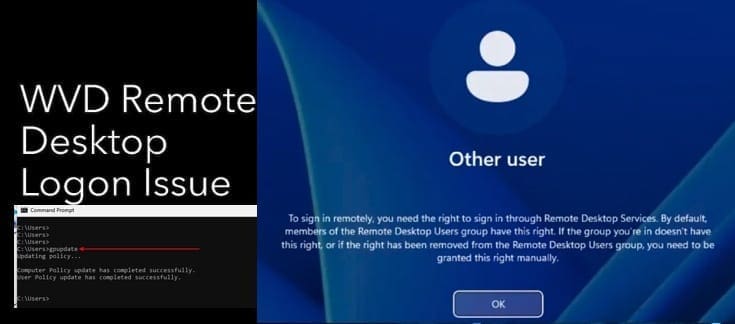
Fix you need the right to sign in through Remote Desktop Services

Posted on 25/05/202524/06/2026 Christian By Christian No Comments on Fix you need the right to sign in through Remote Desktop Services
Fix you need the right to sign in through Remote Desktop Services

Remote Desktop Protocol (RDP) is a Microsoft protocol that enables users to connect to and control a a PC remotely. It does this by providing a graphical interface that enables interaction as if the user were physically present. In this article, we shall discuss the steps to fix you need the right to sign in…

Read More “Fix you need the right to sign in through Remote Desktop Services” »

Windows, Windows Server

Unable to run downloaded Programs due to Defender SmartScreen

Posted on 13/05/202524/06/2026 Christian By Christian No Comments on Unable to run downloaded Programs due to Defender SmartScreen
Unable to run downloaded Programs due to Defender SmartScreen

In this article, we will learn how to fix ‘Unable to run downloaded Programs due to Defender SmartScreen”. Microsoft Defender SmartScreen is a security feature in Windows 10 and 11 that checks every download from trusted sources. Please, see How to Manage Microsoft Defender Antivirus with Argon ACMP, and How to apply and install Veeam…

Read More “Unable to run downloaded Programs due to Defender SmartScreen” »

Windows

Posts pagination

Previous 1 … 10 11 12 … 117 Next

Microsoft MVP

vexpert-badge-stars-5

Virtual Background

VEEAMLEGEND

Categories

Top 30 Sysadmin blog

veeaam100

Veeam Vanguard

  • Trellix Native Encryption
    Manage BitLocker and FileVault with Trellix Native Encryption Mac
  • images 5 3
    How to uninstall AWS CLI in Windows AWS/Azure/OpenShift
  • M365 Users
    Manage MS365 Accounts with PowerShell Microsoft Exchange/Office/365
  • hero activedirectory 2
    Concept of Active Directory Computer Account Windows Server
  • cisco general
    How to update Cisco ASA Network | Monitoring
  • OPEN OFFICE
    How to Install Apache OpenOffice on Ubuntu  Linux
  • MacOS Catalina Desktop
    Mac FileVault Encryption: How to enable FileVault disk encryption Security | Vulnerability Scans and Assessment
  • aws flow log
    AWS Flow Logs IAM Role Setup AWS/Azure/OpenShift

Subscribe to Blog via Email

Enter your email address to subscribe to this blog and receive notifications of new posts by email.

Join 1,746 other subscribers
  • RSS - Posts
  • RSS - Comments
  • About
  • Authors
  • Write for us
  • Contact
  • Advertise with us
  • General Terms and Conditions
  • Privacy policy
  • Feedly
  • Telegram
  • Youtube
  • Facebook
  • Instagram
  • LinkedIn
  • Tumblr
  • Pinterest
  • Twitter
  • mastodon
  • Bsky

Tags

Active Directory Azure Bitlocker Microsoft Windows PowerShell WDS Windows 10 Windows 11 Windows Deployment Services Windows Server 2016

Copyright © 2026 TechDirectArchive