Skip to content

TechDirectArchive

Hands-on IT, Cloud, Security & DevOps Insights

  • Home
  • About
  • Advertise With US
  • Reviews
  • Contact
  • Toggle search form
Home » Windows Server » How to apply Windows Updates from WSUS to AWS Instances
  • dd featured 1
    How to delete obsolete drivers from the Driver Store in Windows Windows
  • MM
    How to install Mattermost on Ubuntu and Debian Linux
  • image 41
    INACCESSIBLE BOOT DEVICE: Fix Your PC ran into a problem and needs to restart Windows
  • VBR console update
    Veeam Backup Console must be updated to the latest version Backup
  • Screenshot 2021 01 22 at 23.27.30
    How does Bitlocker Network Unlock work? Windows Server
  • How to Remove Hyper V
    How to uninstall Hyper-V on a Windows PC Virtualization
  • 2FA For SSH in Linux
    Set Two-Factor Authentication for SSH in Linux Linux
  • allthings.how how to download and install winget windows package manager windows 10 winget cli
    How to install Winget CLI on Windows Windows Server

How to apply Windows Updates from WSUS to AWS Instances

Posted on 17/05/201806/12/2023 Christian By Christian No Comments on How to apply Windows Updates from WSUS to AWS Instances
Patch management

Automate the process of applying Windows Updates from WSUS to multiple servers on AWS using RunCommand. Streamline your update management effortlessly. After having updates pushed to all servers from WSUS, in order to avoid the manual operation of installing updates, we can automate this process to a whole lot of servers on AWS using the RunCommand. To apply Updates on WSUS, use the run command. Please see How to Configure SSL between WSUS servers (Upstream and Downstream Servers), Handy WSUS Commands, Windows Server Update Services Commands, WAUACLT, PowerShell and USOClient.

For more articles I have written, see the following hyperlinks: Configuring WSUS Email Notification to Work With Office365, How to setup and configure Windows server update services (WSUS).

What to consider when applying WSUS updates

Some prerequisites must be met before applying Windows updates to production servers. They are as follows;

When applying Windows Updates from WSUS, make sure to deploy these updates to the Test-servers-group (Test servers). After applying updates on the test servers, access them via RDP before proceeding to update Production servers.

Other factors that must be considered:

  • Pull an AMI of all Production Server AMI (Ensure this is complete before applying windows updates)
  • Approve and install identical updates for the test-server-group. Once tested and applied, approve them for Production servers.

Step 2:  Proceed to AWS

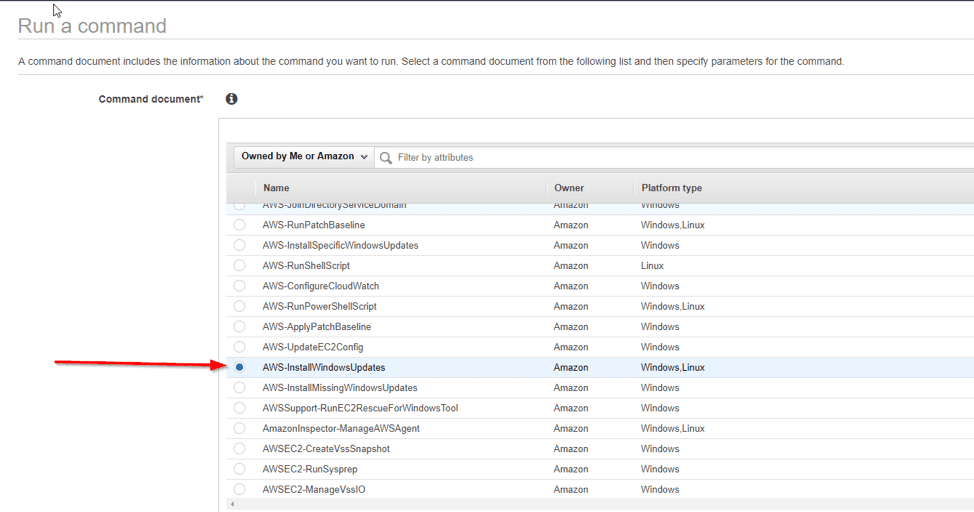
Access the RunCommand (within Systems Manager and Services) to seamlessly handle Windows Updates from WSUS for efficient management.

Choose AWS-ConfigureWindowsUpdates to enable automatic installation of Windows updates when triggered.
WSUS benefits

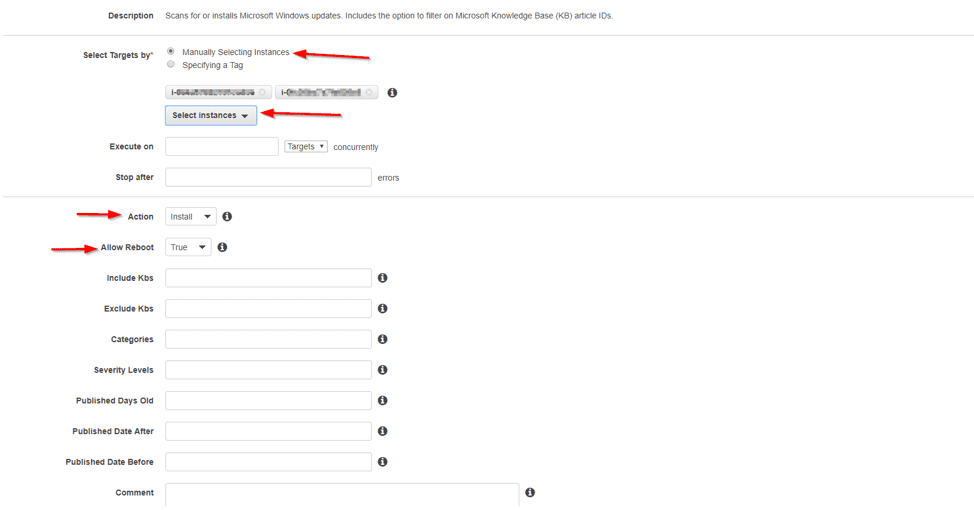
on the same page, select the instances.

Please see how to Start, Stop and Restart Windows Server Update Services (WSUS) via PowerShell and CMD, Windows Server Update Services: Windows 2016 Servers does not show up on WSUS console, and WSUS clients appear and disappear from the WSUS Update Services console.

The prerequisites to have these servers available are as follows

To maintain optimal performance, keep your EC2config for Windows Server 2008/2012 or EC2 Launch for Windows Server 2016 updated, including essential Windows Updates from WSUS.

The SSM agent attaches the appropriate role to all instances, ensuring correct configuration and functionality. You can never find the instances here if this is not the case.
Update deployment

And click on the run. Ensuring the installation of updates and automatic server reboot for seamless operation.

Other information

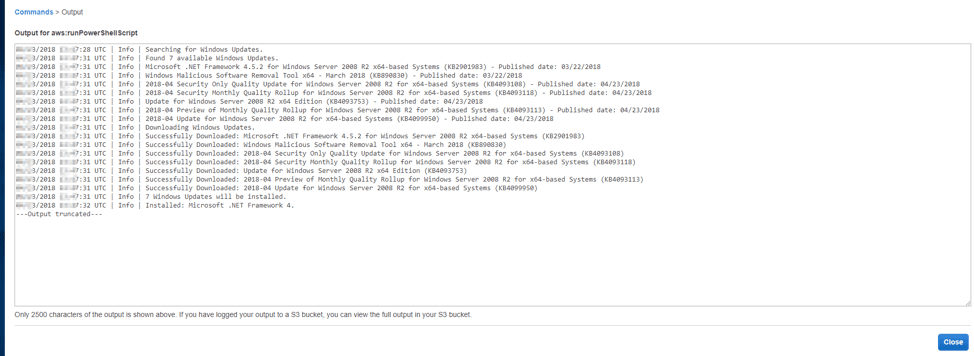
Note, you can view the status of the run command to see if any failed or succeeded as shown below


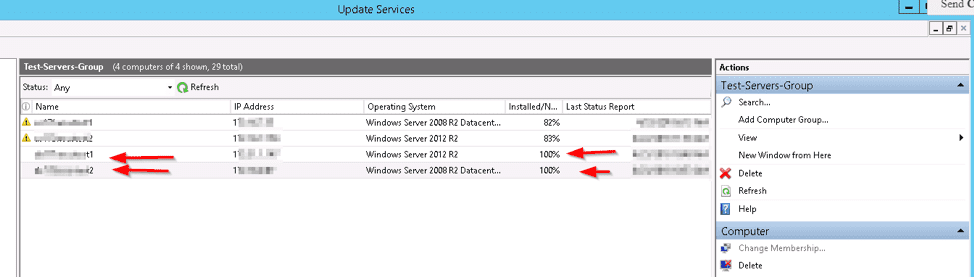
Check on the WSUS server after the updates are applied

Check the WSUS console; it should display servers fully patched, as shown below. Furthermore, I confirmed non-problematic updates and accessible servers through Remote Desktop Manager (RDP).
Note: Prerequisites determine an instance’s eligibility or discoverability via the run command. The RunCommand output will look like this below.

Also, see the “Important Areas to Master on WSUS (Installed and not applicable, Install 1/4, and Installed / Not applicable 100)”, Targeting WSUS Client with the Registry keys: How to configure WSUS Clients to get Updates from the WSUS server using Registry settings,
Windows Server upgrades

I hope you found this blog post on how to apply Windows Updates from WSUS to AWS instances helpful. If you have any questions, please let me know in the comment session.

Rate this post

Thank you for reading this post. Kindly share it with others.

  • Click to share on X (Opens in new window) X
  • Click to share on Reddit (Opens in new window) Reddit
  • Click to share on LinkedIn (Opens in new window) LinkedIn
  • Click to share on Facebook (Opens in new window) Facebook
  • Click to share on Pinterest (Opens in new window) Pinterest
  • Click to share on Tumblr (Opens in new window) Tumblr
  • Click to share on Telegram (Opens in new window) Telegram
  • Click to share on WhatsApp (Opens in new window) WhatsApp
  • Click to share on Pocket (Opens in new window) Pocket
  • Click to share on Mastodon (Opens in new window) Mastodon
  • Click to share on Bluesky (Opens in new window) Bluesky
  • Click to share on Threads (Opens in new window) Threads
  • Click to share on Nextdoor (Opens in new window) Nextdoor
AWS/Azure/OpenShift, Windows Server Tags:AWS, AWS CLI, services, Windows Deployment Services

Post navigation

Previous Post: Important Areas to Master on WSUS
Next Post: SimpleSAMLphp Setup on Windows Server [Part 1]

Related Posts

  • adc
    How to add a second Domain Controller Windows Server
  • WindowsTerminalServerRDS
    Remove a Remote Desktop Service collection Windows Server
  • 41592 3264bitw10
    What is the difference between 32-bit and 64-bit processors Windows Server
  • View installed Updates on Windows
    Get lists of installed Microsoft Windows Updates Windows
  • react 1
    How to deploy a React Application to AWS S3 AWS/Azure/OpenShift
  • windows update 03
    How to target WSUS clients with the registry keys Windows Server

More Related Articles

adc How to add a second Domain Controller Windows Server
WindowsTerminalServerRDS Remove a Remote Desktop Service collection Windows Server
41592 3264bitw10 What is the difference between 32-bit and 64-bit processors Windows Server
View installed Updates on Windows Get lists of installed Microsoft Windows Updates Windows
react 1 How to deploy a React Application to AWS S3 AWS/Azure/OpenShift
windows update 03 How to target WSUS clients with the registry keys Windows Server

Leave a Reply Cancel reply

You must be logged in to post a comment.

Microsoft MVP

VEEAMLEGEND

vexpert-badge-stars-5

Virtual Background

GoogleNews

Categories

veeaam100

sysadmin top30a
 
  • dd featured 1
    How to delete obsolete drivers from the Driver Store in Windows Windows
  • MM
    How to install Mattermost on Ubuntu and Debian Linux
  • image 41
    INACCESSIBLE BOOT DEVICE: Fix Your PC ran into a problem and needs to restart Windows
  • VBR console update
    Veeam Backup Console must be updated to the latest version Backup
  • Screenshot 2021 01 22 at 23.27.30
    How does Bitlocker Network Unlock work? Windows Server
  • How to Remove Hyper V
    How to uninstall Hyper-V on a Windows PC Virtualization
  • 2FA For SSH in Linux
    Set Two-Factor Authentication for SSH in Linux Linux
  • allthings.how how to download and install winget windows package manager windows 10 winget cli
    How to install Winget CLI on Windows Windows Server

Subscribe to Blog via Email

Enter your email address to subscribe to this blog and receive notifications of new posts by email.

Join 1,841 other subscribers
  • RSS - Posts
  • RSS - Comments
  • About
  • Authors
  • Write for us
  • Advertise with us
  • General Terms and Conditions
  • Privacy policy
  • Feedly
  • Telegram
  • Youtube
  • Facebook
  • Instagram
  • LinkedIn
  • Tumblr
  • Pinterest
  • Twitter
  • mastodon

Tags

AWS Azure Bitlocker Microsoft Windows PowerShell WDS Windows 10 Windows 11 Windows Deployment Services Windows Server 2016

Copyright © 2025 TechDirectArchive


Loading Comments...
 

You must be logged in to post a comment.