Skip to content

TechDirectArchive

Hands-on IT, Cloud, Security & DevOps Insights

  • Home
  • About
  • Advertise With US
  • Reviews
  • Contact
  • Toggle search form
Home » Windows Server » Client Visibility Issues: Fix WSUS Clients appear then disappear in the console
  • Resize Proxmox VM
    How to Resize or Expand Proxmox Hard Drive Virtualization
  • a3a5a8be58fa09468cd4f70d36869e98
    Restore AD Objects: How to restore deleted user accounts in Active Directory with Microsoft LDP and PowerShell Windows Server
  • Screenshot 2024 02 28 at 11.17.41 PM
    GitHub Pages Deployment Guide Linux
  • Screenshot 2020 05 26 at 18.57.25
    WDS and DHCP Deployment Scenarios: Configure DHCP Options 60, 66, and 67 Windows Server
  • PXE E18 Server response timeout
    Stuck at Start PXE over IPv4: PXE-E18 Server response timeout Windows
  • mssql ubuntu install feature image
    How to reset MSSQL Server SA Password on Ubuntu Oracle/MSSQL/MySQL
  • GPO 2
    Why GPO is not the best solution for managing Windows updates Windows Server
  • Cloud Infrastructure and Application Security Best Practices
    [AZURE] Hybrid Cloud Infrastructure and Application Security Best Practices Network | Monitoring

Client Visibility Issues: Fix WSUS Clients appear then disappear in the console

Posted on 17/05/201825/09/2024 Christian By Christian 6 Comments on Client Visibility Issues: Fix WSUS Clients appear then disappear in the console
WSUS client issues

In the corporate realm, the WSUS Update Services Console plays a pivotal role. Formerly recognized as Software Update Services (SUS). In this article, we shall discuss how to Fix WSUS Clients appear then disappear in the console. For more articles I have written, see the following hyperlinks: Configuring WSUS Email Notification to Work With Office365, How to setup and configure Windows server update services (WSUS), Important Areas to Master on WSUS (Installed and not applicable, Install 1/4, and Installed / Not applicable 100).

This Microsoft-developed program empowers administrators to efficiently oversee update distribution and hotfix deployment for Microsoft products across networked computers.

Note: When I log in to each workstation and type in the CLI(CMD) the following command below. I am able to see these machines from the WSUS console but the others disappear.

wuauclt.exe /detectnow /reportnow

Reason for unexpected behaviour

When encountering cloned servers, a common occurrence arises due to identical SUSClientID. Each interaction with WSUS Update Services Console overwrites the entry with fresh server data, causing the existing machine to vanish.

Here are some interesting articles: How to Configure SSL between WSUS servers (Upstream and Downstream Servers). Handy WSUS Commands – Windows Server Update Services Commands, WAUACLT, PowerShell and USOClient, and how to Start, Stop and Restart Windows Server Update Services (WSUS) via PowerShell and CMD.

WSUS Update Services console Solution

Navigate to this registry path below and delete the “**SusClientID**” and “**SusClientIDValidation**” registry values in the key. Please see how to fix Windows 2016 Servers does not show up on WSUS console,

HKLMSoftwareMicrosoftWindowsCurrentVersionWindowsUpdate
Update Services console

Restart the Windows update service

client connectivity

Perform or run the following from the CLI below. You may also be interested in these: How to configure WSUS Clients to get Updates from the WSUS server using Registry settings, and how to apply Windows Updates from WSUS to the server using AWS RunCommand.

wuauclt /resetauthorization /detectnow
wuauclt.exe /detectnow /reportnow
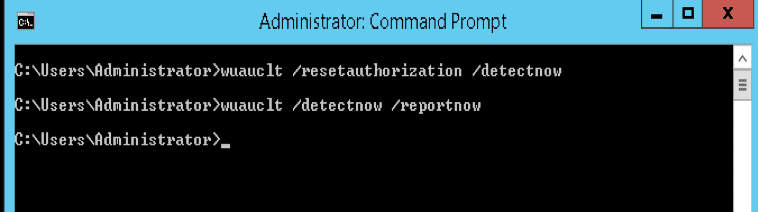
Since the WUACLT is deprecated and not available in the newer operating systems, take a look at this article on how to scan or force updates from WSUS using “usoclient.exe“.

Please see How to configure Windows server update services, How to install WSUS on Windows Server 2022, and “How to disable automatic Windows updates via Windows Settings.

FAQ on WSUS Client Issues

What would the next step be after forcing WSUS clients to re-register with the server and fail?

First, to force WSUS clients to re-register with the server, we have mentioned the steps above. You will have to launch the Windows PC and open an elevated Command Prompt. Then you will have to run the command: wuauclt /resetauthorization /detectnow. This command resets the client’s authorization settings and initiates a detection cycle.
Secondly, after running the command. Wait for a few minutes, and then check the WSUS console to see if the client reappears. If the client still doesn’t appear. Ensure that the Group Policy settings are correctly configured, and investigate network or firewall issues.

Can WSUS client issues be attributed to WSUS server issues?

Yes, WSUS client issues can sometimes be related to problems on the WSUS server. Examples of these are database corruption issues, out-of-sync servers, and inadequate Server Resources.

I hope you found this blog post on how to Fix WSUS Clients appear then disappear in the console helpful. If you have any questions, please let me know in the comment session.

5/5 - (1 vote)

Thank you for reading this post. Kindly share it with others.

  • Click to share on X (Opens in new window) X
  • Click to share on Reddit (Opens in new window) Reddit
  • Click to share on LinkedIn (Opens in new window) LinkedIn
  • Click to share on Facebook (Opens in new window) Facebook
  • Click to share on Pinterest (Opens in new window) Pinterest
  • Click to share on Tumblr (Opens in new window) Tumblr
  • Click to share on Telegram (Opens in new window) Telegram
  • Click to share on WhatsApp (Opens in new window) WhatsApp
  • Click to share on Pocket (Opens in new window) Pocket
  • Click to share on Mastodon (Opens in new window) Mastodon
  • Click to share on Bluesky (Opens in new window) Bluesky
  • Click to share on Threads (Opens in new window) Threads
  • Click to share on Nextdoor (Opens in new window) Nextdoor
Windows Server Tags:Microsoft Windows, services, Windows Updates

Post navigation

Previous Post: Cloud Protection Manager: N2WS Veeam CPM Guide
Next Post: Important Areas to Master on WSUS

Related Posts

  • slide office 365 79
    Configure WSUS Email Notification for Office365 Windows Server
  • How does key rotation work in MBAM
    How does Key Rotation work in MBAM? Oracle/MSSQL/MySQL
  • MBAM noncompliance
    How to determine why an MBAM-protected device is non-compliant Security | Vulnerability Scans and Assessment
  • WAMPServer Virtual Host
    How to create Virtual Hosts in a WAMPserver Web Server
  • Screenshot 2021 01 22 at 23.27.30
    How does Bitlocker Network Unlock work? Windows Server
  • Error 0x800f0823 The specified package cannot be added to this Windows Image
    Error 0x800f0823: Wizard.hta Screen stuck during WDS Deployment Windows Server

More Related Articles

slide office 365 79 Configure WSUS Email Notification for Office365 Windows Server
How does key rotation work in MBAM How does Key Rotation work in MBAM? Oracle/MSSQL/MySQL
MBAM noncompliance How to determine why an MBAM-protected device is non-compliant Security | Vulnerability Scans and Assessment
WAMPServer Virtual Host How to create Virtual Hosts in a WAMPserver Web Server
Screenshot 2021 01 22 at 23.27.30 How does Bitlocker Network Unlock work? Windows Server
Error 0x800f0823 The specified package cannot be added to this Windows Image Error 0x800f0823: Wizard.hta Screen stuck during WDS Deployment Windows Server

Comments (6) on “Client Visibility Issues: Fix WSUS Clients appear then disappear in the console”

  1. Avatar photo Graeme says:
    17/04/2020 at 6:42 AM

    This exact problem has done my head in with some AWS servers running 2016
    The wuauclt is deprecated but you can run usoclient.exe startscan to force a check-in to WSUS and get a new client ID generated too
    Thanks regardless for the tip it’s going to save a lot of headaches

    Log in to Reply
    1. Avatar photo SysEnthusiast says:
      17/04/2020 at 2:06 PM

      Hi Graeme,

      Thank you very much for your nice comment. I appreciate this. For more commands on usoclient.exe, see the following article
      – https://techdirectarchive.com/2020/02/05/handy-windows-server-update-services-commands-wauaclt-powershell-and-usoclient/

      Log in to Reply
  2. Avatar photo Mike says:
    01/10/2020 at 9:34 AM

    tks, you made my day 😉

    Log in to Reply
    1. chris Christian says:
      01/10/2020 at 9:35 AM

      You are welcome

      Log in to Reply
  3. Avatar photo Sergei says:
    22/03/2022 at 11:23 AM

    Thanks a lot for the explanation, it has been very useful!

    Log in to Reply
    1. chris Christian says:
      22/03/2022 at 5:06 PM

      Thank you very much Sergei for letting us know.

      Log in to Reply

Leave a Reply Cancel reply

You must be logged in to post a comment.

Microsoft MVP

VEEAMLEGEND

vexpert-badge-stars-5

Virtual Background

GoogleNews

Categories

veeaam100

sysadmin top30a

  • Resize Proxmox VM
    How to Resize or Expand Proxmox Hard Drive Virtualization
  • a3a5a8be58fa09468cd4f70d36869e98
    Restore AD Objects: How to restore deleted user accounts in Active Directory with Microsoft LDP and PowerShell Windows Server
  • Screenshot 2024 02 28 at 11.17.41 PM
    GitHub Pages Deployment Guide Linux
  • Screenshot 2020 05 26 at 18.57.25
    WDS and DHCP Deployment Scenarios: Configure DHCP Options 60, 66, and 67 Windows Server
  • PXE E18 Server response timeout
    Stuck at Start PXE over IPv4: PXE-E18 Server response timeout Windows
  • mssql ubuntu install feature image
    How to reset MSSQL Server SA Password on Ubuntu Oracle/MSSQL/MySQL
  • GPO 2
    Why GPO is not the best solution for managing Windows updates Windows Server
  • Cloud Infrastructure and Application Security Best Practices
    [AZURE] Hybrid Cloud Infrastructure and Application Security Best Practices Network | Monitoring

Subscribe to Blog via Email

Enter your email address to subscribe to this blog and receive notifications of new posts by email.

Join 1,839 other subscribers
  • RSS - Posts
  • RSS - Comments
  • About
  • Authors
  • Write for us
  • Advertise with us
  • General Terms and Conditions
  • Privacy policy
  • Feedly
  • Telegram
  • Youtube
  • Facebook
  • Instagram
  • LinkedIn
  • Tumblr
  • Pinterest
  • Twitter
  • mastodon

Tags

AWS Azure Bitlocker Microsoft Windows PowerShell WDS Windows 10 Windows 11 Windows Deployment Services Windows Server 2016

Copyright © 2025 TechDirectArchive


Loading Comments...
 

You must be logged in to post a comment.