Skip to content

TechDirectArchive

Hands-on IT, Cloud, Security & DevOps Insights

  • Home
  • About
  • Advertise With US
  • Contact
  • Reviews
  • Toggle search form
Home » Mac » Unable to connect to Eduroam WLAN: WiFi Username remembered on MAC
  • screenshot 2020 02 08 at 17.31.28
    How to perform Password Change with OWA Network | Monitoring
  • Manually resize your partition
    KB5034439 Windows Update Error: Resize WinRE Partition Windows Server
  • windows deployment services imagen destacada blog redigit
    How to create a capture image on Windows Deployment Services Windows Server
  • 71PSZcv0RL. AC SX425
    How to disable unused Cisco Access Ports Network | Monitoring
  • windows hello la gi
    All you need to know before deploying Windows Hello for Business Key and Certificate Trust Windows
  • Standby Mode
    Disable modern standby on Windows 10 and 11 Windows
  • Database Collation
    Change SQL Database Collation: ePO events DB and SQL server should match with ePO core collation Oracle/MSSQL/MySQL
  • GNS 3
    Graphical Network Simulator: How to uninstall GNS3 in Windows Windows

Unable to connect to Eduroam WLAN: WiFi Username remembered on MAC


Posted on 22/06/201903/11/2023 Christian By Christian No Comments on Unable to connect to Eduroam WLAN: WiFi Username remembered on MAC

WIFi (WLAN) is a wireless network protocol based on the IEEE 802.11 family of standards. They are commonly used for local area networking of devices and Internet access. Wi-Fi uses multiple parts of the IEEE 802 protocol and is designed to interwork seamlessly with its wired Ethernet. Below is a brief difference between WLAN and WIFI. In this article, we shall discuss “Unable to connect to Eduroam WLAN: WiFi Username remembered on MAC”. Here are some articles I have written relating to MacBook “how to set up external displays on your Mac and arrange your display in Mac, and how to enable or disable automatic software updates on Mac

What is Wireless Local Area Network?

Wireless local network that enables you to connect your devices such as laptops to the Internet without cables. WLAN is the umbrella term for this wireless technology. WiFi is a type of WLAN that stands for an issued certificate according to the IEEE 802.11 standard. Some countries refer to this technology differently and here in Germany, WLAN is popularly used while in Nigeria, WiFi is widely used.

How to import a certificate into the Trusted Root and Personal file certificate store, and how to export a certificate in PFX format in Windows. You may also be interested in this guide: How to install and configure Active Directory Certificate Services.

What to do when you are unable to connect to Eduroam WLAN

In Windows, this is a little bit easier, but a little bit complicated on MAC. I wanted to connect to Eduroam, but my previous credential (username) was always prompted even when I entered a new username and password.

Note: With the latest technology when an app (EASYROAM) is required to connect to Eduoam and a password is no longer required, you may never have to perform these steps. But this guide will show you how this was done in the best and also server as a troubleshooting guide for a similar scenario.

I had to delete the SSL certificate from my keychain access and this worked. The reason might be the certificate has expired and unless you delete the old one, you may never be able to replace the old one. Here are the steps needed in administering SSL on MAC OS.

Please see How to stop Microsoft Edge from remembering your email ID, How to set up a self-hosted speed test server on Ubuntu Linux, and Windows Profile: How to determine your windows username.

Prevent WiFi Username remembering on MAC

From the Finder, click Go. Then click on Utilities. Click on KeyChain Access, and this will open the Certificate Store as shown below.

Keychain-Eduroam

In the left pane, click on the certificate that you wish to delete. In the menu bar, click on Edit and click on Delete.

DeleteOldEduroamcert

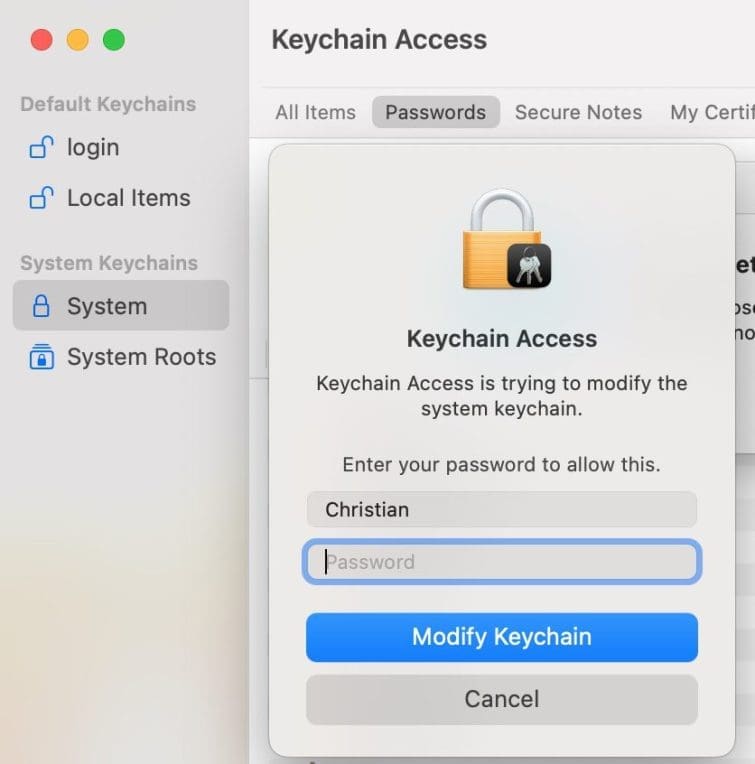
Note: You may be prompted for confirmation in order to complete the change. Thhis is done by entering your password to modify the keychain. Please also see how to lookup a username and machine name using an IP address on windows. Also, see Files On-Demand with OneDrive: Microsoft OneDrive Setup On Windows 10 and 11 and Key Features Explained.
modifykeychain

After this step, you should be able to log in with your new credentials without having any issues.

eduroamlogin

Please see Access WSM: How to setup WatchGuard XTM, and how to fix System check found some issues during MBAM encryption: Fail, the Power cable must be connected.

I hope you found this blog post helpful on how to fix “unable to connect to Eduroam WLAN: WiFi Username remembered on MAC”. Please let me know in the comment session if you have any questions.

Rate this post

Thank you for reading this post. Kindly share it with others.

  • Click to share on X (Opens in new window) X
  • Click to share on Reddit (Opens in new window) Reddit
  • Click to share on LinkedIn (Opens in new window) LinkedIn
  • Click to share on Facebook (Opens in new window) Facebook
  • Click to share on Pinterest (Opens in new window) Pinterest
  • Click to share on Tumblr (Opens in new window) Tumblr
  • Click to share on Telegram (Opens in new window) Telegram
  • Click to share on WhatsApp (Opens in new window) WhatsApp
  • Click to share on Pocket (Opens in new window) Pocket
  • Click to share on Mastodon (Opens in new window) Mastodon
  • Click to share on Bluesky (Opens in new window) Bluesky
  • Click to share on Threads (Opens in new window) Threads
  • Click to share on Nextdoor (Opens in new window) Nextdoor
Mac Tags:Internet Connection, WiFi

Post navigation

Previous Post: How to disable Outlook and Yahoo Auto-Complete
Next Post: How to create a bootable USB using Rufus on Windows

Related Posts

  • chrome feature image light blue
    Set Chrome as default: How to set a browser as default on macOS Mac
  • convert HEIC image format to JPEG format
    Convert HEIC images to JPEG format on Mac with Quick Actions Mac
  • screenshot 2020 05 11 at 15.03.02
    How to record the screen of macOS Mac
  • How To Remove Takeprize50.life Redirect From Mac unboxhow
    Remove unwanted site redirects or pop-ups from Google Chrome Mac
  • maxresdefault 2 7
    How to record your screen with PowerPoint and make slide shows Mac
  • Ping commands
    Ping from Source IP Address from all environments Mac

More Related Articles

chrome feature image light blue Set Chrome as default: How to set a browser as default on macOS Mac
convert HEIC image format to JPEG format Convert HEIC images to JPEG format on Mac with Quick Actions Mac
screenshot 2020 05 11 at 15.03.02 How to record the screen of macOS Mac
How To Remove Takeprize50.life Redirect From Mac unboxhow Remove unwanted site redirects or pop-ups from Google Chrome Mac
maxresdefault 2 7 How to record your screen with PowerPoint and make slide shows Mac
Ping commands Ping from Source IP Address from all environments Mac

Leave a Reply Cancel reply

You must be logged in to post a comment.

Microsoft MVP

VEEAMLEGEND

vexpert-badge-stars-5

Virtual Background

GoogleNews

Categories

veeaam100

sysadmin top30a

  • screenshot 2020 02 08 at 17.31.28
    How to perform Password Change with OWA Network | Monitoring
  • Manually resize your partition
    KB5034439 Windows Update Error: Resize WinRE Partition Windows Server
  • windows deployment services imagen destacada blog redigit
    How to create a capture image on Windows Deployment Services Windows Server
  • 71PSZcv0RL. AC SX425
    How to disable unused Cisco Access Ports Network | Monitoring
  • windows hello la gi
    All you need to know before deploying Windows Hello for Business Key and Certificate Trust Windows
  • Standby Mode
    Disable modern standby on Windows 10 and 11 Windows
  • Database Collation
    Change SQL Database Collation: ePO events DB and SQL server should match with ePO core collation Oracle/MSSQL/MySQL
  • GNS 3
    Graphical Network Simulator: How to uninstall GNS3 in Windows Windows

Subscribe to Blog via Email

Enter your email address to subscribe to this blog and receive notifications of new posts by email.

Join 1,841 other subscribers
  • RSS - Posts
  • RSS - Comments
  • About
  • Authors
  • Write for us
  • Advertise with us
  • General Terms and Conditions
  • Privacy policy
  • Feedly
  • Telegram
  • Youtube
  • Facebook
  • Instagram
  • LinkedIn
  • Tumblr
  • Pinterest
  • Twitter
  • mastodon

Tags

AWS Azure Bitlocker Microsoft Windows PowerShell WDS Windows 10 Windows 11 Windows Deployment Services Windows Server 2016

Copyright © 2025 TechDirectArchive


Loading Comments...
 

You must be logged in to post a comment.