Skip to content

TechDirectArchive

Hands-on IT, Cloud, Security & DevOps Insights

  • Home
  • About
  • Advertise With US
  • Reviews
  • Contact
  • Toggle search form
Home » Linux » Monitoring services using Zabbix

Monitoring services using Zabbix

Posted on 27/08/202124/09/2024 Dickson Victor By Dickson Victor 12 Comments on Monitoring services using Zabbix
Zabbix monitoring

For critical production servers and services, monitoring is very critical. One is to get notified about issues immediately and the second is to resolve quickly hence not affecting SLA. Here, I will be showing you the steps employed in monitoring services using Zabbix, a basic Zabbix template, and very easy Linux commands. Please see PC Health Check: How to Use Windows 11 App, Performance and Diagnostics in Microsoft Cloud with Azure Monitor, and How to check Hard Drive Health (SMART) in Windows.

The traditional way of monitoring services is by monitoring the ports associated with the services, however, in some cases/environments, critical services have to be monitored E.g. (squid). Hence in this post, you will see how to monitor services using service names and not ports on Linux servers.

Some other guides can be found in these links: Practical use of SELinux in production: How to locate directory file context and restore it ,how-to-create-a-static-pod-in-kubernetes-with-demos-that-can-help-you-become-a-better-Kubernetes-administrator, and how to create-and-deliver-a-report-on-system-utilization-on-a-Linux-based-os/.

Note: Moreover, You should already have the Zabbix monitoring tool installed in your environment to do this.

Service Check

First, check the services running

systemctl | grep running 
service monitoring

Take note of whatever service name you will want to monitor, Log in to your Zabbix console and create a new template and application.

Configuration -> Templates -> Create template
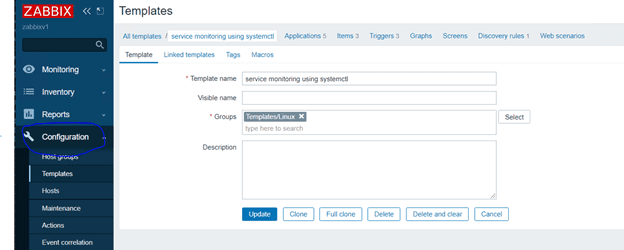
network monitoring

Create New application on Zabbix console  – > systemctl status
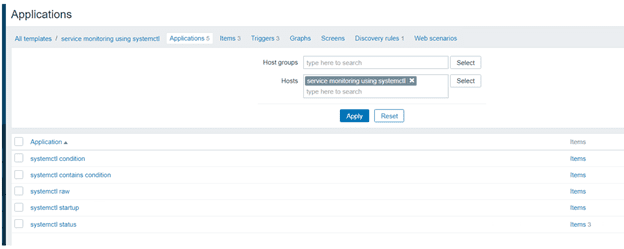
system health monitoring

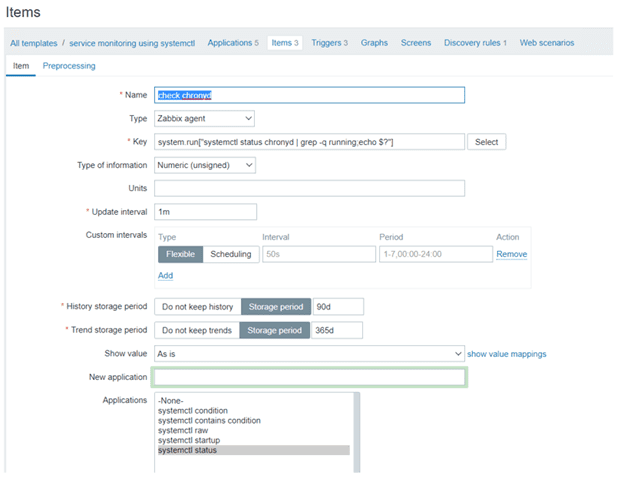
Furthermore, Create an item for whatever service name you want to monitor

Zabbix monitoring
image-5

Here is a guide on how to install Zabbix Monitoring Tool on a Linux System, and how-to-use-container-insights-to-get-the-full-benefits-of-azure-monitor-for-azure-Kubernetes-workload.

Create Alert

Create individual Alert triggers
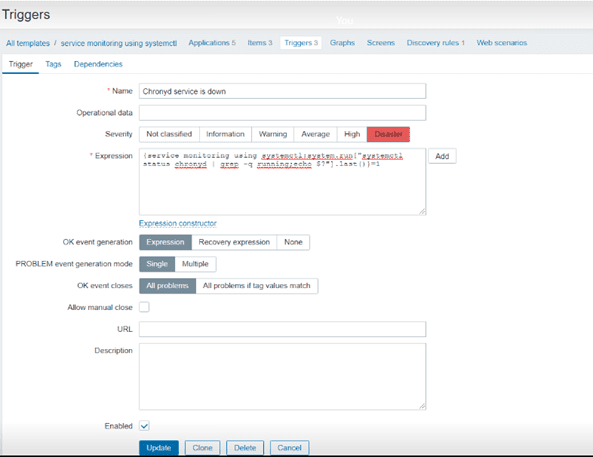
image-6

Trigger expression

{service monitoring using systemctl:system.run["systemctl status chronyd | grep -q running;echo $?"].last()}=1

Please change the service name in the expression to your configured service name.

Once Items and triggers have been created on the services needed. Test or simulate the new configurations by stopping services.

image-7

Now check Zabbix console

image-8

I hope you found his article useful on Monitoring services using Zabbix. Please feel free to leave a comment below.

5/5 - (1 vote)

Thank you for reading this post. Kindly share it with others.

  • Share on X (Opens in new window) X
  • Share on Reddit (Opens in new window) Reddit
  • Share on LinkedIn (Opens in new window) LinkedIn
  • Share on Facebook (Opens in new window) Facebook
  • Share on Pinterest (Opens in new window) Pinterest
  • Share on Tumblr (Opens in new window) Tumblr
  • Share on Telegram (Opens in new window) Telegram
  • Share on WhatsApp (Opens in new window) WhatsApp
  • Share on Mastodon (Opens in new window) Mastodon
  • Share on Bluesky (Opens in new window) Bluesky
  • Share on Threads (Opens in new window) Threads
  • Share on Nextdoor (Opens in new window) Nextdoor
Linux Tags:services

Post navigation

Previous Post: How to secure access to your Virtual Machine with Just-in-Time (JIT) VM Access
Next Post: Enable or disable automatic Google Chrome Live Caption on macOS

Related Posts

  • feature image
    How to install PostgreSQL on Ubuntu Linux
  • goland
    How to install Golang on a Linux System Linux
  • image 129
    Using Awx to deploy, schedule and run playbooks Linux
  • prometheus feature image
    How to use Prometheus for Monitoring Linux
  • SUID GUID Sticky Bit 1
    Set Special File Permissions with SUID or GUID and Sticky Bit Linux
  • Screenshot 2020 05 14 at 18.00.59
    Linux Error 13: Permission denied – Are you root Linux

More Related Articles

feature image How to install PostgreSQL on Ubuntu Linux
goland How to install Golang on a Linux System Linux
image 129 Using Awx to deploy, schedule and run playbooks Linux
prometheus feature image How to use Prometheus for Monitoring Linux
SUID GUID Sticky Bit 1 Set Special File Permissions with SUID or GUID and Sticky Bit Linux
Screenshot 2020 05 14 at 18.00.59 Linux Error 13: Permission denied – Are you root Linux

Comments (12) on “Monitoring services using Zabbix”

  1. Avatar photo Sidheswar Biswal says:
    08/12/2021 at 5:55 AM

    image not showing clearly

    Log in to Reply
    1. chris Christian says:
      08/12/2021 at 11:31 AM

      In the future, we will improve, thank you for pointing this out.

      Log in to Reply
  2. Avatar photo mark burke says:
    18/01/2022 at 3:08 PM

    Hello, I’ve configured this but it’s not triggering the alert. Do i need to open a port from the zabbix server to the host?

    Log in to Reply
  3. Avatar photo Andy says:
    09/03/2022 at 2:23 PM

    I added the item but got an Unsupported item key error.

    Log in to Reply
    1. Avatar photo antoine pacaud says:
      09/05/2022 at 11:03 AM

      Did you add AllowKey=system.run[*] in the agent configuration file ?

      Log in to Reply
  4. Avatar photo antoine pacaud says:
    09/05/2022 at 11:02 AM

    Thanks it works for me with a zabbix version 5.4.9.
    But I had to change the format of the trigger because of that version :

    last(/Template_name/system.run[“systemctl status service_name | grep -q running; echo $?”])=1

    And in requirements I had to add “AllowKey=system.run[*]” in the agent configuration file.

    Log in to Reply
    1. chris Christian says:
      09/05/2022 at 7:42 PM

      Thank you so much for your input.

      Log in to Reply
    2. Avatar photo Fabrizio says:
      06/03/2023 at 4:52 PM

      Hi, can u please type the entire code? 
      For my case, i wrote this code for the trigger:
      last(/WePacsLinux/system.run[“systemctl status orthanc | grep -q running; echo $?”])=11
      and for the item:
      system.run[systemctl status orthanc | grep -q running; echo $?]
      but it gives me this error:
      incorrect trigger expression starting from “last(/WePacsLinux/system.run[“systemctl status orthanc | grep -q running; echo $?”])=1”.

      Log in to Reply
  5. Avatar photo Igor says:
    13/06/2022 at 3:28 PM

    Not working with quotes on Zabbix Server 5.4.3.
    For me item began to work (cron.service, for example) with this code:

    system.run[systemctl status cron.service | grep -q running; echo $?]
    
    Log in to Reply
    1. chris Christian says:
      15/06/2022 at 11:31 PM

      Thank you very much for sharing your solution!

      Log in to Reply
  6. Avatar photo sukhdevkhade35@gmail.com says:
    28/11/2022 at 5:39 PM

    Hi ..It is not possible through SNMP. Do you have any expression throgh snmp .

    net.tcp.service[service_name] it working for some service . Not for all service.

    Thanks

    Log in to Reply
  7. Avatar photo humza says:
    31/01/2023 at 2:22 PM

    can you please describe the total steps and commands briefly ? As it is not working

    Log in to Reply

Leave a Reply Cancel reply

You must be logged in to post a comment.

Microsoft MVP

VEEAMLEGEND

vexpert-badge-stars-5

Virtual Background

GoogleNews

Categories

veeaam100

Veeam Vanguard

  • Word Backup Day Veeam Backup Configuration File Saved The Backup Sever
    [World Backup Day] V13 Upgrade Failure: Veeam Configuration Backup Saved the Day Backup
  • fix 0x00400d error
    Fix the request to add or remove features failed 0x00400d Windows Server
  • PA File
    File Audit and Monitoring: PA File Sight Ultra review and product details Reviews
  • Featured image dataTransfer.
    How to transfer data from an old PC to a new PC Windows
  • pst
    How to Import PST file into Exchange Server 2016 Network | Monitoring
  • original
    Windows Deployment Services: WDSUTIL CommandLine Options on Windows Server 2019 Windows Server
  • MSDTworkaround
    Microsoft Support Diagnostic Tool Vulnerability Fix Windows
  • Actualidad 211741393 129861581 1050x760
    Edge GPO settings: All Group Policies available to configure Microsoft Edge Settings Windows Server

Subscribe to Blog via Email

Enter your email address to subscribe to this blog and receive notifications of new posts by email.

Join 1,814 other subscribers
  • RSS - Posts
  • RSS - Comments
  • About
  • Authors
  • Write for us
  • Advertise with us
  • General Terms and Conditions
  • Privacy policy
  • Feedly
  • Telegram
  • Youtube
  • Facebook
  • Instagram
  • LinkedIn
  • Tumblr
  • Pinterest
  • Twitter
  • mastodon

Tags

Active Directory Azure Bitlocker Microsoft Windows PowerShell WDS Windows 10 Windows 11 Windows Deployment Services Windows Server 2016

Copyright © 2025 TechDirectArchive