Skip to content

TechDirectArchive

Hands-on IT, Cloud, Security & DevOps Insights

  • Home
  • About
  • Advertise With US
  • Contact
  • Reviews
  • Toggle search form
Home » Windows » There was an error opening the Trusted Platform Module snap-in: You do not have permission to open the Trusted Platform Module Console
  • Fix 0x800f0831 Windows Update
    Fix 0x800f0831 Error when installing Windows update Windows
  • RemoteDesktopLinceseServer
    Fix Remote session was disconnected because there are no Remote Desktop License Servers available to provide a license Network | Monitoring
  • Featured image Desktop Stickers
    How to create Desktop Stickers in Windows 11 Windows
  • remote desktop connection tabs   rdp tabs
    Guide to Remote Desktop Connection Properties for Secure Access Windows
  • Mendeley Cite with MSWord Issue resolved
    Mendeley Cite ECITE40001 Error: Fix issue using Microsoft Word Desktop application Mac
  • Screenshot 2020 05 14 at 17.47.09
    Configure OpenSSH Server: A Quick Guide Linux
  • Banner
    How to Stop OneDrive from Starting Up Automatically on Windows 11 Windows
  • 1 WeXxkEX0JG3oB781HD8Hrg 3
    Fix Access denied to the hard drive, and the security tab missing under properties Windows Server

There was an error opening the Trusted Platform Module snap-in: You do not have permission to open the Trusted Platform Module Console

Posted on 28/08/202121/12/2023 Christian By Christian No Comments on There was an error opening the Trusted Platform Module snap-in: You do not have permission to open the Trusted Platform Module Console
Trusted Platform Module error

The Trusted Platform Module (TPM) was designed to provide hardware-based, security-related functions. In this article, we shall discuss this following issue ‘There was an error opening the Trusted Platform Module snap-in: You do not have permission to open the Trusted Platform Module Console”. Please see This device cannot use a Trusted Platform Module, allow BitLocker without a compatible TPM when turning on Bitlocker and how to enable Bitlocker Pre-Boot Authentication via the Group Policy.

TPM is a secure crypto-processor that is designed to carry out cryptographic operations. The chip includes multiple physical security mechanisms to make it tamper-resistant, and malicious software is unable to tamper with the security functions of the TPM.

Also, it is worth noting that, these features; Windows Hello, Fingerprint verification, and critical biometric data store their information on the TPM module. These information can not be stored somewhere else, otherwise, there will be consequences. Here are some related guides you may be interested in. 
- Why does Microsoft require additional system requirements? How to check if you have Secure Boot and TPM enabled, and 
- what is Measured Boot, Secure Boot, Trusted Boot, and Early Launch Anti-Malware: How to secure the Windows 10 boot process.

Permission Issue: Unable to Access TPM Console

The error message indicates you lack the necessary rights to open the Trusted Platform Module Console.

Snap-in permission issue

Solution: Ensure you run the TPM Management console as an Administrator.

Note: When encountering the Fixing Trusted Platform Module Snap-In Error, you might encounter a prompt to enter your administrative password. This step is necessary unless you already possess Administrator privileges on the device.

TPM Console access problem

Administrator Privileges Prevent the ‘Fixing Trusted Platform Module Snap-In Error’
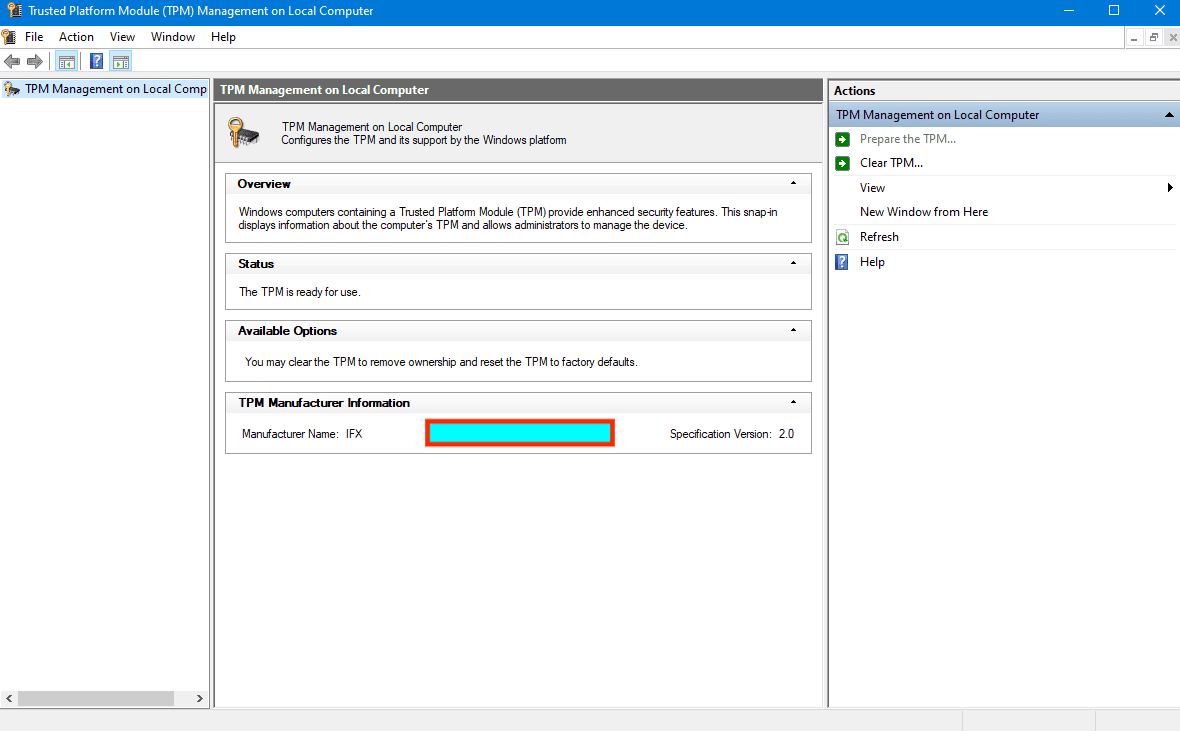
TPM

In Fixing the Trusted Platform Module Snap-In Error. It’s important to note that access to the TPM module requires administrative rights.

Furthermore, liaising with system administrators for essential permissions in TPM device administration in a domain environment is advisable.

deleteTPM

Note: Encounter the “Fixing Trusted Platform Module Snap-In Error” by accessing your system’s BIOS or UEFI if TPM isn’t enabled. Within the security section, ensure to Enable TPM for a potential resolution.

Ensure your device is restarted afterwards. 

Here is an article describing the process “How to clear, enable or disable TPM in Windows via the BIOS or UEFI“. Also, see how to fix your device cannot use a Trusted Platform Module, allow BitLocker without a compatible TPM.

I hope you found this blog post on “There was an error opening the Trusted Platform Module snap-in: You do not have permission to open the Trusted Platform Module Console”‘ helpful. Please let me know in the comment session if you have any questions.

Rate this post

Thank you for reading this post. Kindly share it with others.

  • Click to share on X (Opens in new window) X
  • Click to share on Reddit (Opens in new window) Reddit
  • Click to share on LinkedIn (Opens in new window) LinkedIn
  • Click to share on Facebook (Opens in new window) Facebook
  • Click to share on Pinterest (Opens in new window) Pinterest
  • Click to share on Tumblr (Opens in new window) Tumblr
  • Click to share on Telegram (Opens in new window) Telegram
  • Click to share on WhatsApp (Opens in new window) WhatsApp
  • Click to share on Pocket (Opens in new window) Pocket
  • Click to share on Mastodon (Opens in new window) Mastodon
  • Click to share on Bluesky (Opens in new window) Bluesky
  • Click to share on Threads (Opens in new window) Threads
  • Click to share on Nextdoor (Opens in new window) Nextdoor
Windows Tags:Microsoft Windows, TPM, Trusted Platform Module, Windows 10, Windows Server 2016

Post navigation

Previous Post: How to Integrate SonarCloud with Azure DevOps Pipeline
Next Post: Clear TPM via Management Console or Windows Defender Center App

Related Posts

  • microsoft edge
    How to configure static page in Microsoft Edge browser via Local Group Policy on Windows Windows
  • image 1
    Fix Windows Can’t find the path: Please check the spelling and try again Windows
  • firewall windows 1
    Periodic Scanning: How to schedule Windows Defender Antivirus to scan on Windows Windows
  • fghj
    How to enable or disable DotNet Framework (NetFx3) via PowerShell, Control Panel, and DISM in Windows Windows
  • NTUSER Files in Windows
    What Is the NTUSER.DAT File in Windows? Windows
  • Using the Command Prompt to add and modify the Windows registry
    How to add and modify the Windows Registry from the Command Prompt Windows

More Related Articles

microsoft edge How to configure static page in Microsoft Edge browser via Local Group Policy on Windows Windows
image 1 Fix Windows Can’t find the path: Please check the spelling and try again Windows
firewall windows 1 Periodic Scanning: How to schedule Windows Defender Antivirus to scan on Windows Windows
fghj How to enable or disable DotNet Framework (NetFx3) via PowerShell, Control Panel, and DISM in Windows Windows
NTUSER Files in Windows What Is the NTUSER.DAT File in Windows? Windows
Using the Command Prompt to add and modify the Windows registry How to add and modify the Windows Registry from the Command Prompt Windows

Leave a Reply Cancel reply

You must be logged in to post a comment.

Microsoft MVP

VEEAMLEGEND

vexpert-badge-stars-5

Virtual Background

GoogleNews

Categories

veeaam100

sysadmin top30a

  • Fix 0x800f0831 Windows Update
    Fix 0x800f0831 Error when installing Windows update Windows
  • RemoteDesktopLinceseServer
    Fix Remote session was disconnected because there are no Remote Desktop License Servers available to provide a license Network | Monitoring
  • Featured image Desktop Stickers
    How to create Desktop Stickers in Windows 11 Windows
  • remote desktop connection tabs   rdp tabs
    Guide to Remote Desktop Connection Properties for Secure Access Windows
  • Mendeley Cite with MSWord Issue resolved
    Mendeley Cite ECITE40001 Error: Fix issue using Microsoft Word Desktop application Mac
  • Screenshot 2020 05 14 at 17.47.09
    Configure OpenSSH Server: A Quick Guide Linux
  • Banner
    How to Stop OneDrive from Starting Up Automatically on Windows 11 Windows
  • 1 WeXxkEX0JG3oB781HD8Hrg 3
    Fix Access denied to the hard drive, and the security tab missing under properties Windows Server

Subscribe to Blog via Email

Enter your email address to subscribe to this blog and receive notifications of new posts by email.

Join 1,836 other subscribers
  • RSS - Posts
  • RSS - Comments
  • About
  • Authors
  • Write for us
  • Advertise with us
  • General Terms and Conditions
  • Privacy policy
  • Feedly
  • Telegram
  • Youtube
  • Facebook
  • Instagram
  • LinkedIn
  • Tumblr
  • Pinterest
  • Twitter
  • mastodon

Tags

Active Directory AWS Azure Bitlocker Microsoft Windows PowerShell WDS Windows 10 Windows 11 Windows Server 2016

Copyright © 2025 TechDirectArchive


Loading Comments...
 

You must be logged in to post a comment.