What are the differences between dnf and apt package managers?

If you have used Fedora before, I didn’t entirely surprise you, but for Centos or RHEL users, DNF (Dandified Yum) is an updated and better version of yum. DNF is a software package manager for Red Hat Package Management -based Linux distro that installs, updates, and removes packages. In this guide, we shall discuss the differences between dnf and apt package managers. Please see How to deploy Ansible AWX on centos 8, and 5 Steps to Fix Outlook continually prompts for passwords on Windows 10 and 11.
Meanwhile, APT, the acronym for advanced packaging tool, is the primary package manager for Debian-based distributions like Ubuntu. At the end of the day, whether it is APT or DNF you are using, they both help us achieve the same objective, which is to be able to install, update, and remove packages.
Therefore, if everything is new to you and you don’t know what yum stands for, it is the acronym for YellowDog Updater Modified. You can find other guides in the link:
DNF tries to keep Yum's CLI compatibility and specifies a tight API for extensions and plugins. Plugins can change or extend DNF's capabilities, as well as give more CLI commands
My issues with YellowDog Updater Modified
Built with Python and as such has its own performance issues. It is very memory-intensive
Not enough information especially when one runs into issues and decides documentation is the next resort. Dependency-reliant and most often throws its own issues
Why you Should use DNF Package
DNF has more robust features and functionalities than yum. For DNF there are a lot of repositories to get help and support from.
Not as memory intensive as yum. It is compatible with Python 2 & 3. It has all the beautiful behaviors that you know with RPM
Can be located in /etc/dnf/dnf.conf, and it is faster than yum
Also, see Creating an offline local repository in Linux, How to solve Errno 256, and how to fix “The package python-virtualenv has no installation candidate error“.
Installation of DNF Package
To install DNF on RHEL/CentOS 7 systems, you need to set up and enable Epel YUM REPO before installing DNF.
1.# yum install epel-release
2.#yum install DNF
Some useful information about the Apt command
On Ubuntu Debian and associated Linux distributions, apt is a command-line tool for installing, updating, removing, and managing deb packages. It combines the most common commands from the apt-get and apt-cache tools, as well as alternative default values for the several choices.
Apt works for user interactivity. In your shell scripts, users can still use apt-get and apt-cache although apt alone will still get the job done because they are backward compatible
Some examples of dnf vs apt use case
#dnf install <package name>e.g dnf install httpd
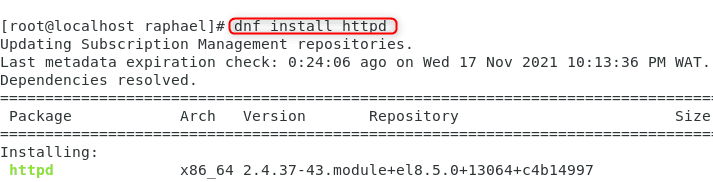
So as you can see you all you need do is just type dnf in place of where you used to type yum
#apt install <package name>e.g apt install nmap

#dnf upradge <package name >For example, dnf upgrade nmap
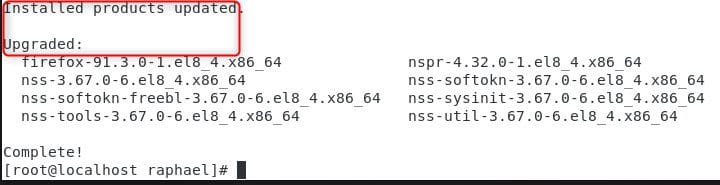
#apt upgrade <package name >e.g apt upgrade nmap
dnf search httpd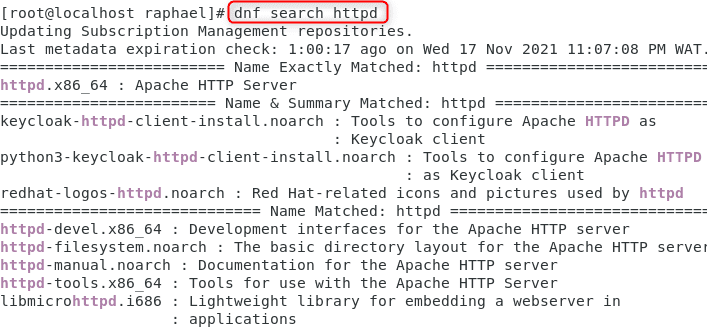
Interesting differences between DNF & APT
| DNF | APT |
| Dandified Yum | Advanced Package Tool |
| works with .rpm package format | works with .deb package format |
| dnf is the front-end of RPM | apt is the front end of DPKG |
| dnf updates the repo lists automatically | apt update gets all information from configured source |
| dnf is used in RHEL, Fedora, CentOS, and other derivatives pf RHEL | apt is used in Debian and all its derivatives like Ubuntu, Knoppix, etc. |
| can download and install from URLs directly | cannot download and install from URLs directly, it needs .deb packages |
| doesn’t support one-click installs | supports one-click install |
| dnf remove <software name> | apt remove <software name> |
| dnf upgrade | apt upgrade |
| dnf was first introduced in Fedora in the year 2013 | first stable version of apt was released in the year 2014 |
Summary
In conclusion, Dnf and apt are package managers as they help with the update, installation, and removal of packages. These two package managers, being the most popular, basically mimic eachother’ss most essential syntactical elements, allowing transitioning between them a breeze.


