Skip to content

TechDirectArchive

Hands-on IT, Cloud, Security & DevOps Insights

  • Home
  • About
  • Advertise With US
  • Reviews
  • Contact
  • Toggle search form
Home » AWS/Azure/OpenShift » How to use GitHub as Source Provider for AWS CodePipeline
  • Feature image
    When Should I Use TPM or TPM + PIN Security | Vulnerability Scans and Assessment
  • Veeam Plugin update for Proxmox
    Update Veeam Backup for Proxmox Plugin to support PVE 9.0 Backup
  • AWS Budget
    How to manage costs with AWS Budgets AWS/Azure/OpenShift
  • copy and paste between host machines and VirtualBox VM
    How to copy and paste between host machines and VirtualBox VM Virtualization
  • screenshot 2020 04 27 at 13.30.17
    What are the differences between a Role and a Feature Windows Server
  • hero windowsadmincenter
    How to set up Windows Admin Center on a Windows Server Windows Server
  • veeamONE integration with VBR
    Install Veeam ONE and Add VBR: Fix failed to connect to VBR Backup
  • banner
    How to Back Up and Restore the Windows Registry Windows

How to use GitHub as Source Provider for AWS CodePipeline

Posted on 28/04/202321/11/2023 Temitope Odemo By Temitope Odemo No Comments on How to use GitHub as Source Provider for AWS CodePipeline
banner2-1

GitHub is a very popular tool among programmers and is best used as a facilitating project management and collaborative tool. GitHub serves as a code repository for billions of lines of code. Developers can store or push code from GitHub, but in this guide, I will be showing you how to use GitHub as Source Provider for AWS CodePipeline instead of using AWS CodeCommit or Amazon S3 as the source provider. Please see How to Integrate Jira Software with GitHub Cloud, and How to Deploy GitHub Repositories to cPanel using GitHub Actions.

You can also read about how you can Set Up a Continuous Deployment Pipeline Using AWS CodePipeline, How to use Command-Line on Git Bash and GitHub Desktop to PUSH local code to GitHub and How to Deploy Code from GitHub to Azure App Service from the Command-line. Here is a YouTube video on how to use GitHub as Source Provider for AWS CodePipeline.

Steps to Make GitHub a Source Provider to AWS

1: Open your AWS Account. 2: Launch the CodePipeline and create a new Pipeline.
3. On the Add Source stage page, select the location of the source you selected and follow the steps below:

Create-pipeline-1
Creating Pipeline

4. Select GitHub (Version 2) for the Source provider.

GitHub-version-2
The Add source stage section

5. Click Connect to GitHub or select an existing connection that you have already configured or create a new one and then return to this task.

Connect-to-GitHub
Connect to GitHub

Create GitHub App Connection

6. On the Create GitHub App Connection section enter the Connection name and click on Connect to GitHub.
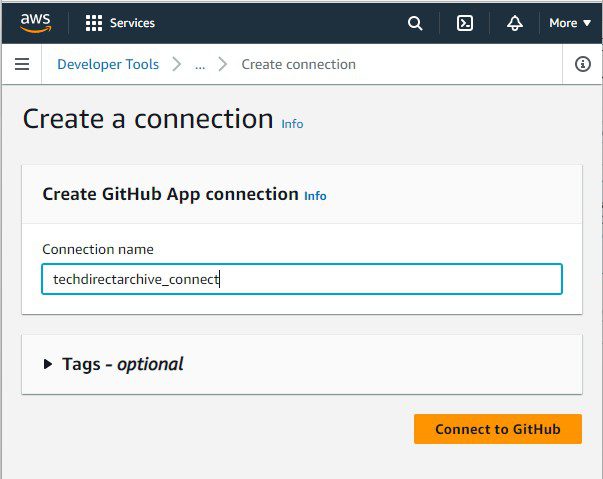
GitHub-App-connection
Create GitHub App Connection

7. Authorize AWS to connect to GitHub by clicking on AWS Connector for GitHub.

AWS-Connector-for-GitHub
AWS Connector for GitHub

8. You will be redirected to a connection screen, click Install a new app.
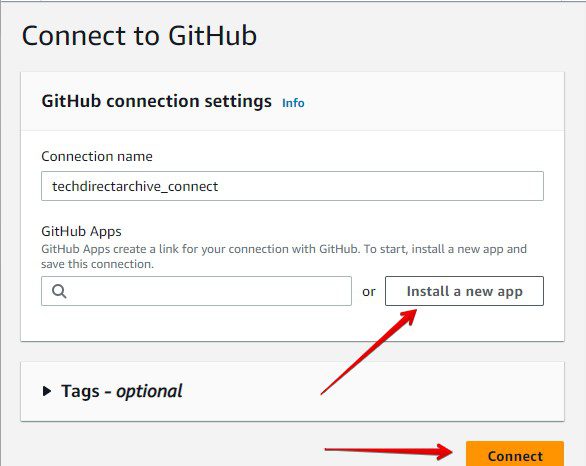
GitHub-Connection
Installing a new App

9. On the Install AWS Connector for GitHub page select the Github account you need and click Install. On the next page select the repository you want to connect to your Pipeline, click install and confirm access.

Select-Repository
Installing AWS Connector for GitHub

Please see How to clone a repository and install software from GitHub on Windows, Azure DevOps and GitHub integration for Docker and Kubernetes deployment, and how to Create an App Service Plan with Continuous Deployment to deploy a .NET Application from GitHub.

Connect to the GitHub page

10. On the Connect to GitHub page, click Connect.

GitHub-Connection2
GitHub connection settings

11.  Immediately after the GitHub connection is successful, the Add source page will be updated and you will now see Ready to Connect.

The next thing to do is to specify the repository and branch. Select CodePipeline default and click next to continue with the Setup of a Continuous Deployment Pipeline with AWS CodePipeline.

GitHub-Connection-Ready-1
GitHub Connection ready to connect

I hope you found this blog post on how to use GitHub as Source Provider for AWS CodePipeline Interesting and helpful. In case you have any questions do not hesitate to ask in the comment section.

Rate this post

Thank you for reading this post. Kindly share it with others.

  • Click to share on X (Opens in new window) X
  • Click to share on Reddit (Opens in new window) Reddit
  • Click to share on LinkedIn (Opens in new window) LinkedIn
  • Click to share on Facebook (Opens in new window) Facebook
  • Click to share on Pinterest (Opens in new window) Pinterest
  • Click to share on Tumblr (Opens in new window) Tumblr
  • Click to share on Telegram (Opens in new window) Telegram
  • Click to share on WhatsApp (Opens in new window) WhatsApp
  • Click to share on Pocket (Opens in new window) Pocket
  • Click to share on Mastodon (Opens in new window) Mastodon
  • Click to share on Bluesky (Opens in new window) Bluesky
  • Click to share on Threads (Opens in new window) Threads
  • Click to share on Nextdoor (Opens in new window) Nextdoor
AWS/Azure/OpenShift Tags:AWS, Github, Repository

Post navigation

Previous Post: Setup a Continuous Deployment Pipeline with AWS CodePipeline
Next Post: Configure Windows LAPS Management with Microsoft Intune

Related Posts

  • insufficientaccessright 1
    Azure AD Connect Permission issue: Error 8344 insufficient access rights to perform the operation AWS/Azure/OpenShift
  • banner
    Various ways to restart an AWS EC2 instance AWS/Azure/OpenShift
  • Simple Notification Service AWS SNS
    Create Simple Notification Service (SNS) Notification on AWS AWS/Azure/OpenShift
  • elastic ip association error screen
    Fix Elastic IP Address Could not be Associated AWS/Azure/OpenShift
  • WCD
    Join Bulk Devices using a Provisioning Package to Azure AWS/Azure/OpenShift
  • amazon ec2 multiple ips 1
    What to note before assigning Multiple IPs’ to an Instance AWS/Azure/OpenShift

More Related Articles

insufficientaccessright 1 Azure AD Connect Permission issue: Error 8344 insufficient access rights to perform the operation AWS/Azure/OpenShift
banner Various ways to restart an AWS EC2 instance AWS/Azure/OpenShift
Simple Notification Service AWS SNS Create Simple Notification Service (SNS) Notification on AWS AWS/Azure/OpenShift
elastic ip association error screen Fix Elastic IP Address Could not be Associated AWS/Azure/OpenShift
WCD Join Bulk Devices using a Provisioning Package to Azure AWS/Azure/OpenShift
amazon ec2 multiple ips 1 What to note before assigning Multiple IPs’ to an Instance AWS/Azure/OpenShift

Leave a Reply Cancel reply

You must be logged in to post a comment.

Microsoft MVP

VEEAMLEGEND

vexpert-badge-stars-5

Virtual Background

GoogleNews

Categories

veeaam100

sysadmin top30a
 
  • Feature image
    When Should I Use TPM or TPM + PIN Security | Vulnerability Scans and Assessment
  • Veeam Plugin update for Proxmox
    Update Veeam Backup for Proxmox Plugin to support PVE 9.0 Backup
  • AWS Budget
    How to manage costs with AWS Budgets AWS/Azure/OpenShift
  • copy and paste between host machines and VirtualBox VM
    How to copy and paste between host machines and VirtualBox VM Virtualization
  • screenshot 2020 04 27 at 13.30.17
    What are the differences between a Role and a Feature Windows Server
  • hero windowsadmincenter
    How to set up Windows Admin Center on a Windows Server Windows Server
  • veeamONE integration with VBR
    Install Veeam ONE and Add VBR: Fix failed to connect to VBR Backup
  • banner
    How to Back Up and Restore the Windows Registry Windows

Subscribe to Blog via Email

Enter your email address to subscribe to this blog and receive notifications of new posts by email.

Join 1,841 other subscribers
  • RSS - Posts
  • RSS - Comments
  • About
  • Authors
  • Write for us
  • Advertise with us
  • General Terms and Conditions
  • Privacy policy
  • Feedly
  • Telegram
  • Youtube
  • Facebook
  • Instagram
  • LinkedIn
  • Tumblr
  • Pinterest
  • Twitter
  • mastodon

Tags

AWS Azure Bitlocker Microsoft Windows PowerShell WDS Windows 10 Windows 11 Windows Deployment Services Windows Server 2016

Copyright © 2025 TechDirectArchive


Loading Comments...
 

You must be logged in to post a comment.