Skip to content

TechDirectArchive

Hands-on IT, Cloud, Security, Veeam & DevOps

  • Home
  • About
  • Advertise With US
  • Reviews
  • Contact
  • Toggle search form

Azure Application Gateway: Practical Configuration Guide

Posted on 02/06/202623/06/2026 Link State By Link State No Comments on Azure Application Gateway: Practical Configuration Guide
  1. Home
  2. AWS/Azure/OpenShift
  3. Azure Application Gateway: Practical Configuration Guide
Banner App GW 1

In this article, we shall discuss “Azure Application Gateway: Practical Configuration Guide”. This post provides a practical, real-world inspired walkthrough for configuring an Azure Application Gateway. The goal is to help engineers quickly understand how to design, name, and connect all required components for a production-ready setup. Please see Azure Managing Subscriptions with PowerShell: From Login-AzAccount to Resource Control and Private Endpoint Verification for Azure File Share”, and how to Assign a Public IP to Azure Virtual Machine (VM).

Architecture Overview

An Azure Application Gateway acts as a Layer 7 load balancer that routes traffic based on URL, host, or headers. Key components include:

  • Listener (entry point)
  • Backend Pool (target services)
  • Backend Settings (protocol, port, timeout)
  • Health Probe (availability check), and
  • Routing Rule (binding logic) Sample Request
01 Info App GW

Naming Convention Strategy

A consistent naming convention is critical for maintainability.

Standard format:
<service>.<project>.<country>.<suffix>

Examples:
- svc-alpha-resubmit.prjx.eu.listener
- svc-alpha-resubmit.prjx.eu.probe
- svc-alpha-resubmit.prjx.eu.rule

Step 0 – Choose the Application Gateway

Select the correct gateway instance where the configuration will be applied (e.g., AppGw-Main).
Tip: avoid duplicating gateways unless required for isolation or performance.

Please see Azure Arc for SQL Server PAYG: Installation, Connectivity Requirements and Operational Best Practices, and how to Fix Vulnerable Veeam Backup and Replication 13.0.1.2067 and Earlier.

Step 1 – Backend Pool

Create or reuse a backend pool.

  • Define target VMs or services by IP
  • Ensure network connectivity (NSG, routing)
  • Group services logically

In this case, it is not necessary; it already exists. If it needs to be created, the client must specify the destination VMs, which must then be identified by their IP addresses.

02 Backend

Please see how to Integrate Trellix ePolicy Orchestrator with a Syslog Server, Veeam Backup and Replication: PowerShell must be Remote Signed, and how to Prevent Automatic Driver Updates in Windows and Xen-Orchestra.

Step 2 – Listener

Decide on the ‘standard names’ to be used for new items: to construct the ‘standard name’, you will need the three columns ‘Service’, ‘Prj’ and “Country”

These ‘standard names’ will be followed by the suffixes of the objects created (.listener, .probe, etc.)

Create a listener to accept incoming traffic.

  • Bind hostname (if needed)
  • Use HTTPS whenever possible
  • Follow naming convention
svc-alpha-resub.be.probe
svc-alpha-erp.be

Next, create the listener:

 add the suffix ‘.listener’ to the standard name:

03 Listner 1

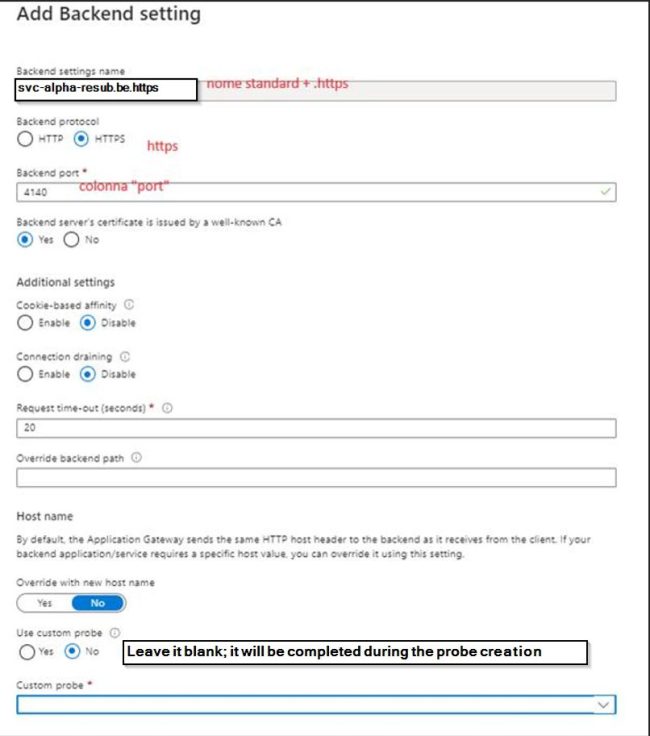
Step 3 – Backend Settings

Add the suffix ‘.https’ to the standard name. Define how traffic is forwarded:

  • Protocol (HTTP/HTTPS)
  • Port
  • Timeout
  • Cookie-based affinity (if needed)
04 Https Backend 1

Step 4 – Health Probe

add the suffix ‘.probe’ to the standard name. Configure a probe to monitor backend health:

  • Use specific endpoint (not just ‘/’)
  • Match expected HTTP codes
  • Tune interval and timeout
05 Probe

Please see Switch from IP Addresses to DNS for Backup Infrastructure in VBR, how to remove a Repository from Veeam Backup and Replication, and how to Update Veeam Backup & Replication to Build 13.0.1.2067.

Step 5 – Routing Rule

add the suffix ‘.rule’ to the standard name. Create the rule that connects everything:

  • Listener → Backend Pool → Settings → Probe
  • Validate routing priority and specificity
06 Rules
07 Rules Listner

Best Practices

– Always use HTTPS with valid certificates
– Prefer dedicated health endpoints (e.g., /health)
– Avoid overly generic probes
– Use clear, consistent naming
– Monitor with Azure metrics and logs
– Apply WAF if exposed externally

Troubleshooting Tips

– 502 errors often indicate backend unreachable or probe failure
– Check NSG and routing rules first
– Verify probe path returns expected status code
– Use Azure diagnostics logs for deeper analysis

Thank you for reading this post. Kindly share it with others.

  • Share on X (Opens in new window) X
  • Share on Reddit (Opens in new window) Reddit
  • Share on LinkedIn (Opens in new window) LinkedIn
  • Share on Facebook (Opens in new window) Facebook
  • Share on Pinterest (Opens in new window) Pinterest
  • Share on Tumblr (Opens in new window) Tumblr
  • Share on Telegram (Opens in new window) Telegram
  • Share on WhatsApp (Opens in new window) WhatsApp
  • Share on Mastodon (Opens in new window) Mastodon
  • Share on Bluesky (Opens in new window) Bluesky
AWS/Azure/OpenShift Tags:Azure Application Gateway, Azure Application Gateway Best Practices, Azure Application Gateway Configuration, Azure Application Gateway Deployment, Azure Application Gateway Load Balancer, Azure Application Gateway Practical Configuration, Azure Application Gateway Setup, Azure Application Gateway Tutorial, Azure Application Gateway WAF, Azure Networking, Azure security, Configure Azure Application Gateway Step by Step

Post navigation

Previous Post: Azure Managing Subscriptions with PowerShell: From Login-AzAccount to Resource Control and Private Endpoint Verification for Azure File Share”
Next Post: How to Repair a Corrupt SQL Server Database Without Data Loss

Related Posts

  • kubernetes
    Create and monitor Apps using the Azure Kubernetes Service manifest AWS/Azure/OpenShift
  • Azure Backup Copy 1
    How to Delete Backup Job in Recovery Services Vault AWS/Azure/OpenShift
  • image 166
    How to deploy a .NET application to AWS Elastic Beanstalk using AWS Tool Kit AWS/Azure/OpenShift
  • Continuous Deployment Pipeline Using AWS CodePipeline
    Setup a Continuous Deployment Pipeline with AWS CodePipeline AWS/Azure/OpenShift
  • Bulk operations in Azure AD
    Perform Bulk User Operations in Azure AD AWS/Azure/OpenShift
  • keyvault
    How To Use Azure Key Vault Secrets in Azure Pipelines AWS/Azure/OpenShift

More Related Articles

kubernetes Create and monitor Apps using the Azure Kubernetes Service manifest AWS/Azure/OpenShift
Azure Backup Copy 1 How to Delete Backup Job in Recovery Services Vault AWS/Azure/OpenShift
image 166 How to deploy a .NET application to AWS Elastic Beanstalk using AWS Tool Kit AWS/Azure/OpenShift
Continuous Deployment Pipeline Using AWS CodePipeline Setup a Continuous Deployment Pipeline with AWS CodePipeline AWS/Azure/OpenShift
Bulk operations in Azure AD Perform Bulk User Operations in Azure AD AWS/Azure/OpenShift
keyvault How To Use Azure Key Vault Secrets in Azure Pipelines AWS/Azure/OpenShift

Leave a Reply Cancel reply

You must be logged in to post a comment.

Microsoft MVP

vexpert-badge-stars-5

Virtual Background

VEEAMLEGEND

Categories

veeaam100

Veeam Vanguard

  • delete5
    How to Delete Diagnostic Data in Windows 10 and Windows 11 Windows
  • tsx
    Error Code: 0x80070035: MDT unable to access the Log share, the Network Path was not found Windows
  • Mimikatz hacktool Trillix
    Windows Defender detects Endpoint Security HipHandlers.dll Security | Vulnerability Scans and Assessment
  • 1 WeXxkEX0JG3oB781HD8Hrg 3
    Fix Access denied to the hard drive, and the security tab missing under properties Windows Server
  • featured image
    How to Add or Remove Sites from Favorites list in Microsoft Edge Windows
  • Featured image Some Settings are managed by your organization
    How to Fix “Some Settings Are Managed by Your Organization” Error in Windows Update Windows
  • settings app not working featured 800x400 1
    Disable or Remove Kiosk Mode Via the Local Settings Windows
  • macos app switcher shortcuts
    How to enable or disable automatic software updates on Mac Mac

Subscribe to Blog via Email

Enter your email address to subscribe to this blog and receive notifications of new posts by email.

Join 1,752 other subscribers
  • RSS - Posts
  • RSS - Comments
  • About
  • Authors
  • Write for us
  • Contact
  • Advertise with us
  • General Terms and Conditions
  • Privacy policy
  • Feedly
  • Telegram
  • Youtube
  • Facebook
  • Instagram
  • LinkedIn
  • Tumblr
  • Pinterest
  • Twitter
  • mastodon
  • Bsky

Tags

Active Directory Azure Bitlocker Microsoft Windows PowerShell WDS Windows 10 Windows 11 Windows Deployment Services Windows Server 2016

Copyright © 2026 TechDirectArchive

Loading Comments...

You must be logged in to post a comment.