Skip to content

TechDirectArchive

Hands-on IT, Cloud, Security & DevOps Insights

  • Home
  • About
  • Advertise With US
  • Reviews
  • Contact
  • Toggle search form
Home » Windows Server » Fix the following error occurred when DNS was queried for the service location
  • Various Msiexec.exe Command Line Switches
    Various Msiexec.exe Command Line Switches Windows Server
  • fix Client Certificate Mapping Authentication error
    How to fix Client Certificate Mapping Authentication error Backup
  • Setup FSx File System 1
    Create and mount FSx File System: Join EC2 instance to AWS Managed AD AWS/Azure/OpenShift
  • Screenshot 2020 06 22 at 23.27.40
    How to fix unable to install msodbcsql17 tool on Ubuntu Oracle/MSSQL/MySQL
  • teams feature
    How to install and configure Microsoft Teams on Ubuntu Linux
  • zabbix
    Monitoring services using Zabbix Linux
  • download9
    Change the default Save and Download Location in Windows Windows
  • Slide1 4
    How to create and configure a Shared Folder on Windows Server Windows Server

Fix the following error occurred when DNS was queried for the service location

Posted on 28/07/202024/04/2023 Christian By Christian No Comments on Fix the following error occurred when DNS was queried for the service location

A DNS query (also known as a DNS request) is a demand for information sent from a user’s computer (DNS client) to a DNS server. When prompted with the following error as shown below. In this guide, I will show you how to fix “the following error occurred when DNS was queried for the service location (SRV) resource record used to locate an Active Directory Domain Controller (AD DS) for domain: Error code 0x0000232B RCODE_NAME_ERROR”. Please see the following guides: DNS: Unable to register a client to Domain, How to find disabled Active Directory User accounts, how to fix WinRM cannot process the request: The following error occurred while using Kerberos authentication, cannot find the computer.
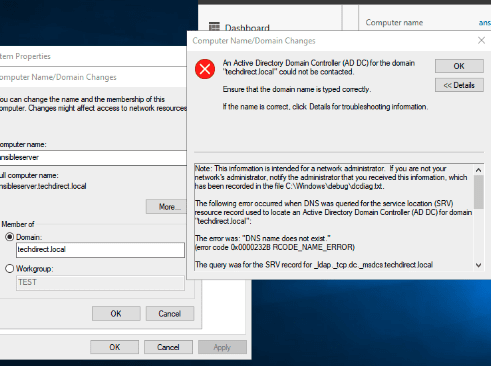
This is a DNS issue, no doubt! Use this guide for the different types of DNS records. When you search on the internet, you may find conflicting tips. In my environment, here are some tips I followed to resolve this issue.

Please see these exciting articles: Domain Name System: How to create a DNS record. How to fix DNS Bad key 9017: The Cluster Name registration failed of one or more associated DNS names. And how to enable God Mode via PowerShell, CLI and GUI.

Resolve Error for “DNS was queried for the service location (SRV)”

Here are  my recommendations below

1: Ensure the client(s) IP parameters (preferred DNS Server) set on the client machine points to the DNS points to internal DNS servers as DNS servers. See a similar error “The following errors occurred attempting to join the domain: The specified domain either does not exist or could not be contacted“.

As you can see, it was pointing to a wrong IP Address (gateway).
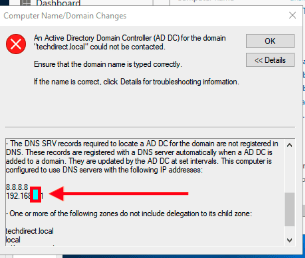
Therefore, I will have to corrected the information.


2: Ensure the DNS server has the right IP address of itself populated for all zones and records. A similar idea was used in resolving this issue “How to fix nslookup unknown: cannot find non-existent domain“.

After ensuring the above two recommendations are met, flush the DNS cache and registered the DNS again using the command below on the DNS server and restart the DNS and netlogon service. You can optionally restart your DNS server. for other DNS troubleshooting parameters, see this link.

ipconfig /registerdns
net stop netlogon
net start netlogon

Now, you should e able to join your device to the domain as shown below. For how to set up a domain, see the following link. Also for how to add a second DC, see the following link. For how to join a PC to a Domain, see the following link.

Note: You will be prompted to restart your device as shown below. Proceed and have it restarted.

I hope you found this blog post helpful on how to fix the following error occurred when DNS was queried for the service location”. If you have any questions, please let me know in the comment session.

Rate this post

Thank you for reading this post. Kindly share it with others.

  • Share on X (Opens in new window) X
  • Share on Reddit (Opens in new window) Reddit
  • Share on LinkedIn (Opens in new window) LinkedIn
  • Share on Facebook (Opens in new window) Facebook
  • Share on Pinterest (Opens in new window) Pinterest
  • Share on Tumblr (Opens in new window) Tumblr
  • Share on Telegram (Opens in new window) Telegram
  • Share on WhatsApp (Opens in new window) WhatsApp
  • Share on Pocket (Opens in new window) Pocket
  • Share on Mastodon (Opens in new window) Mastodon
  • Share on Bluesky (Opens in new window) Bluesky
  • Share on Threads (Opens in new window) Threads
  • Share on Nextdoor (Opens in new window) Nextdoor
Windows Server Tags:DNS, DNSRecord, Domain, Domain Controller, FQDN, Windows Server 2016

Post navigation

Previous Post: The following errors occurred attempting to join the domain: The specified domain either does not exist or could not be contacted
Next Post: How to fix “Unable to Sign In: Domain Not Available”

Related Posts

  • Database Connection Stuck on Working on it
    How to fix TeamPass stuck on working on it Network | Monitoring
  • featured 2 2
    Clone a repository and install software from GitHub on Windows Windows Server
  • 2022 1
    Install Windows Server 2022 on VirtualBox Network | Monitoring
  • WSUS Post deployment Configuration Failed
    The schema version of the database is from a newer version of wsus Windows Server
  • Windows Server 2016 1 1
    Merits and demerits of Local System Account and Service Logon Account Windows Server
  • Screenshot 2021 01 22 at 23.27.30
    How does Bitlocker Network Unlock work? Windows Server

More Related Articles

Database Connection Stuck on Working on it How to fix TeamPass stuck on working on it Network | Monitoring
featured 2 2 Clone a repository and install software from GitHub on Windows Windows Server
2022 1 Install Windows Server 2022 on VirtualBox Network | Monitoring
WSUS Post deployment Configuration Failed The schema version of the database is from a newer version of wsus Windows Server
Windows Server 2016 1 1 Merits and demerits of Local System Account and Service Logon Account Windows Server
Screenshot 2021 01 22 at 23.27.30 How does Bitlocker Network Unlock work? Windows Server

Leave a Reply Cancel reply

You must be logged in to post a comment.

Microsoft MVP

VEEAMLEGEND

vexpert-badge-stars-5

Virtual Background

GoogleNews

Categories

veeaam100

sysadmin top30a

  • Various Msiexec.exe Command Line Switches
    Various Msiexec.exe Command Line Switches Windows Server
  • fix Client Certificate Mapping Authentication error
    How to fix Client Certificate Mapping Authentication error Backup
  • Setup FSx File System 1
    Create and mount FSx File System: Join EC2 instance to AWS Managed AD AWS/Azure/OpenShift
  • Screenshot 2020 06 22 at 23.27.40
    How to fix unable to install msodbcsql17 tool on Ubuntu Oracle/MSSQL/MySQL
  • teams feature
    How to install and configure Microsoft Teams on Ubuntu Linux
  • zabbix
    Monitoring services using Zabbix Linux
  • download9
    Change the default Save and Download Location in Windows Windows
  • Slide1 4
    How to create and configure a Shared Folder on Windows Server Windows Server

Subscribe to Blog via Email

Enter your email address to subscribe to this blog and receive notifications of new posts by email.

Join 1,832 other subscribers
  • RSS - Posts
  • RSS - Comments
  • About
  • Authors
  • Write for us
  • Advertise with us
  • General Terms and Conditions
  • Privacy policy
  • Feedly
  • Telegram
  • Youtube
  • Facebook
  • Instagram
  • LinkedIn
  • Tumblr
  • Pinterest
  • Twitter
  • mastodon

Tags

AWS Azure Bitlocker Microsoft Windows PowerShell WDS Windows 10 Windows 11 Windows Deployment Services Windows Server 2016

Copyright © 2025 TechDirectArchive


Loading Comments...
 

You must be logged in to post a comment.