Skip to content

TechDirectArchive

Hands-on IT, Cloud, Security & DevOps Insights

  • Home
  • About
  • Advertise With US
  • Reviews
  • Contact
  • Toggle search form
Home » Linux » Deploying a load balancer from scratch and adding backend servers
  • Header image
    How to setup a Third-Party DNS Server on a Linux Server Linux
  • Capture 91
    How to install IIS Web Server on Windows Server Web Server
  • WDSMDT
    What are the differences between MDT and WDS Windows Server
  • S3 Bucket Replication
    Set up Cross-Region Replication for S3 Buckets AWS/Azure/OpenShift
  • feature image app services
    How to Migrate Azure Web Apps AWS/Azure/OpenShift
  • VMware Tech Showcase
    Great details on VMware Tech Showcase Virtualization
  • feature photo terraform
    How to install Amazon RDS using Terraform Linux
  • Group Policy Error
    How to Fix Failed to open the Group Policy Object on this Computer Windows

Deploying a load balancer from scratch and adding backend servers

Posted on 24/09/202121/03/2024 Dickson Victor By Dickson Victor No Comments on Deploying a load balancer from scratch and adding backend servers
load balancer

Load balancing is a key and Major part of IT infrastructure and this is because the High availability and efficient performance of webservers are very important. The purpose of load balancing is to prevent a server from being overloaded and maintain healthy servers by balancing incoming requests. Please see Setup Public Load Balancer in Azure, How to create a load balancer for Azure Stack Hub, and How to Configure Network Load Balancing In Windows Server

A Load Balancer is available, reliable, and highly scalable web application. Furthermore, In this tutorial, I will deploy one Haproxy server and 2 backend servers in a Lab environment. However, in a subsequent post, I will show how to configure, deploy and troubleshoot an ELB on cloud platforms.

NOTE: All deployments are done on CentOS 8.

Also, see Installing and configuring SimpleSAMLphp [Part 2], and How to create an EC2 Instance.

Installing and configuring HAproxy

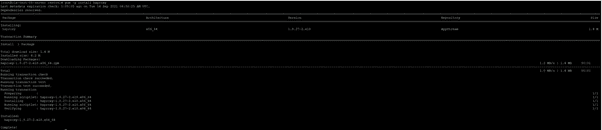
Yum -y install Haproxy
backend servers

NOTE: Back up the default config file, should anything go wrong, we can revert.

mv /etc/haproxy/haproxy.cfg /etc/haproxy/haproxy.cfg-bak

create a new haproxy config file and paste the following

vim /etc/haproxy/haproxy.cfg
#———————————————————————
global
log 127.0.0.1 local2
chroot /var/lib/haproxy
pidfile /var/run/haproxy.pid
maxconn 4000
user haproxy
group haproxy
daemon
# turn on stats unix socket
stats socket /var/lib/haproxy/stats
# utilize system-wide crypto-policies
ssl-default-bind-ciphers PROFILE=SYSTEM
ssl-default-server-ciphers PROFILE=SYSTEM
#———————————————————————
defaults
mode http
log global
option httplog
option dontlognull
option http-server-close
option forwardfor except 127.0.0.0/8
option redispatch
retries 3
timeout http-request 10s
timeout queue 1m
timeout connect 10s
timeout client 1m
timeout server 1m
timeout http-keep-alive 10s
timeout check 10s
maxconn 3000
# main frontend which proxys to the backends
frontend haproxy_balancer # define the name of the frontend.
bind 192.168.0.10:80 # IP address of HAProxy server
option http-server-close
option forwardfor
stats uri /haproxy?stats # Specify the HAProxy status page.
default_backend webservers
# round robin balancing between the various backends
backend webservers # Specify a name for identifying an application
mode http
balance roundrobin # defines the roundrobin load balancer scheduling algorithm
option httpchk HEAD / HTTP/1.1\r\nHost:\ localhost
server nginx-web1 192.168.0.11:80 check # IP address of the first backend server
server nginx-web2 192.168.0.12:80 check # IP address of the second backend server

NOTE: Kindly change the Mode and the server IPs as specified based on your configurations

Test the configuration for errors

haproxy -c -f /etc/haproxy/haproxy.cfg
deployment

Start and Enable the Haproxy service

scratch

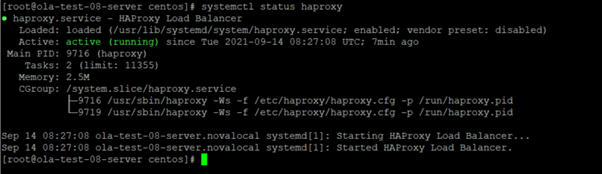
Checking the HAproxy status

load balancer

Open the Web Url of your front end server

Screenshot-2021-09-24-at-13.46.25

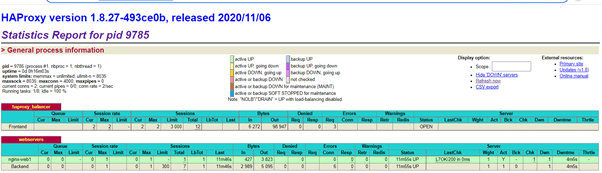
Check Statistics and status of Haproxy
load balancer

Now you can keep adding backend servers.

NOTE: When deploying a load balancer from scratch, ensure that backend servers have Nginx installed. Additionally, confirm the availability and firewall permissions for the backend port.

I hope you found this blog post on Deploying a load balancer from scratch and adding backend servers helpful. Please let me know in the comment session if you have any questions.

Rate this post

Thank you for reading this post. Kindly share it with others.

  • Share on X (Opens in new window) X
  • Share on Reddit (Opens in new window) Reddit
  • Share on LinkedIn (Opens in new window) LinkedIn
  • Share on Facebook (Opens in new window) Facebook
  • Share on Pinterest (Opens in new window) Pinterest
  • Share on Tumblr (Opens in new window) Tumblr
  • Share on Telegram (Opens in new window) Telegram
  • Share on WhatsApp (Opens in new window) WhatsApp
  • Share on Pocket (Opens in new window) Pocket
  • Share on Mastodon (Opens in new window) Mastodon
  • Share on Bluesky (Opens in new window) Bluesky
  • Share on Threads (Opens in new window) Threads
  • Share on Nextdoor (Opens in new window) Nextdoor
Linux Tags:deployment

Post navigation

Previous Post: Exchange Recovery: Repair EDB Files and Recover Mailboxes
Next Post: Delivering System Utilization Report on a Linux based OS

Related Posts

  • ntp server testen
    Enable or disable Linux System’s Clock Sync with NTP Server Linux
  • DNS FEATURE
    Domain Name System: All you need to know about DNS Linux
  • Screenshot 2021 02 05 at 22.40.51
    Disable automatic screen lock on Ubuntu Desktop Linux
  • Webp.net resizeimage 1
    Automate Infrastructure Deployments in the Cloud with Ansible and Azure Pipelines AWS/Azure/OpenShift
  • screenshot 2020 05 05 at 22.42.35
    How to run Windows applications on Linux via WineHQ Linux
  • Screenshot 2020 05 14 at 17.47.09
    Configure OpenSSH Server: A Quick Guide Linux

More Related Articles

ntp server testen Enable or disable Linux System’s Clock Sync with NTP Server Linux
DNS FEATURE Domain Name System: All you need to know about DNS Linux
Screenshot 2021 02 05 at 22.40.51 Disable automatic screen lock on Ubuntu Desktop Linux
Webp.net resizeimage 1 Automate Infrastructure Deployments in the Cloud with Ansible and Azure Pipelines AWS/Azure/OpenShift
screenshot 2020 05 05 at 22.42.35 How to run Windows applications on Linux via WineHQ Linux
Screenshot 2020 05 14 at 17.47.09 Configure OpenSSH Server: A Quick Guide Linux

Leave a Reply Cancel reply

You must be logged in to post a comment.

Microsoft MVP

VEEAMLEGEND

vexpert-badge-stars-5

Virtual Background

GoogleNews

Categories

veeaam100

sysadmin top30a

  • Header image
    How to setup a Third-Party DNS Server on a Linux Server Linux
  • Capture 91
    How to install IIS Web Server on Windows Server Web Server
  • WDSMDT
    What are the differences between MDT and WDS Windows Server
  • S3 Bucket Replication
    Set up Cross-Region Replication for S3 Buckets AWS/Azure/OpenShift
  • feature image app services
    How to Migrate Azure Web Apps AWS/Azure/OpenShift
  • VMware Tech Showcase
    Great details on VMware Tech Showcase Virtualization
  • feature photo terraform
    How to install Amazon RDS using Terraform Linux
  • Group Policy Error
    How to Fix Failed to open the Group Policy Object on this Computer Windows

Subscribe to Blog via Email

Enter your email address to subscribe to this blog and receive notifications of new posts by email.

Join 1,836 other subscribers
  • RSS - Posts
  • RSS - Comments
  • About
  • Authors
  • Write for us
  • Advertise with us
  • General Terms and Conditions
  • Privacy policy
  • Feedly
  • Telegram
  • Youtube
  • Facebook
  • Instagram
  • LinkedIn
  • Tumblr
  • Pinterest
  • Twitter
  • mastodon

Tags

AWS Azure Bitlocker Microsoft Windows PowerShell WDS Windows 10 Windows 11 Windows Deployment Services Windows Server 2016

Copyright © 2025 TechDirectArchive


Loading Comments...
 

You must be logged in to post a comment.