Skip to content

TechDirectArchive

Hands-on IT, Cloud, Security & DevOps Insights

  • Home
  • About
  • Advertise With US
  • Reviews
  • Contact
  • Toggle search form
Home » Linux » How to install Googler on a Linux System
  • download
    How to import Users and Groups into Pleasant Password Manager Password Manager
  • images 8
    Microsoft Direct Access: Now Always On VPN Windows Server
  • Server Manager
    How to reinstall Server Manager and disable Server Manager at startup for all users and login users Windows Server
  • servicechannels3 1
    Long Term Servicing Branch vs Semi-Annual Channel Windows
  • image 28
    How to monitor your website uptime and status using Uptime Configuration Management Tool
  • erroradkupdate
    An error has occurred in the script on this page: HTA applications report a Script error after upgrading to ADK for Windows 11, version 22H2 Windows Server
  • Netstat
    Network statistics: How to save netstat command output to a text Web Server
  • wac
    Fix Windows Admin Center cannot be reached Windows

How to install Googler on a Linux System

Posted on 31/10/202231/07/2023 Raphael Gab-Momoh By Raphael Gab-Momoh No Comments on How to install Googler on a Linux System
Gfeature

The Googler command-line utility is used to open various movies, navigate to various URLs, and also to browse news. It is a robust open-source tool for performing Google searches, Googler is also Python-reliant, so before downloading it, check sure Python is up to date on your operating system. In this article, we shall be looking at how to install Googler on your Linux machine.

Find other useful articles here: How to Install and use Minikube on a Linux System and How to launch a free WordPress test site with TasteWP? and How to Perform Load Test on Mobile App using Apache JMeter installed on your Windows System also How to install Redis on a Linux System

Prerequisites for installing Googler on Linux

The following prerequisites are required in order to install Googler on Linux.

  1. A Linux machine especially Ubuntu ( the commands will work on any version from 18 and higher)
  2. Command line
  3. A user account with Sudo privileges.

Please also see How to use the Widgets feature on Windows 11, how to set a browser as default in Windows, and how To Install Google Cloud SDK on a Linux System.

Approach 1: Installation using the default repository

Ubuntu’s default repository contains the Googler package; to verify this, we will use the command to see if the package is present there.

apt show googler
googler-show
googler show

The information about the Googler package that is now available has been displayed; now, we will use the apt package manager to install the package:

sudo apt install googler -y
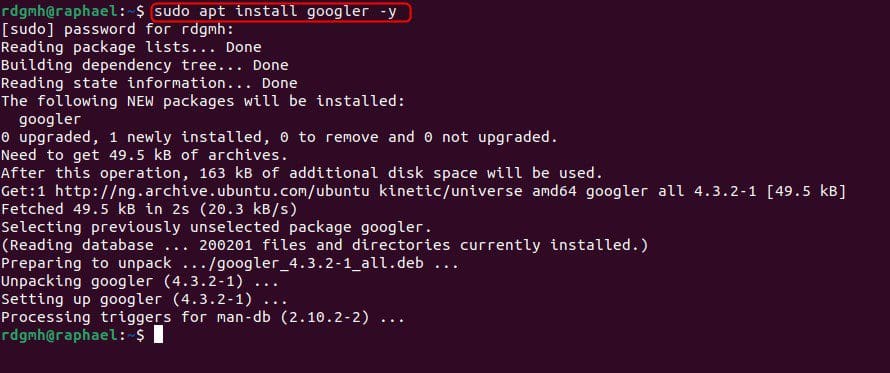
apt-install-g
apt install googler

Use the following command to check the installed version of Googler:

googler --version
gversion
Googler version

Using the command: once you install the package, we will use Googler to search for “clear.” or even “hello world”

googler clear
googler-clear
search result for the word “clear”

Use the following command to access the Googler manual to learn more about how to use Googler:

man googler
man-g
man googler

Use the following command to delete Googler from Ubuntu:

 sudo apt purge googler -y
delete-1
delete

Please also see how to make Cortana use your default web browser such as Google Chrome, and how to set a browser as default on macOS.

Approach 2: Install from Snapcraft

Googler can also be installed on Ubuntu by downloading the package as a snap from the Snapcraft store. We’ll use the following command to achieve this:

 sudo snap install googler
googler-1
installed from snap store

Using the snap utility, delete Googler:

sudo snap remove googler

Running the command successfully removed googler

googler-2

Summary: How to install Googler on a Linux System

Googler is Google’s command-line utility for searching for websites as well as browsing videos and news. You can learn how t install and use googler by following the steps laid out in the article.

I hope you found this blog post helpful on how to install Googler on a Linux System. Please let me know in the comment session if you have any questions.

Rate this post

Thank you for reading this post. Kindly share it with others.

  • Click to share on X (Opens in new window) X
  • Click to share on Reddit (Opens in new window) Reddit
  • Click to share on LinkedIn (Opens in new window) LinkedIn
  • Click to share on Facebook (Opens in new window) Facebook
  • Click to share on Pinterest (Opens in new window) Pinterest
  • Click to share on Tumblr (Opens in new window) Tumblr
  • Click to share on Telegram (Opens in new window) Telegram
  • Click to share on WhatsApp (Opens in new window) WhatsApp
  • Click to share on Pocket (Opens in new window) Pocket
  • Click to share on Mastodon (Opens in new window) Mastodon
  • Click to share on Bluesky (Opens in new window) Bluesky
  • Click to share on Threads (Opens in new window) Threads
  • Click to share on Nextdoor (Opens in new window) Nextdoor
Linux

Post navigation

Previous Post: Useful Tutorial on CBackup Software
Next Post: Find BIOS Serial Number and System Information on Windows 11

Related Posts

  • Screenshot 2022 04 13 at 21.38.35
    Check Weather Conditions via Command Line on Windows, macOS, Linux and Web Linux
  • Convert PEM to PPK 1
    Convert a PEM Key to a PPK Key on a Linux and Windows AWS/Azure/OpenShift
  • goland
    How to install Golang on a Linux System Linux
  • discorddd
    Discord Installation Guide for Linux System Linux
  • Screenshot 2024 02 28 at 11.17.41 PM
    GitHub Pages Deployment Guide Linux
  • centos feature
    How to change the system time zone under RedHat and CentOS Linux

More Related Articles

Screenshot 2022 04 13 at 21.38.35 Check Weather Conditions via Command Line on Windows, macOS, Linux and Web Linux
Convert PEM to PPK 1 Convert a PEM Key to a PPK Key on a Linux and Windows AWS/Azure/OpenShift
goland How to install Golang on a Linux System Linux
discorddd Discord Installation Guide for Linux System Linux
Screenshot 2024 02 28 at 11.17.41 PM GitHub Pages Deployment Guide Linux
centos feature How to change the system time zone under RedHat and CentOS Linux

Leave a Reply Cancel reply

You must be logged in to post a comment.

Microsoft MVP

VEEAMLEGEND

vexpert-badge-stars-5

Virtual Background

GoogleNews

Categories

veeaam100

sysadmin top30a
 
  • download
    How to import Users and Groups into Pleasant Password Manager Password Manager
  • images 8
    Microsoft Direct Access: Now Always On VPN Windows Server
  • Server Manager
    How to reinstall Server Manager and disable Server Manager at startup for all users and login users Windows Server
  • servicechannels3 1
    Long Term Servicing Branch vs Semi-Annual Channel Windows
  • image 28
    How to monitor your website uptime and status using Uptime Configuration Management Tool
  • erroradkupdate
    An error has occurred in the script on this page: HTA applications report a Script error after upgrading to ADK for Windows 11, version 22H2 Windows Server
  • Netstat
    Network statistics: How to save netstat command output to a text Web Server
  • wac
    Fix Windows Admin Center cannot be reached Windows

Subscribe to Blog via Email

Enter your email address to subscribe to this blog and receive notifications of new posts by email.

Join 1,840 other subscribers
  • RSS - Posts
  • RSS - Comments
  • About
  • Authors
  • Write for us
  • Advertise with us
  • General Terms and Conditions
  • Privacy policy
  • Feedly
  • Telegram
  • Youtube
  • Facebook
  • Instagram
  • LinkedIn
  • Tumblr
  • Pinterest
  • Twitter
  • mastodon

Tags

AWS Azure Bitlocker Microsoft Windows PowerShell WDS Windows 10 Windows 11 Windows Deployment Services Windows Server 2016

Copyright © 2025 TechDirectArchive


Loading Comments...
 

You must be logged in to post a comment.