Skip to content

TechDirectArchive

Hands-on IT, Cloud, Security & DevOps Insights

  • Home
  • About
  • Advertise With US
  • Reviews
  • Contact
  • Toggle search form
Home » Mac » Unable to Turn Bluetooth On or Off on Mac
  • Root
    Change your root password: Manage the root user on your macOS Mac
  • sysprep
    SysPrep was unable to validate your Windows Installation Virtualization
  • Dellupdate 1
    Fix for security vulnerabilities in the BIOS firmware for some Intel Processors Windows
  • IIS8
    How to add an account to the local IIS_IUSRS group Windows Server
  • ClamAV
    How to install and manage ClamAV and ClamTK on Ubuntu Linux Anti-Virus Solution
  • Cloud Infrastructure and Application Security Best Practices
    Hybrid Cloud Infrastructure and Application Security Best Practices Network | Monitoring
  • How to configure Azure container register with secured connection with container apps
    Configure Azure Container Registry for a secure connection with Azure Container Apps AWS/Azure/OpenShift
  • WCD
    Join Bulk Devices using a Provisioning Package to Azure AWS/Azure/OpenShift

Unable to Turn Bluetooth On or Off on Mac

Posted on 11/03/202311/03/2023 Christian By Christian No Comments on Unable to Turn Bluetooth On or Off on Mac
Turn-bluetooth-on-and-off

Bluetooth is one of the most popular wireless technologies that allow you to connect two or more devices to perform daily tasks with less hardware. With a wide range of possibilities, it’s completely up to you to decide how to use Bluetooth on Mac. But linking your computer to wireless keyboards, mice, trackpads, and speakers is a good place to start. It is used for exchanging data between fixed and mobile devices over short distances using UHF radio waves in the industrial, scientific and medical radio bands. In this troubleshooting guide, you will learn how to resolve the following issue “Unable to Turn Bluetooth On or Off on Mac”. Here are some guides you might be interested in: How to migrate Veeam MsSQL Database to a new MsSQL Server, and how to install Veeam Backup and Replication 11 Community Edition with a dedicated SQL Server.

If you wish to prevent interference on an aeroplane, or you do not want your Mac connecting to Bluetooth devices for some other reason due to security measures, the ability to completely turn Bluetooth off and on becomes very handy. But for some users, this is not the case as it does work correctly. Here are some related guides: Add Hardware and Peripherals: How to add a device to a Windows 10 Computer, and How to connect and remove Beoplay E8 3rd Generation to Mac.

Why is this issue “Unable to Turn Bluetooth On or Off on Mac” Present?

From the resolution, I assume that the Property List files (.plist file) were corrupted and this can affect Bluetooth connectivity. You can see from the image below, that there is no way to turn BlueTooth Off. This is what I tend to resolve in this article.

TurnBluetoothoff

Also, when you press the Shift + Option and click on the Bluetooth icon in the menu bar, you will also see the button is greyed out as shown below. You can also click on the Bluetooth Icon, and you would notice that the switch to turn it off or one is greyed out.

Bluetoothdiscoverabilityoff

What is a .plist file?

Preference and configuration files in macOS use property lists (plists) to specify the attributes, or properties, of an app or process. An example is the preferences .plist for the Finder in the Library/Preferences/ folder of a user’s home folder. The file is named com.apple.

The main macOS Bluetooth device cache is in the”/Library/Preferences/com.apple.Bluetooth.plist“. Due to corruption etc, you may have to delete the numerous Bluetooth .plist files. See the example below!

Note: Deleting this file “com.apple.Bluetooth.plist“ONLY will not resolve this issue as mentioned in this guide “Cannot open Bluetooth Preference Pane because it is not available on Mac“. Here are some interesting guides: how to migrate Veeam MsSQL Database to a new MsSQL Server, how to install Veeam Backup and Replication 11 Community Edition with a dedicated SQL Server, and How to create a dual-boot setup on Windows 11.

Solution: Delete the Bluetooth .plist files to resolve the Unable to Turn Bluetooth On or Off issue

Deleting Property List files which can sometimes become corrupted and stealthily affect Bluetooth connectivity. To remove the .plist files, please follow the steps below.

Choose Go from the Finder menu at the top of your screen and select “Go to Folder”.
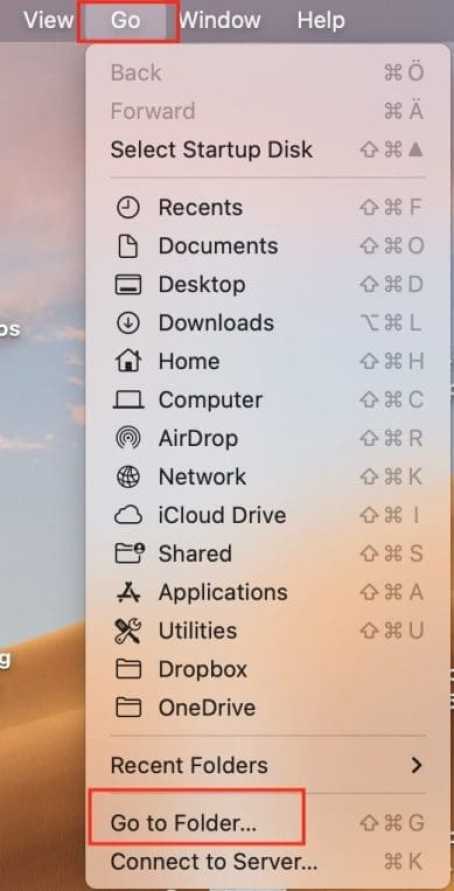
Go-Finder

Enter /Library/Preferences. Find the com.apple.Bluetooth.plist file and delete it

com.apple_.Bluetooth

Navigate back to the Finder Menu. This time, let me show you another step. Right-click on the Finder Menu and select “Go to Folder“. Click on Go to Folder.

Finder-menu

Type in Type in ~/Library/Preferences/ByHost and hit Enter! Find com.apple.Bluetooth.1111.plist file and delete it 

Bluetooth-plist-files

Upon selection, you will discover a lock that will be visible close to the Turn Bluetooth off button. Click on the lock and you will be prompted to enter your password.

Tuurn-Bluetooth-On-or-Off-Lock-on-Mac-1
Note: This fix did not require any restart! This might not be the case for you. Please shut down your Mac for a few minutes as it will automatically generate new .plist files, and this will resolve the issue "Unable to Turn Bluetooth On or Off on Mac".

Switch Bluetooth Off

Let’s switch Bluetooth off on Mac. To do this, just google the Bluetooth button or Click on Turn Bluetooth off as shown below. As you can see below, you will be able to Turn BlueTooth Off and On again as you wish 🙂

Optionstoswitchoffbluetoothnowpossibleonmac-1

Here is a guide on how to remove a Bluetooth device and connect a new Bluetooth device to Macbook, and how to fix Bluetooth not available on MacBook,

Switch Bluetooth On

Now, that we have switched Bluetooth off, let me show you how to enable or On it again. Just click on the Turn Bluetooth on the button or toggle the Bluetooth button On. Want to learn how to pair a third-party Bluetooth accessory with your iPhone or iPad, please see this link. This approach is similar to pairing your Macbook.

Switch-blueeth-on-on-mac

I hope you found this blog post on how to fix unable to Turn Bluetooth On or Off on Mac interesting and helpful. In case you have any questions do not hesitate to ask in the comment section.

Rate this post

Thank you for reading this post. Kindly share it with others.

  • Click to share on X (Opens in new window) X
  • Click to share on Reddit (Opens in new window) Reddit
  • Click to share on LinkedIn (Opens in new window) LinkedIn
  • Click to share on Facebook (Opens in new window) Facebook
  • Click to share on Pinterest (Opens in new window) Pinterest
  • Click to share on Tumblr (Opens in new window) Tumblr
  • Click to share on Telegram (Opens in new window) Telegram
  • Click to share on WhatsApp (Opens in new window) WhatsApp
  • Click to share on Pocket (Opens in new window) Pocket
  • Click to share on Mastodon (Opens in new window) Mastodon
  • Click to share on Bluesky (Opens in new window) Bluesky
  • Click to share on Threads (Opens in new window) Threads
  • Click to share on Nextdoor (Opens in new window) Nextdoor
Mac Tags:macOS Monterey, macOS Ventura

Post navigation

Previous Post: Force BitLocker Recovery mode: How to unlock BitLocker Protected Drive
Next Post: Disable modern standby on Windows 10 and 11

Related Posts

  • Root
    Change your root password: Manage the root user on your macOS Mac
  • image 10
    Change Visual Studio Code UI language JIRA|Confluence|Apps
  • macOS
    How to upgrade macOS Big Sur to macOS Monterey Mac
  • VirtualinstallationonMac
    How to install Oracle VirtualBox on a Mac device Mac
  • homebrew social card
    Package Manager for macOS: How to install Homebrew on macOS Mac
  • skype
    Stop Apps from running automatically on MAC Mac

More Related Articles

Root Change your root password: Manage the root user on your macOS Mac
image 10 Change Visual Studio Code UI language JIRA|Confluence|Apps
macOS How to upgrade macOS Big Sur to macOS Monterey Mac
VirtualinstallationonMac How to install Oracle VirtualBox on a Mac device Mac
homebrew social card Package Manager for macOS: How to install Homebrew on macOS Mac
skype Stop Apps from running automatically on MAC Mac

Leave a Reply Cancel reply

You must be logged in to post a comment.

Microsoft MVP

VEEAMLEGEND

vexpert-badge-stars-5

Virtual Background

GoogleNews

Categories

veeaam100

sysadmin top30a
 
  • Root
    Change your root password: Manage the root user on your macOS Mac
  • sysprep
    SysPrep was unable to validate your Windows Installation Virtualization
  • Dellupdate 1
    Fix for security vulnerabilities in the BIOS firmware for some Intel Processors Windows
  • IIS8
    How to add an account to the local IIS_IUSRS group Windows Server
  • ClamAV
    How to install and manage ClamAV and ClamTK on Ubuntu Linux Anti-Virus Solution
  • Cloud Infrastructure and Application Security Best Practices
    Hybrid Cloud Infrastructure and Application Security Best Practices Network | Monitoring
  • How to configure Azure container register with secured connection with container apps
    Configure Azure Container Registry for a secure connection with Azure Container Apps AWS/Azure/OpenShift
  • WCD
    Join Bulk Devices using a Provisioning Package to Azure AWS/Azure/OpenShift

Subscribe to Blog via Email

Enter your email address to subscribe to this blog and receive notifications of new posts by email.

Join 1,841 other subscribers
  • RSS - Posts
  • RSS - Comments
  • About
  • Authors
  • Write for us
  • Advertise with us
  • General Terms and Conditions
  • Privacy policy
  • Feedly
  • Telegram
  • Youtube
  • Facebook
  • Instagram
  • LinkedIn
  • Tumblr
  • Pinterest
  • Twitter
  • mastodon

Tags

AWS Azure Bitlocker Microsoft Windows PowerShell WDS Windows 10 Windows 11 Windows Deployment Services Windows Server 2016

Copyright © 2025 TechDirectArchive


Loading Comments...
 

You must be logged in to post a comment.