In this article, we shall discuss how to fix Error 202: AMD Software Installer Fails to install Update. With this error message, AMD Software Installer Cannot Proceed as a Windows Update is Currently in Progress. Please see Upgrading Azure AD Connect to Microsoft Entra Connect Sync, PCI Driver Error: Connection to Deployment Share could not be made, and Steps to Fix the “Invalid OS GUID” Error in MDT.
Cause “AMD Software Installer Fails to install Update”
This error is prompted when the Software Installer has detected that a Windows update is currently in progress and cannot proceed until the update has successfully completed as shown in the image below.

Please see Resolve Veeam ONE “The specified property cannot be found” and License Mismatch Errors During upgrade, How to fix Update Error 0x800f0831 in Windows or Windows Server, and Faulting SecHealthUI: Resolve Windows Defender Notification.
Solution
The fix to this issue is very simple. Open Windows Update to check on the progress of current update(s). This can be done by typing “Windows Update Settings” in the Windows search box, then hit the Enter key.
If an update is in progress, wait until it completes. As you can see below, our attention is currently needed.

When you click to expand the Windows update. You can see that there is a pending “Restart” required.
Next, restart the system and then install the AMD Software Package. If an update has completed but pending a system restart, please restart the system and then install the AMD Software Package.

Please see How to Update Your AMD Radeon Display Adapter Driver, how to update Proxmox VE to the latest version 9.2.3 today, and Secure Boot 2023 Compliance Across WinPE, MDT, WDS, and ADK: Boot Chain Alignment and PXE Validation [Final Part].
Update the AMD Software Adrenalin Edition
You should launch the AMD Software Adrenalin Edition to initiate updates as shown below.
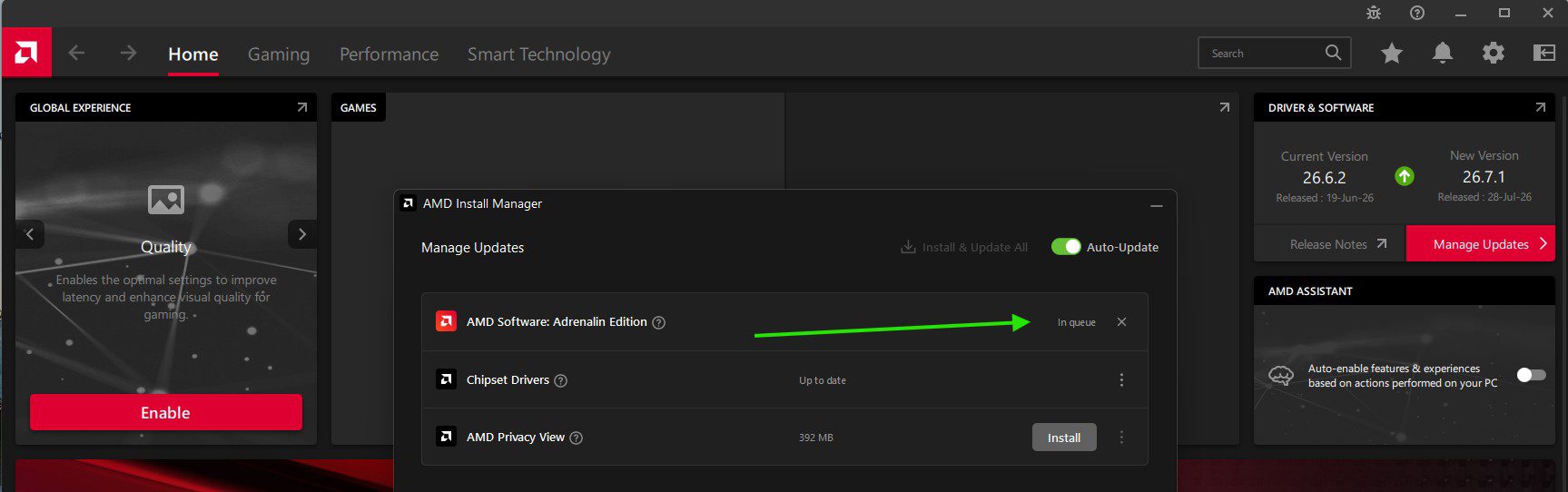
Currently installing the AMD Software Adrenalin Edition updates as shown below.

Please see the update progress

As you can see below, the Adrenalin Edition and the Chipset Drivers are up to date.

I hope you found this post on “how to fix Error 202: AMD Software Installer Fails to install Update” very useful. Please feel free to leave a comment below.