Skip to content

TechDirectArchive

Hands-on IT, Cloud, Security & DevOps Insights

  • Home
  • About
  • Advertise With US
  • Reviews
  • Contact
  • Toggle search form
Home » Windows » How to check Windows activation status and change your product key
  • Windows Storage Sense Enable
    Storage Sense: Manage Storage Drives on Windows Storage
  • WinRM and Kerberos Delegation troubleshooting
    Troubleshooting WinRM and Kerberos Delegation for WAC Network | Monitoring
  • image 2
    How to Fix Microsoft Edge Not Responding Windows
  • AZMFeature
    Performance and Diagnostics in Microsoft Cloud with Azure Monitor AWS/Azure/OpenShift
  • acctlockout 1
    Configure Local Administrators Account lockout Windows
  • Featured image Clearing cache
    How to clear cache in Windows 11 Windows
  • screenshot 2020 03 07 at 22.25.21
    How to export and import User Profile – FrontFace Lockdown Tool Windows
  • Stop teams from auto start
    Prevent Microsoft Teams from starting automatically on Windows Windows

How to check Windows activation status and change your product key

Posted on 13/11/202013/08/2025 Christian By Christian No Comments on How to check Windows activation status and change your product key
check Windows 10 activation status

Activation is the process by which your Windows device is licensed and considered genuine. In this guide, we shall discuss “how to Check Windows activation status and change your product key”. Activation helps verify that your copy of Windows is genuine and hasn’t been used on more devices than the Microsoft Software License Terms permits. See this guide on other methods to find your Windows product key, how to activate DriveLock License on Windows Server, how to use Software Licensing Management Tool (slmgr) to install and uninstall Windows product key, and how to find your Windows 10 Product key.

To activate Windows 10, you need a digital license or a product key in order for your device to be certified as genuine. There are a few ways to determine if your device is properly licensed, but I will be showing you just one method in this blog post.

Kindly follow the steps below to determine or change your product key. Select the Windows Start button or search for settings on the fly from the Windows search box.

change product key

Click on update and security as shown below

Windows 10 activation


Change Product Key

Consequently, Select Activation, The activation status will be listed close to the activation, as shown below

update product key

Enter Product Key

In addition, To change the product key, click on the Change product key button as shown above.

Nonetheless, This will open up a Windows for you to enter your new product key as shown below. Enter the key click on Next and follow the prompts.

check Windows 10 activation status


How to check Windows 10 activation status

If the license is genuine, Windows 10 will register it and attempt to activate it online automatically.

Note: Moreover, You can also search for the Activation settings on the fly from the Windows search button below.
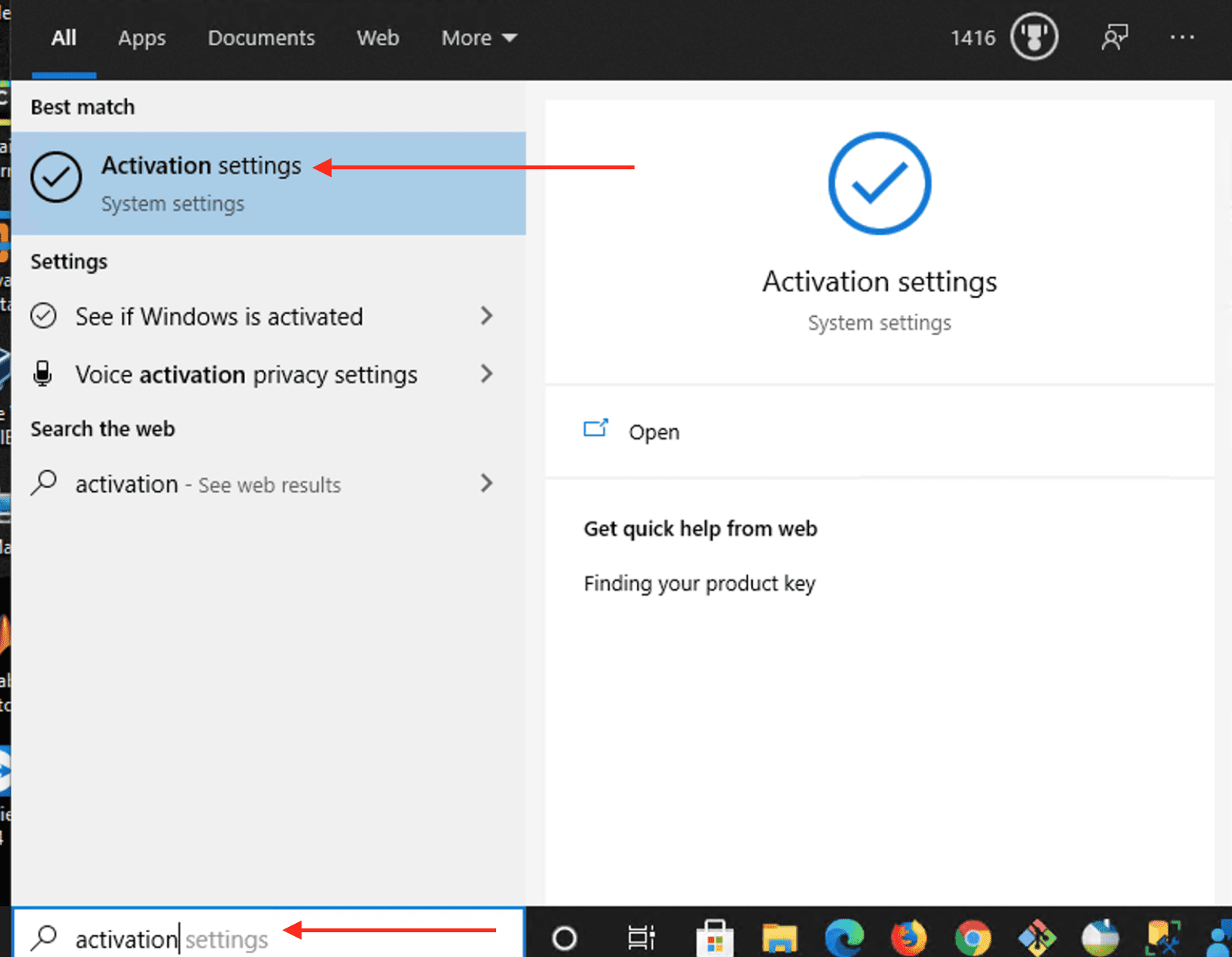
It is vital to determine if your Windows 10 device is activated and linked to your Microsoft account. Linking your Microsoft account with your digital license enables you to reactivate Windows using the Activation troubleshooter whenever you make a significant hardware change.

Note: Microsoft allows anyone to download Windows 10 for free and install it without a product key. However, see more information on the Microsoft activation process.

Furthermore, I hope you found this blog post on How to Check Windows activation status and change your product key helpful. If you have any questions, please let me know in the comment session.

5/5 - (1 vote)

Thank you for reading this post. Kindly share it with others.

  • Click to share on X (Opens in new window) X
  • Click to share on Reddit (Opens in new window) Reddit
  • Click to share on LinkedIn (Opens in new window) LinkedIn
  • Click to share on Facebook (Opens in new window) Facebook
  • Click to share on Pinterest (Opens in new window) Pinterest
  • Click to share on Tumblr (Opens in new window) Tumblr
  • Click to share on Telegram (Opens in new window) Telegram
  • Click to share on WhatsApp (Opens in new window) WhatsApp
  • Click to share on Pocket (Opens in new window) Pocket
  • Click to share on Mastodon (Opens in new window) Mastodon
  • Click to share on Bluesky (Opens in new window) Bluesky
  • Click to share on Threads (Opens in new window) Threads
  • Click to share on Nextdoor (Opens in new window) Nextdoor
Windows Tags:Licensing, Windows 10, Windows Activation

Post navigation

Previous Post: Error 1707: Network address invalid when trying to connect remotely
Next Post: Graphical Network Simulator: How to uninstall GNS3 in Windows

Related Posts

  • remote desktop version and protocol
    Determine the Remote Desktop Client Version Windows
  • ADO Self hosted agent
    How to Create Self-Hosted Agent for Azure DevOps Pipelines Automation
  • Screenshot 2020 08 07 at 21.09.01
    Error 0x204: Unable to Connect to Remote PC [Part 2] Windows
  • screenshot 2020 05 05 at 10.26.12
    How to enable or disable User Account Control Windows
  • Featured image Clearing cache
    How to clear cache in Windows 11 Windows
  • iCloud for Windows
    Use iCloud for Windows: How to install and uninstall iCloud for Windows Mac

More Related Articles

remote desktop version and protocol Determine the Remote Desktop Client Version Windows
ADO Self hosted agent How to Create Self-Hosted Agent for Azure DevOps Pipelines Automation
Screenshot 2020 08 07 at 21.09.01 Error 0x204: Unable to Connect to Remote PC [Part 2] Windows
screenshot 2020 05 05 at 10.26.12 How to enable or disable User Account Control Windows
Featured image Clearing cache How to clear cache in Windows 11 Windows
iCloud for Windows Use iCloud for Windows: How to install and uninstall iCloud for Windows Mac

Leave a Reply Cancel reply

You must be logged in to post a comment.

Microsoft MVP

VEEAMLEGEND

vexpert-badge-stars-5

Virtual Background

GoogleNews

Categories

veeaam100

sysadmin top30a

  • Windows Storage Sense Enable
    Storage Sense: Manage Storage Drives on Windows Storage
  • WinRM and Kerberos Delegation troubleshooting
    Troubleshooting WinRM and Kerberos Delegation for WAC Network | Monitoring
  • image 2
    How to Fix Microsoft Edge Not Responding Windows
  • AZMFeature
    Performance and Diagnostics in Microsoft Cloud with Azure Monitor AWS/Azure/OpenShift
  • acctlockout 1
    Configure Local Administrators Account lockout Windows
  • Featured image Clearing cache
    How to clear cache in Windows 11 Windows
  • screenshot 2020 03 07 at 22.25.21
    How to export and import User Profile – FrontFace Lockdown Tool Windows
  • Stop teams from auto start
    Prevent Microsoft Teams from starting automatically on Windows Windows

Subscribe to Blog via Email

Enter your email address to subscribe to this blog and receive notifications of new posts by email.

Join 1,839 other subscribers
  • RSS - Posts
  • RSS - Comments
  • About
  • Authors
  • Write for us
  • Advertise with us
  • General Terms and Conditions
  • Privacy policy
  • Feedly
  • Telegram
  • Youtube
  • Facebook
  • Instagram
  • LinkedIn
  • Tumblr
  • Pinterest
  • Twitter
  • mastodon

Tags

AWS Azure Bitlocker Microsoft Windows PowerShell WDS Windows 10 Windows 11 Windows Deployment Services Windows Server 2016

Copyright © 2025 TechDirectArchive


Loading Comments...
 

You must be logged in to post a comment.