Skip to content

TechDirectArchive

Hands-on IT, Cloud, Security & DevOps Insights

  • Home
  • About
  • Advertise With US
  • Reviews
  • Contact
  • Toggle search form
Home » AWS/Azure/OpenShift » Create, list, lock, deploy, and delete Azure Resource Group via Azure CLI

Create, list, lock, deploy, and delete Azure Resource Group via Azure CLI

Posted on 06/11/202104/05/2024 Dickson Victor By Dickson Victor No Comments on Create, list, lock, deploy, and delete Azure Resource Group via Azure CLI
Webp.net-resizeimage-4

Azure Resource Manager is the deployment and management service for Azure. It provides a management layer that enables you to create, update, and delete resources in your Azure account. You use management features, like access control, locks, and tags, to secure and organize your resources after deployment. This guide discusses how to create, list, lock, deploy, and delete Azure Resource Group via Azure CLI. Also here are some of my related guides: How to manage azure resource manager resource groups by using Azure CLI, how to configure azure resources with tools, and how to install and configure Ansible on Ubuntu.

In this article, you will learn the following listed below. Please see How to disable Lock Screen on Windows 10, how to disable Lock Screen on Windows 10, and How to solve VMware workstation .lck error.

  • What is a resource group?
  • Create resource groups using CLI.
  • List resource groups using CLI.
  • Lock resource groups CLI.
  • Deploy resources CLI.
  • Delete resource groups CLI.

What is a resource group?

A resource group is a container that holds related resources for an Azure solution. The resource group can include all the resources for the solution or only those resources that you want to manage as a group.

Here are some exciting articles: how to install Ansible on Windows with Cygwin, how to automate infrastructure deployments in the cloud with ansible and azure pipelines, how to install Kerberos packages in Windows via Cygwin, how to configure a remote server (windows) to Support Ansible, and how to deploy Azure VMware solution private cloud.

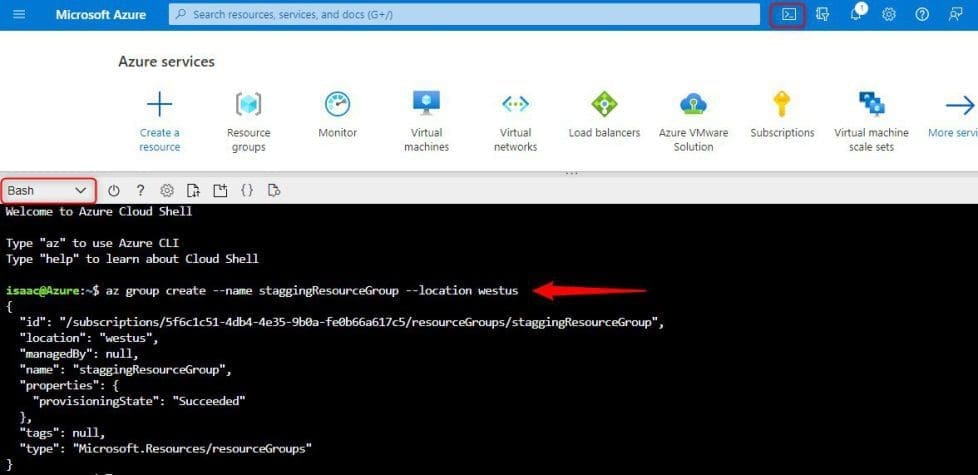
Create resource groups using CLI

  • Go to the Azure Portal
  • At the top bar, click on the cloud shell
  • Select to open the bash terminal
  • Type the following below to create a resource group
az group create --name staggingResourceGroup --location westus
Capture-8

Please see how to fix AWS CLI Error: All commands return Unknown output type [None], How to disable automatic screen lock in Ubuntu Linux, and How to uninstall AWS CLI in Windows.

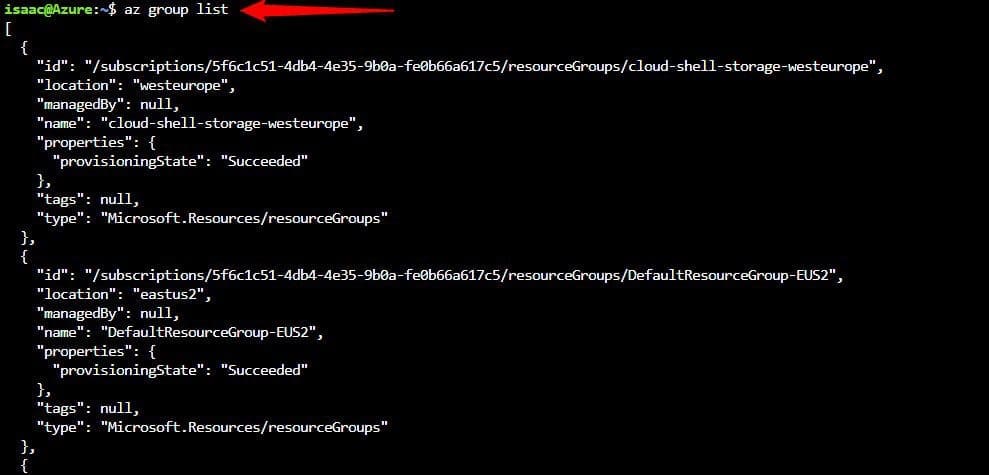
List resource groups using CLI

  • Go to the Azure Portal
  • At the top bar, click on the cloud shell
  • Select to open the bash terminal
  • Type the following below to create a resource group
az group list
Capture-9

Lock resource groups using CLI

Locking prevents other users in your organization from accidentally deleting or modifying critical resources.

  • Go to the Azure Portal
  • At the top bar, click on the cloud shell
  • Select to open the bash terminal
  • Type the following below to create a resource group
az lock create --name LockGroup --lock-type CanNotDelete --resource-group staggingResourceGroup

Capture-10

How to get the locks for a resource group

az lock list --resource-group staggingResourceGroup

Capture-11

How to delete a lock for a resource group

az lock delete --name LockGroup --resource-group staggingResourceGroup

Capture-12

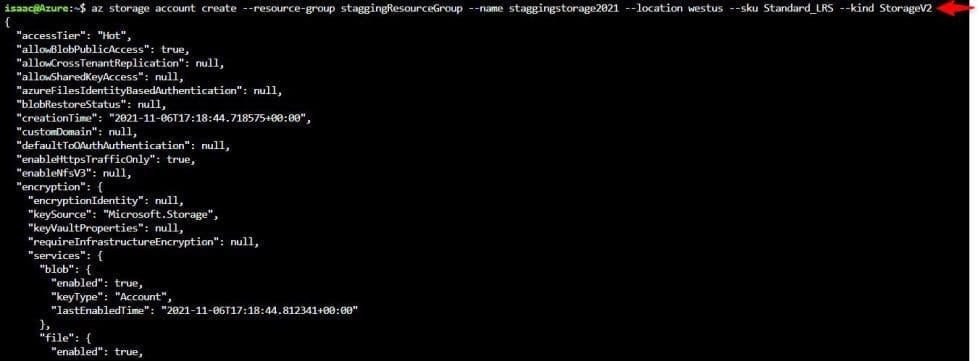
Deploy resources using CLI

Go to the Azure Portal. At the top bar, click on the cloud shell, select to open the bash terminal

Type the following below to create a resource group

az storage account create --resource-group staggingResourceGroup --name staggingstorage2021 --location westus --sku Standard_LRS --kind StorageV2
Capture-13

Deploy resources using CLI

Go to the Azure Portal. At the top bar, click on the cloud shell, and Select to open the bash terminal

Type the following below to create a resource group

az group delete --name staggingResourceGroup
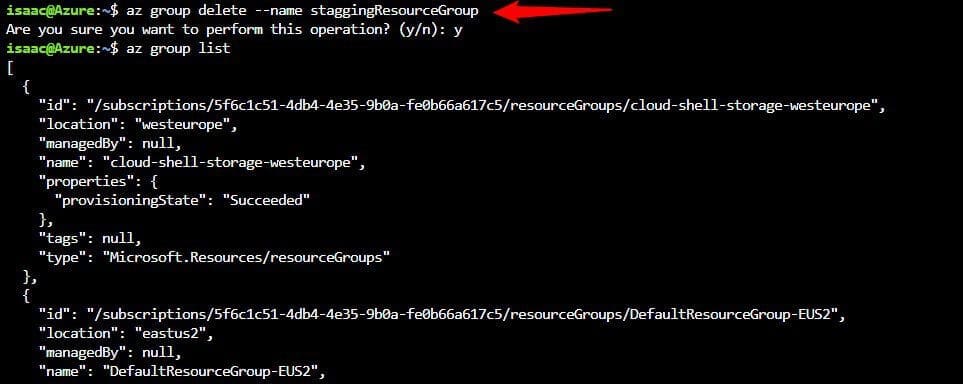
Capture-14

This article provided a step-by-step overview of the steps on how to create, list, lock, deploy, and delete Azure Resource Group via Azure CLI.

Rate this post

Thank you for reading this post. Kindly share it with others.

  • Share on X (Opens in new window) X
  • Share on Reddit (Opens in new window) Reddit
  • Share on LinkedIn (Opens in new window) LinkedIn
  • Share on Facebook (Opens in new window) Facebook
  • Share on Pinterest (Opens in new window) Pinterest
  • Share on Tumblr (Opens in new window) Tumblr
  • Share on Telegram (Opens in new window) Telegram
  • Share on WhatsApp (Opens in new window) WhatsApp
  • Share on Mastodon (Opens in new window) Mastodon
  • Share on Bluesky (Opens in new window) Bluesky
  • Share on Threads (Opens in new window) Threads
  • Share on Nextdoor (Opens in new window) Nextdoor
AWS/Azure/OpenShift Tags:Azure, Azure CLI, Azure resources, Microsoft Azure, Resource Group

Post navigation

Previous Post: How to use the Azure Cloud Shell or Azure CLI and Azure PowerShell
Next Post: Upgrading from Windows 10 with Unsupported CPU and TPM 1.0

Related Posts

  • AzureAD
    Azure Active Directory integration with on-premise AD using PTA AWS/Azure/OpenShift
  • Microsoft Enterprise Root Certification Authority and Forest Domain to Azure migration
    Migrate Microsoft Enterprise Root Certification Authority and Forest Domain to Azure AWS/Azure/OpenShift
  • How to create EC2 instance using Ansible
    How to launch an EC2 instance AWS/Azure/OpenShift
  • HybridCloudTrust
    WHFB Hybrid Cloud Kerberos Trust Model is now available AWS/Azure/OpenShift
  • amazon ec2 multiple ips 1
    What to note before assigning Multiple IPs’ to an Instance AWS/Azure/OpenShift
  • AWS import issues   OVA
    Error importing OVA file to AWS: Client error saved empty is empty AWS/Azure/OpenShift

More Related Articles

AzureAD Azure Active Directory integration with on-premise AD using PTA AWS/Azure/OpenShift
Microsoft Enterprise Root Certification Authority and Forest Domain to Azure migration Migrate Microsoft Enterprise Root Certification Authority and Forest Domain to Azure AWS/Azure/OpenShift
How to create EC2 instance using Ansible How to launch an EC2 instance AWS/Azure/OpenShift
HybridCloudTrust WHFB Hybrid Cloud Kerberos Trust Model is now available AWS/Azure/OpenShift
amazon ec2 multiple ips 1 What to note before assigning Multiple IPs’ to an Instance AWS/Azure/OpenShift
AWS import issues   OVA Error importing OVA file to AWS: Client error saved empty is empty AWS/Azure/OpenShift

Leave a Reply Cancel reply

You must be logged in to post a comment.

Microsoft MVP

VEEAMLEGEND

vexpert-badge-stars-5

Virtual Background

GoogleNews

Categories

veeaam100

Veeam Vanguard

  • Add camaeras
    Add additional CC400W Cameras to Synology Surveillance Station Backup
  • windows1019h2
    Synchronize your Domain Controller with an external time source Windows Server
  • drivelock 1280x720 1
    Concept of DriveLock with a focus on Encryption Security | Vulnerability Scans and Assessment
  • maxresdefault 2 2
    Fix Outlook Not Responding and Outlook Crashing or freezing Network | Monitoring
  • Active Directory Restore issue
    AD Recovery: Fix device ran into an issue with error 0xc00002e2 Windows Server
  • Password Migration to ICloud Keychain
    How to import your Chrome or Firefox passwords into your iCloud Keychain Mac
  • scandium
    How to Test Web Applications Using Scandium Configuration Management Tool
  • removeguesttrello
    Remove a member from Trello Workspace: How to add or remove a Board Guest to a Trello Board JIRA|Confluence|Apps

Subscribe to Blog via Email

Enter your email address to subscribe to this blog and receive notifications of new posts by email.

Join 1,821 other subscribers
  • RSS - Posts
  • RSS - Comments
  • About
  • Authors
  • Write for us
  • Advertise with us
  • General Terms and Conditions
  • Privacy policy
  • Feedly
  • Telegram
  • Youtube
  • Facebook
  • Instagram
  • LinkedIn
  • Tumblr
  • Pinterest
  • Twitter
  • mastodon

Tags

Active Directory Azure Bitlocker Microsoft Windows PowerShell WDS Windows 10 Windows 11 Windows Deployment Services Windows Server 2016

Copyright © 2025 TechDirectArchive


Loading Comments...
 

You must be logged in to post a comment.