Skip to content

TechDirectArchive

Hands-on IT, Cloud, Security & DevOps Insights

  • Home
  • About
  • Advertise With US
  • Reviews
  • Contact
  • Toggle search form
Home » Mac » Cannot Uninstall the OneDrive App: The item “OneDrive” canot be moved to the Bin because it is open

Cannot Uninstall the OneDrive App: The item “OneDrive” canot be moved to the Bin because it is open

Posted on 06/07/202211/12/2023 Christian By Christian No Comments on Cannot Uninstall the OneDrive App: The item “OneDrive” canot be moved to the Bin because it is open
OneDrive App

OneDrive is a cloud-based file storage and sharing utility. Learn more about OneDrive offerings. We shall discuss “Cannot Uninstall OneDrive: OneDrive can’t be moved to Bin”. Embrace OneDrive’s seamless integration. Preloaded in Windows 10 and 11, it syncs files securely. Available for Mac, Xbox, and even Linux via Insync. Please see how to Share Files, Stop Sharing and Restore Previous Versions of Files on Microsoft OneDrive. Anyone who runs Windows 10 or Windows 11 with an online account, uses Microsoft 365 or an Outlook.com account for their e-mails already has a Microsoft account and simply logs in to OneDrive with this log-in data

For Mac users, taking advantage of free online cloud storage. There are other amazing tiers of online storage you can use on Mac, and they are Apple’s iCloud, Google Drive, Dropbox, and OneDrive.

OneDrive Basic offers 5GB of storage with an option to upgrade to higher plans. So, if you need more online storage on your Mac, you can make use of the OneDrive service.

Sometimes you may feel there’s less and less application memory on your Mac, and if you want to delete some apps to free up space, OneDrive is on your list. You can remove OneDrive from Mac manually as described in the subsequent steps below.

Kindly refer to these related guides: How to Disable or Uninstall OneDrive on Windows 10 and 11, Microsoft OneDrive Setup On Windows 10 and 11, and Key Features Explained, and how to move OneDrive Folder to a Different Location in Windows 10.

Fix the item “OneDrive” can’t be moved to the Bin because it’s open

You are unable to remove OneDrive because the application is automatically opened upon login. 

In order to resolve this error,, we will have to remove the app from automatic login and then proceed with the deletion again. As you can see from the image below, we are unable to delete OneDrive from Mac.

uninstall

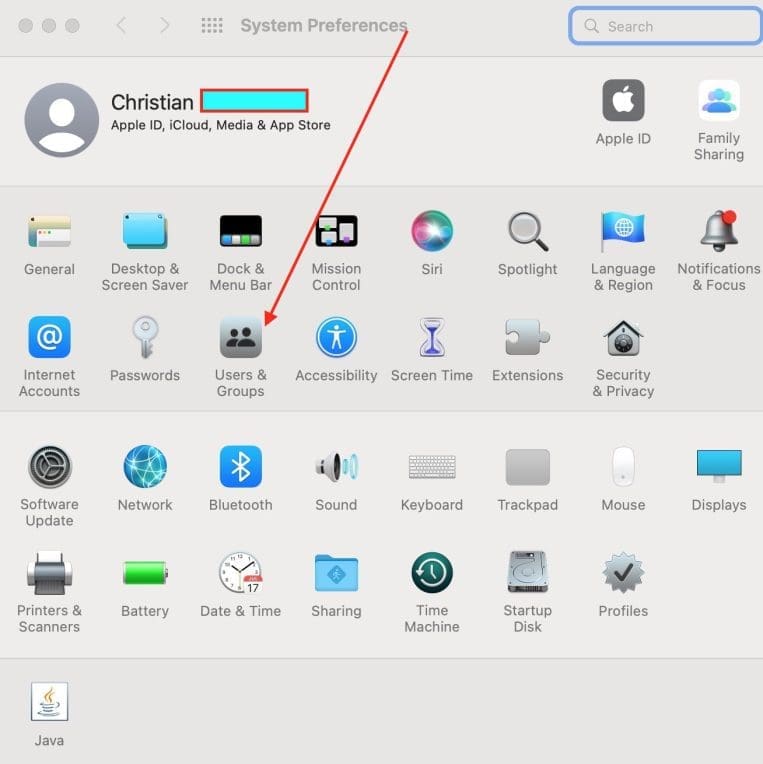
Navigate to System Preferences from the LaunchPad,

item cannot be moved to Bin

Click on the Users & Groups as shown below
Mac

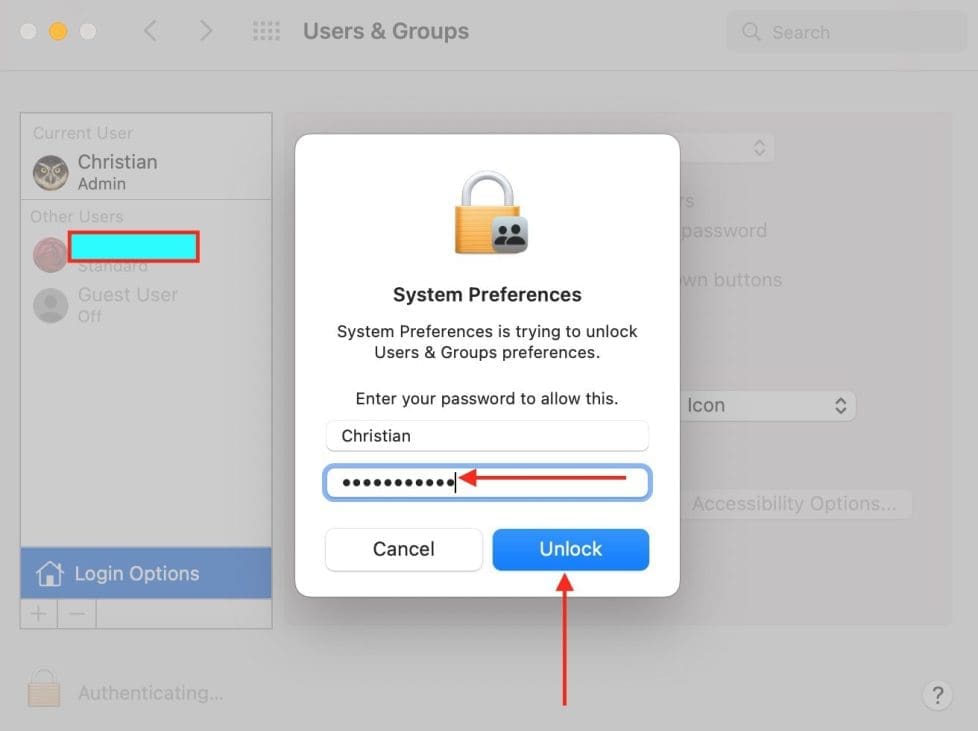
Click on the “Login Options” tab, and on the Padlock in order to make changes.

OneDrive App

You will be required to authenticate to unlock USers & Grup Preferences. Please Enter your Administrative PAssword.
uninstall

As you can see below, OneDrive starts automatically when I log in. You can uncheck and restart.

item cannot be moved to Bin
Mac

Alternatively, I have decided to remove it entirely. Because I am deleting OneDrive, I will have to remove it by selecting OneDrive and clicking on the (-) button as shown in the image below.

OneDrive App

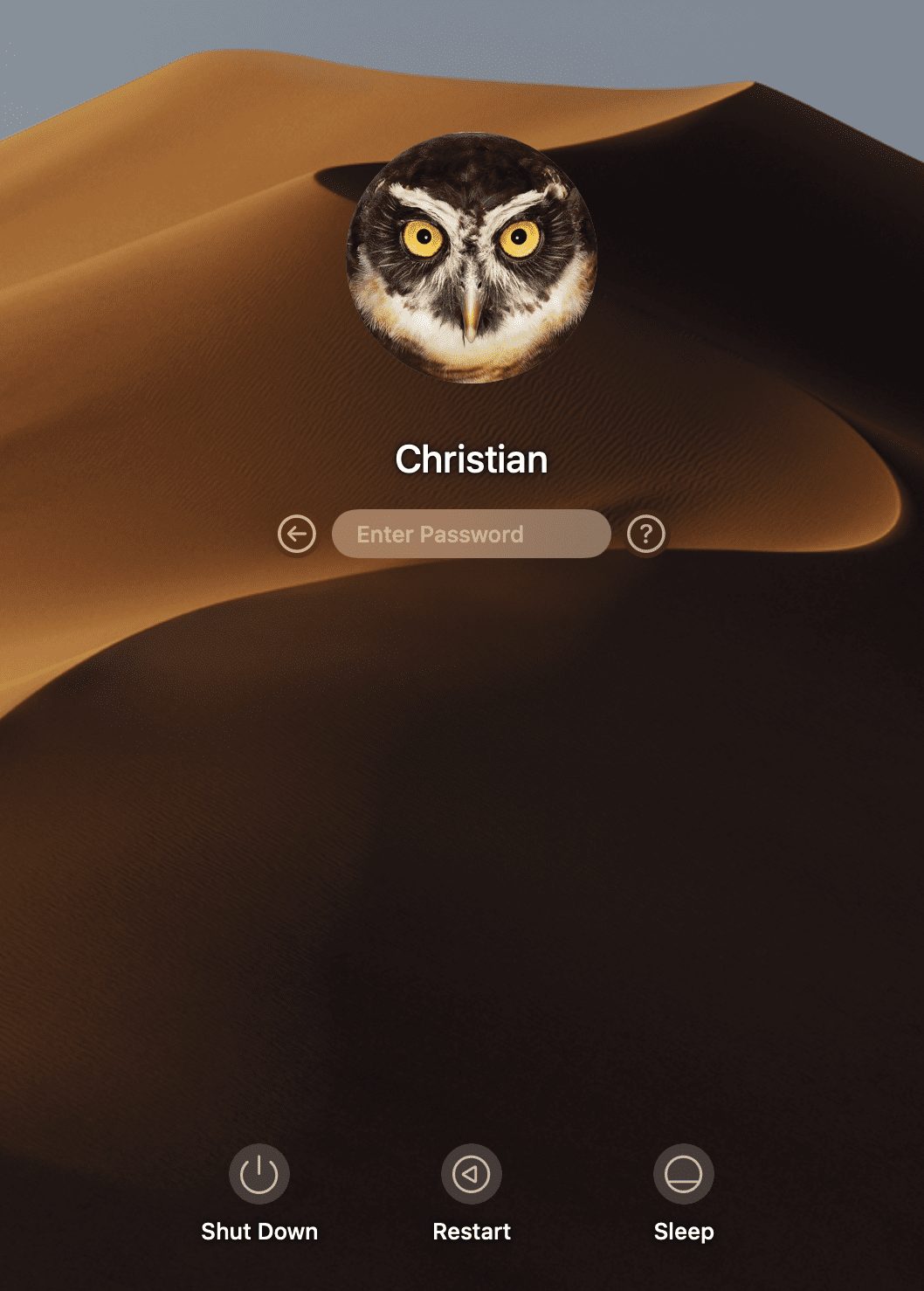
Then restart your Mac (Apple menu > Restart). As you can see below, my device has restarted.
logintomac

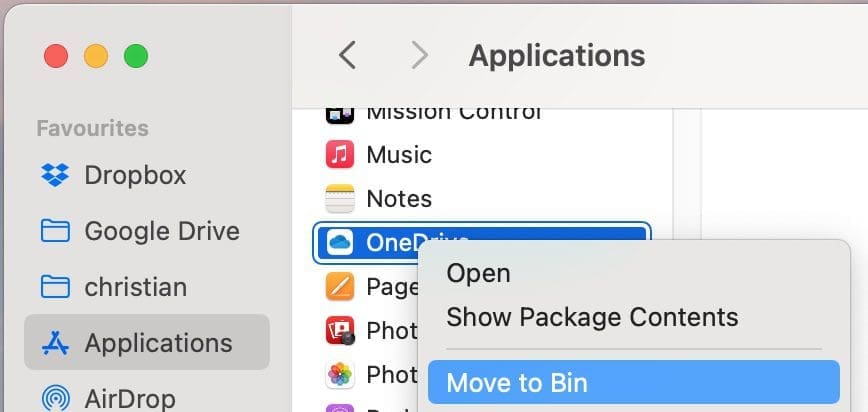
After it boots up, drag the OneDrive application to the Bin
DeleteOneDrive

You will be required to enter your password to be able to do this.

uninstallOndriveonmac

I will recommend emptying the trash. After that, you should be able to re-download OneDrive from the Mac App Store.

Screenshot-2022-07-06-at-01.43.19
That is all, OneDrive has been completely uninstalled.

I hope you found this blog post on “Cannot Uninstall OneDrive: OneDrive can’t be moved to Bin” helpful. If you have any questions, please let me know in the comment session.

Rate this post

Thank you for reading this post. Kindly share it with others.

  • Share on X (Opens in new window) X
  • Share on Reddit (Opens in new window) Reddit
  • Share on LinkedIn (Opens in new window) LinkedIn
  • Share on Facebook (Opens in new window) Facebook
  • Share on Pinterest (Opens in new window) Pinterest
  • Share on Tumblr (Opens in new window) Tumblr
  • Share on Telegram (Opens in new window) Telegram
  • Share on WhatsApp (Opens in new window) WhatsApp
  • Share on Mastodon (Opens in new window) Mastodon
  • Share on Bluesky (Opens in new window) Bluesky
  • Share on Threads (Opens in new window) Threads
  • Share on Nextdoor (Opens in new window) Nextdoor
JIRA|Confluence|Apps, Mac Tags:macOS Monterey, Microsoft OneDrive, OneDrive

Post navigation

Previous Post: How to download a shared ZOOM recording
Next Post: How to Hide or Stop Apps Like OneDrive from Auto-Opening

Related Posts

  • macos app switcher shortcuts
    How to enable or disable automatic software updates on Mac Mac
  • Schedule and join Teams Meeting
    How to schedule and join meetings with Microsoft Teams JIRA|Confluence|Apps
  • Mendeley Error Code ACLx80sr
    Fix Mendeley Cite Error has occurred: ECITE40001 (ac1x80sr) JIRA|Confluence|Apps
  • screenshot 2020 03 20 at 00.44.47
    How to check if homebrew is installed on macOS Mac
  • tredfghgfde3456578
    How to install Java Runtime Environment on Mac OS Mac
  • Auto Update Upgrade issues
    Fix Microsoft Office Showing “Upgrade Required” in AutoUpdate JIRA|Confluence|Apps

More Related Articles

macos app switcher shortcuts How to enable or disable automatic software updates on Mac Mac
Schedule and join Teams Meeting How to schedule and join meetings with Microsoft Teams JIRA|Confluence|Apps
Mendeley Error Code ACLx80sr Fix Mendeley Cite Error has occurred: ECITE40001 (ac1x80sr) JIRA|Confluence|Apps
screenshot 2020 03 20 at 00.44.47 How to check if homebrew is installed on macOS Mac
tredfghgfde3456578 How to install Java Runtime Environment on Mac OS Mac
Auto Update Upgrade issues Fix Microsoft Office Showing “Upgrade Required” in AutoUpdate JIRA|Confluence|Apps

Leave a Reply Cancel reply

You must be logged in to post a comment.

Microsoft MVP

VEEAMLEGEND

vexpert-badge-stars-5

Virtual Background

GoogleNews

Categories

veeaam100

Veeam Vanguard

  • rdp5
    Change expired RDP Password: How to change a password on a Remote Desktop session Windows Server
  • Remove Custom Domain from Entra ID and Azure tenant
    Delete Azure Tenant: Remove Custom Domain from Entra ID AWS/Azure/OpenShift
  • Disable BitLocker
    Disable BitLocker: How to correctly disable MBAM-encrypted devices Windows
  • Password Migration to ICloud Keychain
    How to import your Chrome or Firefox passwords into your iCloud Keychain Mac
  • banner
    How to Fix Python was not found run without arguments to install from the Microsoft Store Windows
  • Screenshot 2022 04 02 at 22.59.54
    How to fix importing the project failed: Project namespace path can contain only letters, digits, etc Version Control System
  • images 3 4
    What are the differences between an ADM and ADMX file Windows Server
  • slide10
    Add Dynamic Wallpaper controlled by time on Windows 10 and 11 Windows

Subscribe to Blog via Email

Enter your email address to subscribe to this blog and receive notifications of new posts by email.

Join 1,813 other subscribers
  • RSS - Posts
  • RSS - Comments
  • About
  • Authors
  • Write for us
  • Advertise with us
  • General Terms and Conditions
  • Privacy policy
  • Feedly
  • Telegram
  • Youtube
  • Facebook
  • Instagram
  • LinkedIn
  • Tumblr
  • Pinterest
  • Twitter
  • mastodon

Tags

Active Directory Azure Bitlocker Microsoft Windows PowerShell WDS Windows 10 Windows 11 Windows Deployment Services Windows Server 2016

Copyright © 2025 TechDirectArchive


Loading Comments...
 

You must be logged in to post a comment.