Skip to content

TechDirectArchive

Hands-on IT, Cloud, Security & DevOps Insights

  • Home
  • About
  • Advertise With US
  • Contact
  • Reviews
  • Toggle search form
Home » Windows Server » Fix failed to create new Scheduled Task RemoteException
  • stopsappsfromstart
    How to Hide or Stop Apps Like OneDrive from Auto-Opening Mac
  • Screenshot 2024 02 09 at 7.34.18 PM
    How to create a Logic App for monitoring tweets AWS/Azure/OpenShift
  • AppLocker
    Fix unable to start the Application Identity Service Windows
  • banner 3
    How to Set Network Adapter Priority on Windows 11 Network | Monitoring
  • drivelock
    How to perform DriveLock quick setup Security | Vulnerability Scans and Assessment
  • AWS Budgets
    How to create AWS Budget AWS/Azure/OpenShift
  • Top 10 communication software for Mac 2021
    Top 10 communication software for Mac 2021 Reviews
  • fsa
    How to prevent MacBook from automatically Logging out Mac

Fix failed to create new Scheduled Task RemoteException

Posted on 04/04/202023/08/2023 Christian By Christian No Comments on Fix failed to create new Scheduled Task RemoteException

Windows Admin Center is a locally deployed, browser-based app. It is used for managing Windows servers, clusters, hyper-converged infrastructure, as well as Windows 10 PCs. It is a free product and is ready to use in production. In this article, I will show you how to Fix failed to create new Scheduled Task RemoteException. You may like the following articles: How to Create Shared Folder in Windows Sandbox, and Mendeley Cite ECITE40001 Error: Fix issue using Microsoft Word Desktop application.

When prompted with an error when trying to access WAC from other browsers saying the site is not secure. See the following links for “How to setup Windows Admin Center, “How to install Chocolatey” and “How to install, upgrade and uninstall software with Chocolatey“. You may also be interested in Winglet, which is also a Windows Package manager “Winglet”. See how to install Winglet and how to install applications with Winglet CLI.

Reason for the Error “Fix failed to create new Scheduled Task RemoteException”

The following error displayed below is a result of a bug in the Windows Admin Center. I was able to successfully create a scheduled task on a monthly basis in my lab environment as shown in the image below.

Error: Failed to create new Scheduled Task RemoteException: Exception calling UpdateTriggers RemoteException: You cannot call a method on a null-valued expression. RemoteException: Cannot validate argument on parameter Xml - daily task ok but monthly not
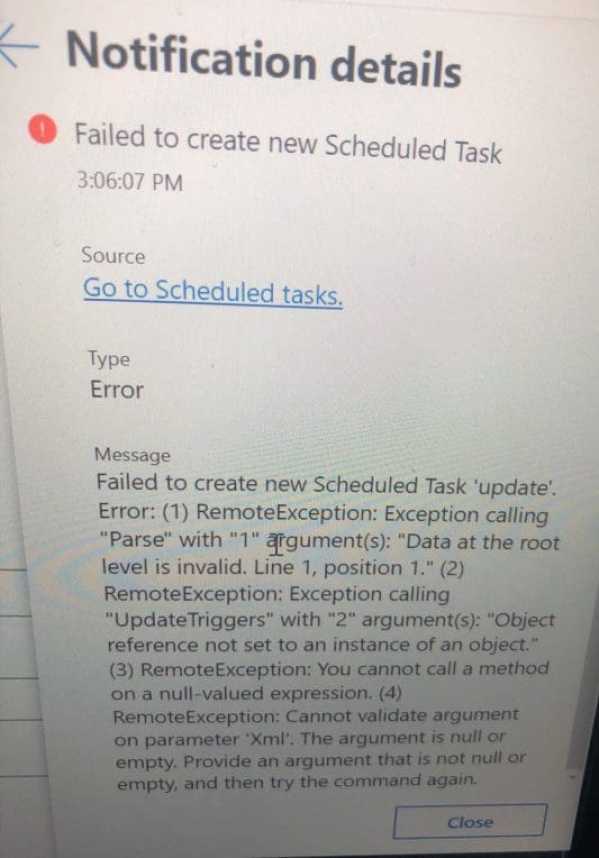
No Fix at the Moment

At the time of writing this piece, there isn’t a fix yet. I found this error was reported also in the Windows Server user voice. Please see Why you should attend VeeamOn 2023, How to create an Advanced Windows Scheduled Task, How to unlink FaceTime from Mac, and how to create, edit and delete a scheduled task via the Command Prompt.

Note: Daily tasks can be created, edited, run, and deleted successfully.

This issue comes up when you select the trigger on a monthly (monthlyDOW) basis. I am sure this will be fixed soon. Please see this exciting guide on how to use Prometheus for Monitoring, and how to Failed to create a new scheduled task name RemoteException: Cannot create the file when that file already exists.

I hope you found this blog post helpful. If you have any questions, please let me know in the comment session.

Rate this post

Thank you for reading this post. Kindly share it with others.

  • Share on X (Opens in new window) X
  • Share on Reddit (Opens in new window) Reddit
  • Share on LinkedIn (Opens in new window) LinkedIn
  • Share on Facebook (Opens in new window) Facebook
  • Share on Pinterest (Opens in new window) Pinterest
  • Share on Tumblr (Opens in new window) Tumblr
  • Share on Telegram (Opens in new window) Telegram
  • Share on WhatsApp (Opens in new window) WhatsApp
  • Share on Pocket (Opens in new window) Pocket
  • Share on Mastodon (Opens in new window) Mastodon
  • Share on Bluesky (Opens in new window) Bluesky
  • Share on Threads (Opens in new window) Threads
  • Share on Nextdoor (Opens in new window) Nextdoor
Windows Server Tags:Microsoft Windows, WAC, Windows 10, Windows 11

Post navigation

Previous Post: Fix Failed to create scheduled task due to Windows Server Management service issue
Next Post: Concept of DriveLock with a focus on Encryption

Related Posts

  • a3a5a8be58fa09468cd4f70d36869e98
    Restore AD Objects: How to restore deleted user accounts in Active Directory with Microsoft LDP and PowerShell Windows Server
  • TeamPass Password manager
    Install and configure TeamPass Password Manager Password Manager
  • Logon fsilure errors
    Logon Failure Reasons for Windows Event Viewer Windows Server
  • MBAM Reports
    Microsoft BitLocker Administration and Monitoring Report Fields Windows Server
  • dfggg 2
    Installing and configuring SimpleSAMLphp [Part 2] Windows Server
  • screenshot 2020 04 27 at 13.30.17
    What are the differences between a Role and a Feature Windows Server

More Related Articles

a3a5a8be58fa09468cd4f70d36869e98 Restore AD Objects: How to restore deleted user accounts in Active Directory with Microsoft LDP and PowerShell Windows Server
TeamPass Password manager Install and configure TeamPass Password Manager Password Manager
Logon fsilure errors Logon Failure Reasons for Windows Event Viewer Windows Server
MBAM Reports Microsoft BitLocker Administration and Monitoring Report Fields Windows Server
dfggg 2 Installing and configuring SimpleSAMLphp [Part 2] Windows Server
screenshot 2020 04 27 at 13.30.17 What are the differences between a Role and a Feature Windows Server

Leave a Reply Cancel reply

You must be logged in to post a comment.

Microsoft MVP

VEEAMLEGEND

vexpert-badge-stars-5

Virtual Background

GoogleNews

Categories

veeaam100

sysadmin top30a

  • stopsappsfromstart
    How to Hide or Stop Apps Like OneDrive from Auto-Opening Mac
  • Screenshot 2024 02 09 at 7.34.18 PM
    How to create a Logic App for monitoring tweets AWS/Azure/OpenShift
  • AppLocker
    Fix unable to start the Application Identity Service Windows
  • banner 3
    How to Set Network Adapter Priority on Windows 11 Network | Monitoring
  • drivelock
    How to perform DriveLock quick setup Security | Vulnerability Scans and Assessment
  • AWS Budgets
    How to create AWS Budget AWS/Azure/OpenShift
  • Top 10 communication software for Mac 2021
    Top 10 communication software for Mac 2021 Reviews
  • fsa
    How to prevent MacBook from automatically Logging out Mac

Subscribe to Blog via Email

Enter your email address to subscribe to this blog and receive notifications of new posts by email.

Join 1,836 other subscribers
  • RSS - Posts
  • RSS - Comments
  • About
  • Authors
  • Write for us
  • Advertise with us
  • General Terms and Conditions
  • Privacy policy
  • Feedly
  • Telegram
  • Youtube
  • Facebook
  • Instagram
  • LinkedIn
  • Tumblr
  • Pinterest
  • Twitter
  • mastodon

Tags

Active Directory AWS Azure Bitlocker Microsoft Windows PowerShell WDS Windows 10 Windows 11 Windows Server 2016

Copyright © 2025 TechDirectArchive


Loading Comments...
 

You must be logged in to post a comment.