Skip to content

TechDirectArchive

Hands-on IT, Cloud, Security & DevOps Insights

  • Home
  • About
  • Advertise With US
  • Reviews
  • Contact
  • Toggle search form
Home » Web Server » There has been a critical error on this website please check your site admin email inbox for instructions
  • Slide4
    How to install Let’s Encrypt on Apache Web Server Linux
  • screenshot 2020 03 18 at 23.03.42
    Enable God Mode via PowerShell or the CLI and GUI Windows
  • fixzoomaudioissue
    How to fix unable to access microphone on Zoom JIRA|Confluence|Apps
  • Cluster
    Install and configure Hyper-V Cluster On Windows Server Virtualization
  • Internet Explorer
    How to uninstall Internet Explorer from your Windows Device Windows
  • Screenshot 2022 04 25 at 16.46.34
    Hide YouTube Subscriber Count: Privacy for Channel Subscriptions JIRA|Confluence|Apps
  • 1 WeXxkEX0JG3oB781HD8Hrg
    Error 0x204: Unable to Connect to Remote PC [Part 1] Windows Server
  • Capture
    An account with the same name exists in Active Directory: Re-using the account was blocked by a security policy Security | Vulnerability Scans and Assessment

There has been a critical error on this website please check your site admin email inbox for instructions

Posted on 14/12/202222/11/2023 Temitope Odemo By Temitope Odemo No Comments on There has been a critical error on this website please check your site admin email inbox for instructions
wordpresserrorsiteadmin

WordPress users usually experience this error: “There has been a critical error on your website. Please check your site admin email inbox for instructions.” This error usually displays when you are trying to access the WordPress admin. The main cause of this error is incompatibility. In this article, you will learn how to Fix WordPress error: There has been a critical error on this website, please check your site admin email inbox for instructions. Also, see SysPrep was unable to validate your Windows Installation: After resolving the issue, use Sysprep to validate your issue again.

When the current WordPress version and the plugins are not compatible. This will disrupt the WordPress admin settings. Here are some related guides: How to Install and Setup WordPress into a cPanel and Configure Your First WordPress Theme. Kindly refer to this YouTube video on how to fix there has been a critical error on this WordPress website.

You may want to learn How to launch a free WordPress test site with TasteWP?. How to Install and Configure WordPress on Your Windows Computer Using WAMP SERVER. How to integrate WordPress site with WP Telegram.

Why was the “Critical Error Prompted?

Follow the steps below to fix the issue shown in the image below. There has been a critical error on this website please check your site admin email inbox for instructions.

image

1: Sometimes this issue is caused as a result of the PHP version. WordPress can automatically update your PHP Version. This can sometimes have a negative impact on the theme and plugins for the website.

All you need to do is go into your cPanel and search for the section where you have the PHP Version settings.

You can downgrade the current PHP version to the previous version and you will be good.

image-1

Please here are some related guides. Fix critical Veeam Backup and Replication 9.5, 10, and 11. How to delete obsolete drivers from the Driver Store in Windows, Fix WordPress Error “The Link You Followed Has Expired”, and WordPress site on Azure: How to create a website hosted in Azure. How to configure the new GPO settings and Security baseline available for Windows 10 21H1. And how to determine the version of GNOME running on your Ubuntu Linux.

Resolution “There has been a critical error on this website please check your site admin email”

To resolve this issue “There has been a critical error on this website please check your site admin email inbox for instructions”, please downgrade to the previous version.

image-2

2. Running your WordPress in Debug Mode can fix this issue. All you need to do is access the cPanel and open the public_html directory.

Then, open the WordPress configuration file called wp-config.php using the edit button. Search for WP_DEBUG and change the false to true.
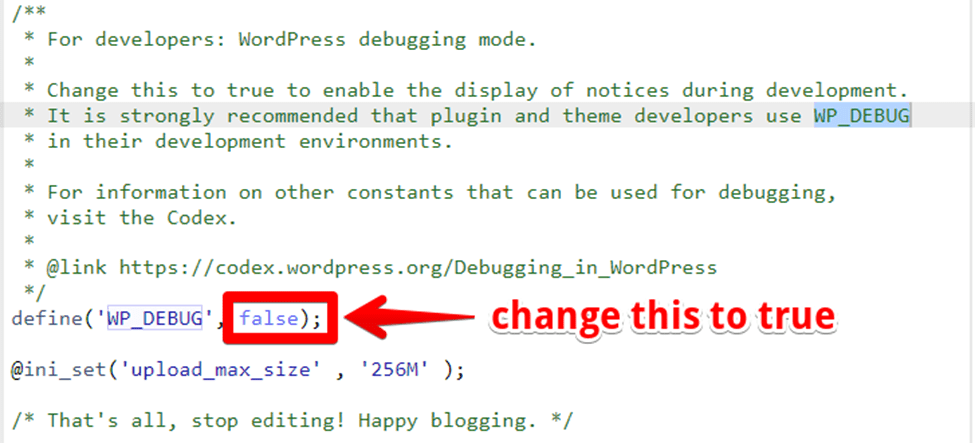
image-3

After doing the above refresh the webpage again and you will details of what is causing the error. This is a process called debugging whereby you are trying to find the cause of an error.

image-4

3. The above message shows it’s a plugin issue. So what you need to do next is to deactivate the WordPress Plugin from the cPanel by navigating to /home/mysite/htdocs/wp-content/plugins/………

image-5

You can rename the plugins folder or the plugins itself which is causing the error.

image-6

Please see how to install MySQL Workbench on Local Computer to connect with Azure Database for MySQL Server

I hope you found this blog post on how to fix the error “There has been a critical error on this website please check your site admin email inbox for instructions” interesting and helpful. In case you have any questions do not hesitate to ask in the comment section.

Rate this post

Thank you for reading this post. Kindly share it with others.

  • Click to share on X (Opens in new window) X
  • Click to share on Reddit (Opens in new window) Reddit
  • Click to share on LinkedIn (Opens in new window) LinkedIn
  • Click to share on Facebook (Opens in new window) Facebook
  • Click to share on Pinterest (Opens in new window) Pinterest
  • Click to share on Tumblr (Opens in new window) Tumblr
  • Click to share on Telegram (Opens in new window) Telegram
  • Click to share on WhatsApp (Opens in new window) WhatsApp
  • Click to share on Pocket (Opens in new window) Pocket
  • Click to share on Mastodon (Opens in new window) Mastodon
  • Click to share on Bluesky (Opens in new window) Bluesky
  • Click to share on Threads (Opens in new window) Threads
  • Click to share on Nextdoor (Opens in new window) Nextdoor
Web Server Tags:Web-browser, Website

Post navigation

Previous Post: View and Clear or Print Norton Security Events on a Mac
Next Post: How to retrieve deleted WhatsApp messages on iPhone

Related Posts

  • Slide4
    How to install Let’s Encrypt on Apache Web Server Linux
  • windows 10 logo 100739284 large
    Application pool has been disabled or Changing identity user for IIS Application Pool (Event ID 5059) Web Server
  • Jenkins
    How to Install Jenkins Automation Server on Ubuntu 20.04 LTS Linux
  • 111615smarthomeNG
    Unspecified GSS failure: How to fix Clock skew too great Web Server
  • Remote Desktop 2 1
    How to install RDS via Quick Start Deployment: Install, Publish, Update, and Uninstall Remote Desktop Web Client Web Server
  • BitLocker result virtualization
    Create a web page to visualize the output of BitLocker Recovery Web Server

More Related Articles

Slide4 How to install Let’s Encrypt on Apache Web Server Linux
windows 10 logo 100739284 large Application pool has been disabled or Changing identity user for IIS Application Pool (Event ID 5059) Web Server
Jenkins How to Install Jenkins Automation Server on Ubuntu 20.04 LTS Linux
111615smarthomeNG Unspecified GSS failure: How to fix Clock skew too great Web Server
Remote Desktop 2 1 How to install RDS via Quick Start Deployment: Install, Publish, Update, and Uninstall Remote Desktop Web Client Web Server
BitLocker result virtualization Create a web page to visualize the output of BitLocker Recovery Web Server

Leave a Reply Cancel reply

You must be logged in to post a comment.

Microsoft MVP

VEEAMLEGEND

vexpert-badge-stars-5

Virtual Background

GoogleNews

Categories

veeaam100

sysadmin top30a

  • Slide4
    How to install Let’s Encrypt on Apache Web Server Linux
  • screenshot 2020 03 18 at 23.03.42
    Enable God Mode via PowerShell or the CLI and GUI Windows
  • fixzoomaudioissue
    How to fix unable to access microphone on Zoom JIRA|Confluence|Apps
  • Cluster
    Install and configure Hyper-V Cluster On Windows Server Virtualization
  • Internet Explorer
    How to uninstall Internet Explorer from your Windows Device Windows
  • Screenshot 2022 04 25 at 16.46.34
    Hide YouTube Subscriber Count: Privacy for Channel Subscriptions JIRA|Confluence|Apps
  • 1 WeXxkEX0JG3oB781HD8Hrg
    Error 0x204: Unable to Connect to Remote PC [Part 1] Windows Server
  • Capture
    An account with the same name exists in Active Directory: Re-using the account was blocked by a security policy Security | Vulnerability Scans and Assessment

Subscribe to Blog via Email

Enter your email address to subscribe to this blog and receive notifications of new posts by email.

Join 1,839 other subscribers
  • RSS - Posts
  • RSS - Comments
  • About
  • Authors
  • Write for us
  • Advertise with us
  • General Terms and Conditions
  • Privacy policy
  • Feedly
  • Telegram
  • Youtube
  • Facebook
  • Instagram
  • LinkedIn
  • Tumblr
  • Pinterest
  • Twitter
  • mastodon

Tags

AWS Azure Bitlocker Microsoft Windows PowerShell WDS Windows 10 Windows 11 Windows Deployment Services Windows Server 2016

Copyright © 2025 TechDirectArchive


Loading Comments...
 

You must be logged in to post a comment.